Requirements
Project background
Discuss problems
In traditional classroom teaching, teachers rely primarily on observing students’ hands, expressions, or questions to determine students’ level of understanding and engagement. However, this approach has obvious limitations in large classes or online teaching environments. It is difficult for teachers to get real-time feedback from each student, and they may ignore students who are not good at expressing themselves or are introverted, resulting in poor classroom interactions and reduced student engagement and motivation.
To solve this problem, we developed HandsUp, a computer vision-based classroom interaction system that automatically detects students’ hand gestures and recognizes the color of the cards in their hands to help teachers understand students’ feedback in real time. Through the visualization of data, teachers can quickly identify which students have questions and which students have already mastered the knowledge, thus effectively improved the quality of classroom interactions and enhanced students’ engagement and learning outcomes.
Partner introduction
| Partner | Website |
|---|---|
 National Autistic Society | NAS |
 Intel | Intel |
 UCL Computer Science | UCL Computer Science |
Project goals
Increase inclusivity
One of the primary goals of our project is to increase inclusivity in classroom environments by supporting non-verbal communication methods. Traditional classroom settings often rely heavily on verbal interactions, which can unintentionally exclude students who face challenges in expressing themselves verbally, such as those with speech impairments, social anxiety, or autism spectrum disorder (ASD).
Our system, HandsUp, addresses this issue by enabling students to participate through simple, intuitive non-verbal cues, such as hand gestures and colored cards. This approach ensures that all students, regardless of their communication preferences or abilities, have an equal opportunity to express their understanding, opinions, and questions during lessons. This allows educators to better recognize and respond to every student’s needs, fostering a more inclusive, engaging, and supportive learning environment.
Tech-free learning
Our goal is to create a technology-free solution for students, minimizing the need for personal devices like tablets or smartphones. By relying on simple physical cues (e.g., hand gestures and colored cards) and computer technology on the teacher’s side, we ensure that students can engage without distractions or digital barriers. This method promotes accessibility, ease of use while maintaining a natural learning environment.
Process of gathering requirements
Semi-structured interviews with clients
We conducted meetings and interviews with our clients to understand their specific needs and challenges. These semi-structured interviews allowed us to ask open-ended questions while also gathering specific requirements for the system. Through direct discussions, we gained valuable feedback into how the system could best support teachers and students in real classroom settings.
Iterative method
Our development process followed an iterative method, where we collected feedback every Friday during our meetings. This continuous feedback loop enabled us to improve our design and the product based on real user needs. By incorporating regular feedback, we ensured that our system developed towards a more effective and user-friendly solution.
Personas
Daniel Carter
Role: Teacher at a Special Education School
Type: Male, 40 years old
"I want every student in my class, verbal or non-verbal, to have an equal chance to participate and engage."
Motivations
- Ensure all students, including ASD students, can participate in classroom activities.
- Reduce classroom distractions and make learning more engaging.
- Find interactive teaching methods that do not solely rely on verbal communication.
- Use data-driven insights to tailor teaching strategies to students' needs.
Ideal Features
- A system that allows non-verbal students to express themselves easily.
- A visually engaging and distraction-free interface that suits neurodiverse learners.
- Real-time analytics to track student engagement and participation.
- AI-generated voice options for students who struggle with reading or verbalizing their thoughts.
Pain Points
- Traditional classroom engagement methods do not cater to ASD students effectively.
- Many interactive tools are too complex and overwhelming for neurodiverse learners.
- Some students have difficulty staying focused when using screens for learning.
- Limited tools available that offer meaningful interaction without requiring verbal input.
Alex Johnson
Role: Primary School Student with ASD
Type: Male, 9 years old
"I like answering questions, but sometimes I don't know how to say it. I like using colors to show my answers."
Motivations
- Enjoys interactive and visual learning over traditional verbal instruction.
- Prefers structured and predictable ways to communicate answers.
- Likes hands-on activities but struggles with open-ended verbal discussions.
- Finds comfort in using symbols, colors, and gestures for communication.
Ideal Features
- A non-verbal way to answer questions using colors, icons, or hand gestures.
- Simple and minimal UI to reduce cognitive overload.
- A predictable and structured interaction model to provide comfort.
- Options for visual cues rather than only text-based questions.
Pain Points
- Struggles with verbal expression and prefers structured communication.
- Gets overwhelmed by too much screen interaction or complex interfaces.
- Finds waiting time frustrating when setting up digital tools.
- Easily distracted by too much movement or noise in the classroom.
Use-case diagrams
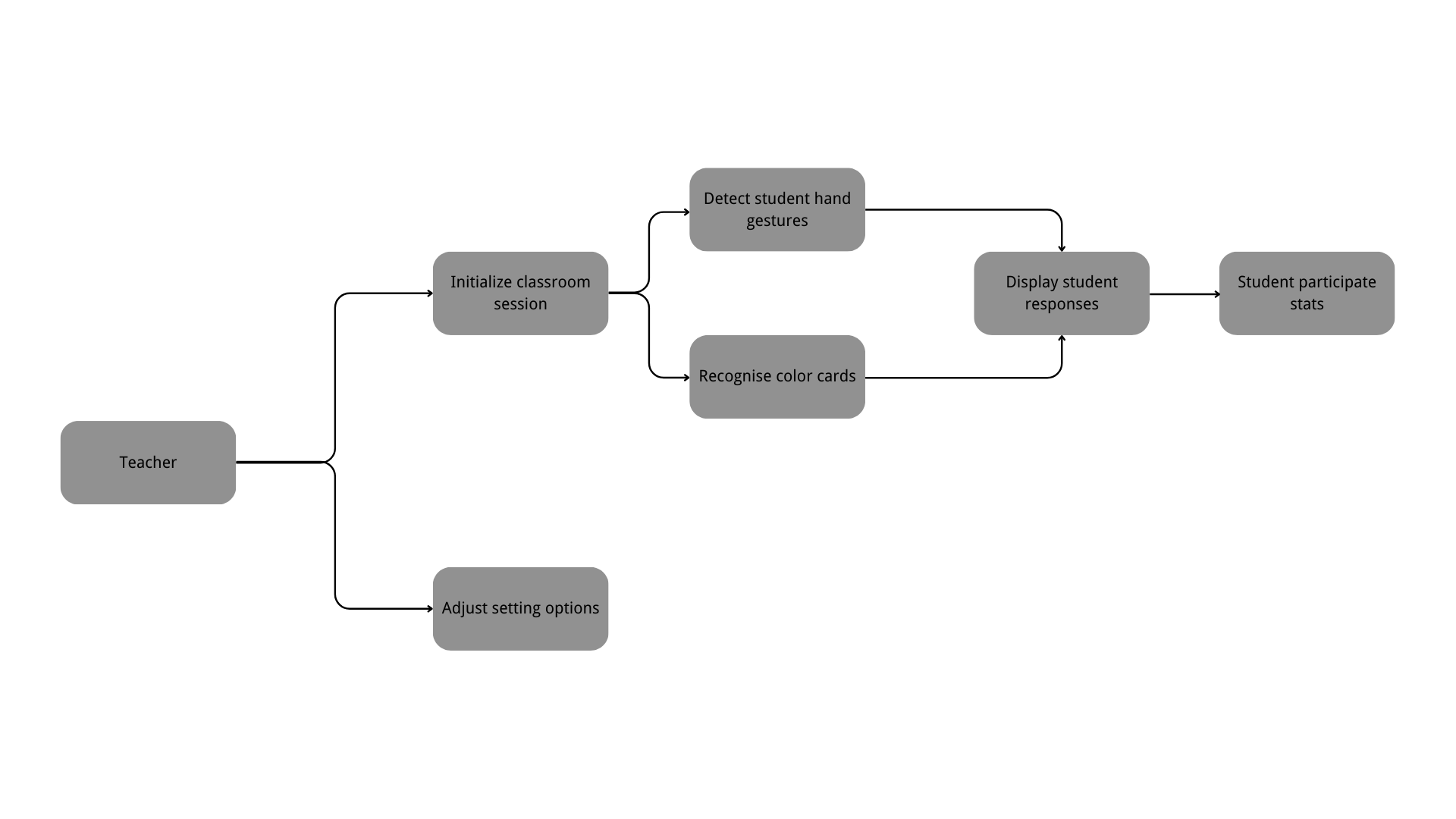
Teacher leading in classroom with non-verbally communicating students
MoSCoW requirements
Functional Requirements
Must Have
- The system should be able to recognize if a student raises his/her hand
- Ensure that the system is able to correctly recognize card colors such as red, blue, yellow and green
- Ensure that the system can recognised a student's choice on table-top mode
- Ensure that the app can cumulatively count choices made by the students, with the use of a pause/start feature controlled by the teacher
- Teachers can immediately see students’ hands up or color feedback to adjust teaching strategies
- Ensure that the system is fully offline
- Ensure that the app works on, and is optimsed for all Intel devices, by using OpenVINO for inference
- Ensure that it works on Window systems
Should Have
- Provide statistics on student interactions at the end of class
- Introduce a "First hands raised" feature which highlights the card which was the first to be raised or detected
Could Have
- The system can reduce the need for teachers to check the screen frequently by broadcasting feedback via voice
- Interaction data from multiple classrooms can be stored for teachers to analyze over time
- Supports integration with distance learning tools such as Zoom, Google Meet, etc
Won’t Have
- The current system focuses only on hand raising and simple color recognition, no complex sign language recognition
- A standalone mobile app will not be developed in the short term, but will be used as a desktop or web-based tool
- Individual student performance will not be tracked over time, only anonymous stats to avoid privacy concerns
Non-functional Requirements
Must Have
- At least 95% accuracy in gesture and color recognition to ensure reliable feedback
- Process and display student feedback within 1 second to keep class flowing
- Can be run in a normal camera environment without additional hardware
Should Have
- UI design is simple and intuitive for teachers to understand and operate quickly
- Include an LLM chat bot capable of producing multiple choice questions from a given input text
Could Have
- Can be run offline without relying on the network, suitable for unstable networks
- Gesture and color detection accuracy can be improved through AI training in the future
- Provides a dark color theme to reduce screen impact on the teacher’s vision
Won’t Have
- Won’t rely on cloud computing, data processed locally whenever possible to ensure low latency
- Won’t develop specialized hardware devices, but remain compatible with existing computers/cameras
- Does not consider VR/AR features, focusing on realistic classroom environments