Babylon Studio is a fun and interactive web-based platform designed to introduce children (ages 10-13) to 3D creation. It leverages Babylon.js for real-time rendering and integrates Blockly to enhance visual effects through accessible block-based controls, making it easy and exciting for young learners to explore 3D development.
The platform helps young children go beyond just learning about 3D by letting them explore and experiment hands-on. It provides a simple, no-code environment where they can play with different materials, lighting, and cool effects like metallic surfaces or glowing objects. children can easily change how things look in their 3D world without needing to know complicated coding. For those who want to take it a step further, we offer a JavaScript code panel - where code is automatically generated as they add blocks. This allows children to gradually learn how to read, modify, and write real JavaScript code while continuing to build in a fun and interactive way.
By focusing on usability, accessibility, and real-time experimentation, Babylon Studio provides a lightweight yet powerful tool that helps learners explore graphics programming, game development, and visual effects in an engaging and simplified way.
Section 1.2 - Project Goals
Our team has established a series of complex goals which would help us to maintain a clear, focused, and structured approach to our project as well as effectively address several core challenges:
High Performance Rendering: Optimize Babylon.js workflows so that scene updates like material tweaks, object manipulations, or runtime shader changes display instantly, even on low spec computers. Our goal is to keep everything running smoothly in real time so users can freely experiment without worrying about slowdowns or interruptions.
Advanced Shader and Visual Customization: Support real time material parameter editing like metallic, roughness, base color etc., making it simple to experiment with different styles right away. This flexibility lets users quickly compare various looks and find the perfect rendering style for their project.
Animation and Movement: We aimed to introduce dynamic features — such as spinning, oscillating, and other movements that can easily be applied to 3D objects. This functionality will allow users to bring their scenes to life, showcase design elements in motion, and gain a deeper understanding of how materials and lighting react under animated conditions. Hence, users can visually explore the impact of motion on their creations.
User-Friendly Interface: Provide intuitive drag-and-drop components that abstract away Babylon.js API complexities. Beginners can easily create 3D objects, adjust lighting, or test GPU shader variables.
AI Guidance and Instant Feedback: Our fourth goal is to incorporate an AI assistant that offers real time suggestions and tips whenever users are working on a scene. This helper offers step by step tutorials to guide users in achieving their desired outcomes for example, creating a shiny sphere with a radius of 1 - it will walk them through navigating the interface, selecting the appropriate blocks, and assembling them in the right order to reach the result. Additionally, it provides detailed explanations of each block’s properties and how they function, helping users better understand the logic behind their creations.By providing immediate feedback, we hope to simplify the learning curve and let users feel confident trying out new ideas.
Correcting and Refining Features: Our goal is to continuously shape the platform based on what people enjoy exploring in the 3D world. Through regular feedback and user testing, we’ll keep refining features, adding new blocks, and improving our interface so that Babylon Studio stays closely aligned with real-world needs and creative interests.
Section 1.3 - SMART Criteria for Our Project
Specific – Develop an intuitive, web-based platform using Babylon.js that allows students to explore 3D graphics, shaders, and post-processing techniques without needing advanced programming skills.
Measurable – Implement at least five interactive features, such as object creation, material editing, animation, lighting, sky, and real-time rendering. Ensure usability through user testing with at least 2 participants from different backgrounds.
Achievable – Focus on creating a functional Minimum Viable Product (MVP) with core features like an interactive block based UI, shader customization, and real-time visual feedback, ensuring the platform remains lightweight and responsive.
Relevant – Address the learning gap in 3D development by making 3D rendering exploration and scene editing techniques more accessible to students and developers who struggle with complex game engines.
Time-bound – Complete the prototype within a short timeframe, with milestones for feature implementation, testing, and final deployment.
Section 2 - Key Target Audience
Due to the nature of our project, we designed Babylon Studio based on the needs of young learners who are just beginning to explore 3D creation. We focused on making the platform intuitive, playful, and accessible, ensuring that users can experiment freely. We have outlined our key target audiences below, which directly influence our design decisions and feature development.
Section 2.1 - Discovering User Requirements
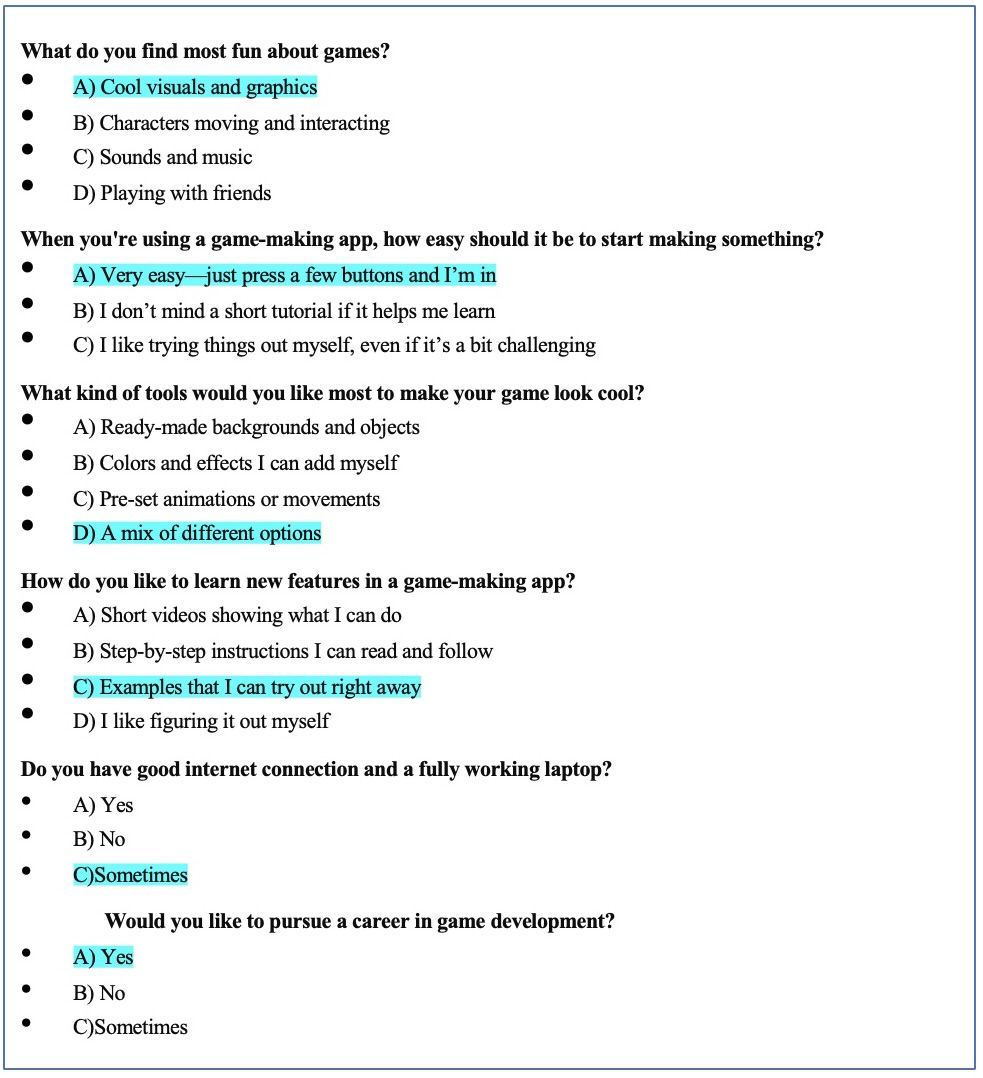
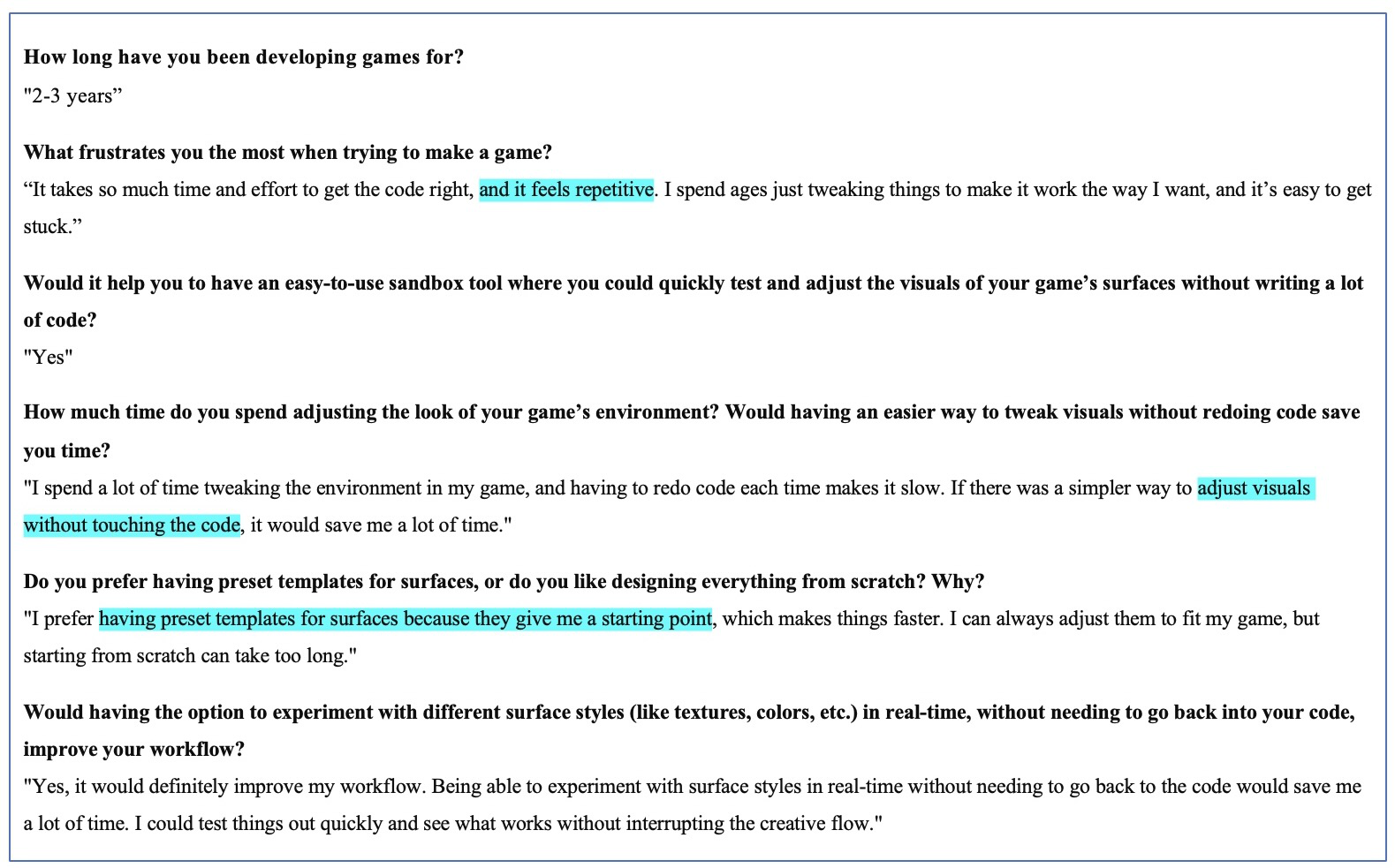
Our research focused on identifying the most effective method for gathering user feedback to refine our app’s functionality. After evaluating various data collection approaches, we determined that a questionnaire combining multiple-choice and short paragraph questions would be the most suitable. This method ensures clarity and accessibility for our target audience—children aged 8 to 14—allowing them to express their thoughts effectively.
To gain deeper insights into user expectations and necessary functionalities, we collected responses from two representative users:
- An 8-year-old student, providing a perspective on how younger users interact with the app and their intuitive expectations.
- A 14-year-old student, offering feedback on usability, feature preferences, and areas for improvement from an older user’s standpoint.
These responses serve as key references in shaping our app’s design, ensuring it meets the needs and expectations of its intended audience.
Section 2.1.1 - Questionnaire with Mix of Multiple Choice Questions
8-Year-Old Student
Section 2.1.2 - Semi-Structured Interview
14-Year-Old Student
Section 2.2 - User Personas: Exploring How Target Users Engage with the App
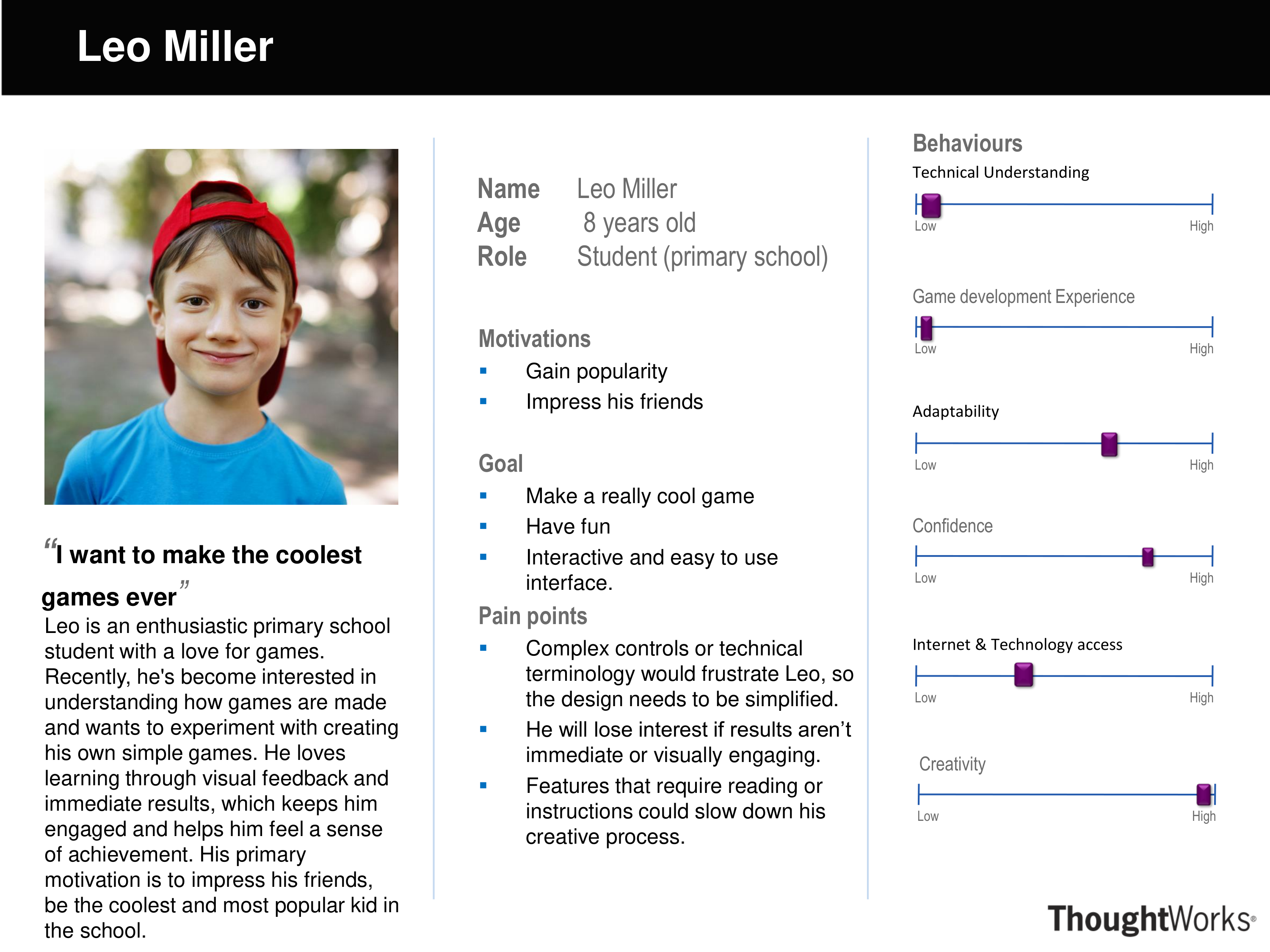
Section 2.2.1 - Scenario 1: Leo, an Aspiring Young Game Creator
- Leo, an 8-year-old, logs onto the app to create something unique.
- The colorful buttons and simple layout encourage free experimentation.
- He selects backgrounds, characters, and objects using easy prompts.
- Instant feedback shows the effects of each change, keeping him excited.
- He enjoys discovering what each button does.
- His friends are impressed by his creation, boosting his pride.
- The app fosters his creativity and confidence in game-building.
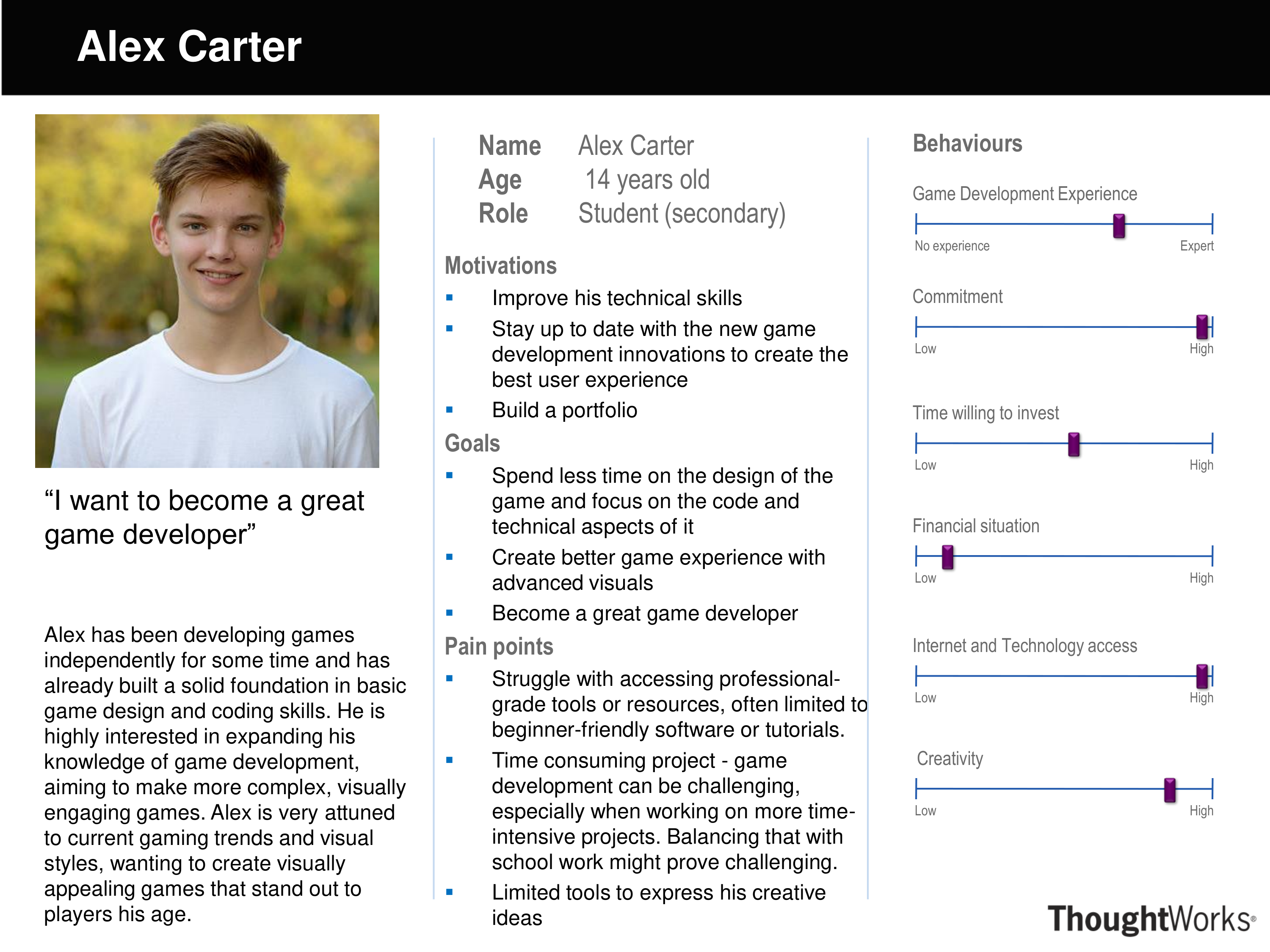
Section 2.2.2 - Scenario 2: Alex Miller, an Ambitious Teen Game Developer
- Alex Miller, 14, is experienced in game development and wants to create complex games to enhance his portfolio.
- He uses the app to build faster and experiment with shaders and graphics.
- The app lets him easily switch mockups and add high-quality visuals.
- Support options explain advanced techniques in simple steps.
- By the end, Alex creates a demo scene he is proud of and the app serves as a strong foundation for his future game development projects.
Section 2.3 – General User Requirements
1. Easy use: Leverage Babylon.js as the core framework to create, render, and customize 3D scenes that can run on typical web browsers and moderate hardware, allowing a broad user base to access Babylon Studio without extra installations. This ensures accessibility and cross-platform functionality.
2. AI assistant: Integrate an AI helper that provides suggestions and step-by-step guidance when users add or modify blocks.
3. Simple interaction for 3D Effects: Enable users to apply shader effects and modify 3D environments using a simple, intuitive block-based interface, making complex visual effects more accessible.
4. Smooth performance on all devices: Ensure Babylon Studio remains lightweight and optimized, allowing it to run smoothly on standard low-spec/school computers and everyday laptops without requiring high-end hardware.
Section 3 - Use Case Diagrams
Use cases are crucial in understanding the functional requirements of a system or software from an end-user perspective.
Section 3.1 - 10-Year-Old Student Use Case Diagram
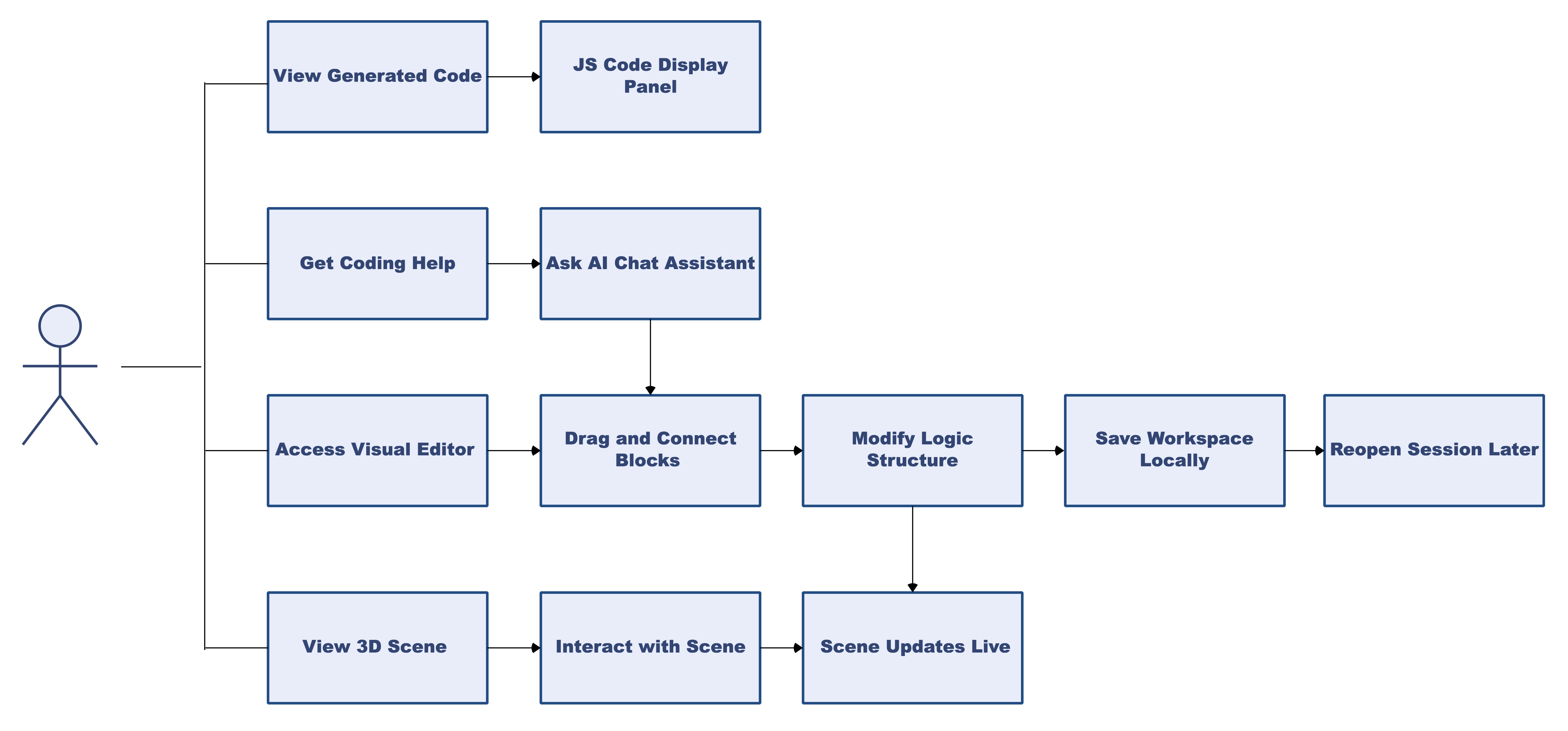
Use Case Description
| Use Case | Description |
|---|---|
| Access Visual Editor | User opens the workspace and sees the block interface |
| Drag and Connect Blocks | User selects and connects visual blocks to define logic |
| Modify Logic Structure | User edits or rearranges block code |
| Save Workspace Locally | Data is stored in localStorage |
| Reopen Session Later | Previously saved blocks are reloaded from the browser |
| View 3D Scene | Real-time rendering of the outcome on a canvas |
| Interact with Scene | Zoom, rotate, or reset the view of the 3D scene |
| View Generated Code | See live-updating JavaScript code generated from blocks |
| Ask AI Chat Assistant | Ask for help, explanations, or debugging tips |
| Scene Updates Live | Any block changes reflect instantly in the 3D view |
Must Have
- An intuitive block based interface with drag-and-drop components for users to configure 3D objects, animations, and materials without coding.
- A 3D scene view that updates instantly with the effects of the blocks.
- Intuitive camera controls (orbit, pan, zoom) with mouse and keyboard.
- Blocks to control various material parameters, such as color, glow, roughness, metallicness, etc.
- Allow users to import custom textures to apply to materials, creating varied and interesting objects.
- Allow for multiple objects of various shapes, along with utilities to postion and rotate the objects.
- A straightforward, intuitive animation feature that brings objects to life through movement. By allowing elements such as spheres to shift positions, rotate, or perform other motions, it creates a more dynamic and engaging user experience.
- Show the user the JS code to replicate the scene created with blocks, so that they can use it as a starting point for their games.
Should Have
- An AI assistant for guidance and help that suggests step by step instructions, identifies common mistakes and suggests solutions, and explains Babylon.js features.
- Blocks to create lights, and change various parameters such as color and intensity.
- Allow the user to create 'hierarchies' of objects, such that a child object will move and rotate if a parent does so.
Could Have
- Blocks to edit parameters of the sky, such as sun position, and an animated day-night cycle.
- Small on-device AI model used to input color as a name, instead of complicated hex codes.
- Export to Babylon.js Playground – Allow users to send their created scenes directly to the Babylon.js Playground for further development.
- Shared library where users share their work and get inspired by other.
- Support industry standard formats such as glTF for model import.
Won't Have
- Export to other 3D Engines – No direct export support for Unity, Unreal, or Blender; focus remains on Babylon.js compatibility.
- Multi-Language Support – The platform will be developed only in English for now, with no translations planned.
- Offline Mode – Babylon Studio requires an internet connection; no local installation or offline functionality will be included.
Section 4.2 - MoSCoW Requirements (Non-Functional)
Must Have
- The platform must be accessible through modern web browsers without requiring special installations.
- The UI should handle user interactions instantly (eg. reflecting block changes, camera movements) to maintain a smooth experience.
- The layout, icons, and block structures must be straightforward, to maintain usability guidelines and ensure the system is easy to learn.
Should Have
- The system will be compatible with multiple devices.
- Babylon Studio should run effectively on a range of systems: laptops, desktops with moderate GPU/CPU capabilities.
Could Have
- Structure the codebase to easily accommodate future blocks or AI features without major refactoring.
Won't Have
- Enable support for multiple languages and regions to ensure a versatile and inclusive user experience.