System Design
Section 1 - System Architecture
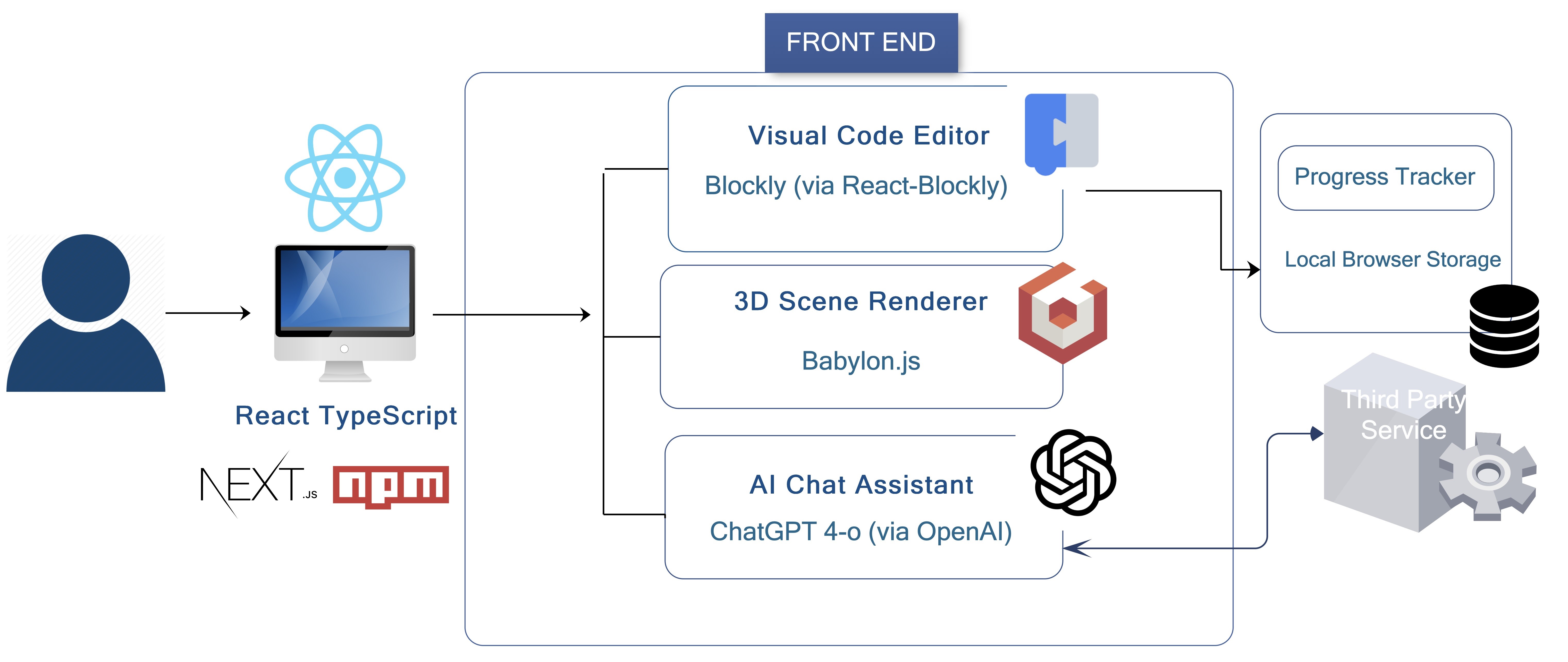
Babylon Studio follows a modular and scalable design, built entirely on the front end. The user interacts through a React-based interface running in the browser, which renders 3D scenes using Babylon.js and supports block-based programming using Blockly. The system integrates with a third-party API, OpenAI's ChatGPT, for the AI assistant directly from the front end, enabling real-time educational assistance. The user's block program (workspace) is tracked and stored using browser-based local storage to allow instant saving without login, database, or backend server requirements. This architecture enables a high-performance learning tool suitable for educational environments, while also allowing flexibility for future enhancements such as database integration or user account systems.
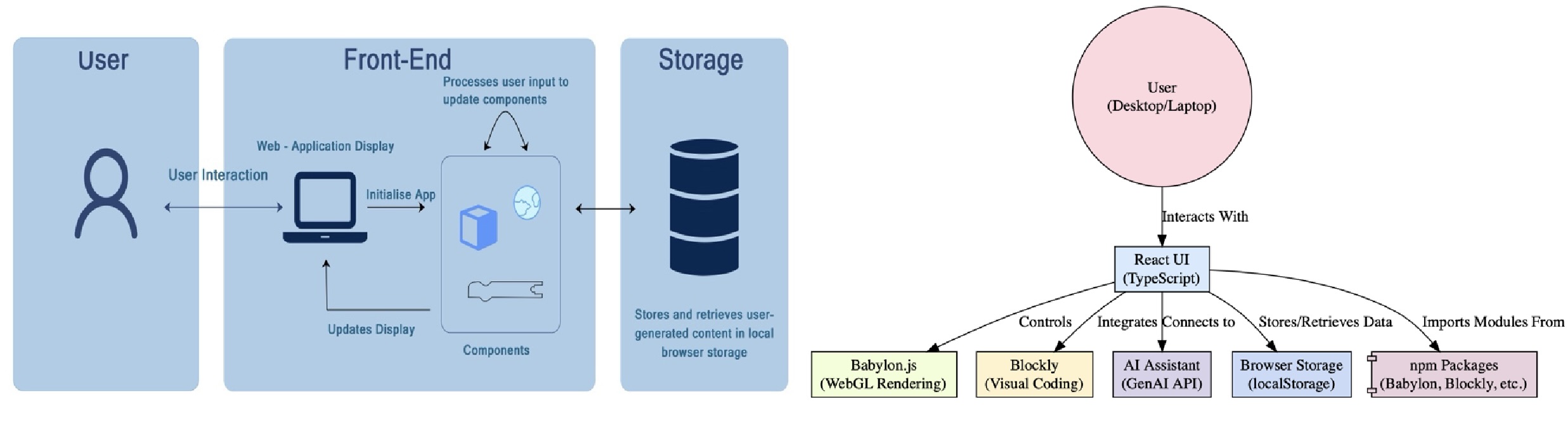
 This diagram illustrates how various tools and libraries — Babylon.js, Blockly, OpenAI, and React — interact within the system.
Section 2 - Design Patterns
Babylon Studio uses the overarching Model-View-Controller design pattern for efficient encapsulation. The 'core' application (implemented in BlocklyCore.ts and SceneCore.ts), implements the model. This includes the Babylon.js scene initialization, the code generation from the Blockly workspace, as well as the application of the generated code to the scene. This separation allows for the model to be unit-tested without requiring the UI to be run. On the other hand, as is usual for web applications, the View and Controller are combined into a React-based website.
The view-controller leverages the component-based architecture of React, a critical design pattern that effectively supports modularity and scalability. Given our application's primary focus on providing an intuitive 3D educational environment, using this pattern enabled us to isolate UI functionalities into reusable, self-contained components, greatly simplifying code maintenance and future development.
By adopting React's component-based architecture, we created dedicated components for specific tasks, enhancing clarity and ease of debugging. For instance, our SceneComponent encapsulates the entire Babylon.js scene setup and rendering process, while BlocklyContainer handles block-based interaction and JavaScript code generation. This modular approach facilitated better collaboration within the team, as components could be developed, tested, and refined independently.
Further enhancing our project's architecture, we utilized React hooks extensively to manage application state effectively and perform side effects such as loading resources or updating the UI in response to user interactions. For example, the use of useLayoutEffect hook in SceneComponent ensures that the Babylon engine is initialized only once, and that the scene view is resized appropriately at all times.
Interface definitions via TypeScript allowed clear contracts between parent and child components, ensuring type safety and improving the robustness of the application. An example includes passing generated JavaScript code from BlocklyContainer to a dedicated JavaScript code viewer component (JSContainer), maintaining a clear and organized data flow within the application.
To maintain stylistic clarity and prevent CSS conflicts, we adopted Tailwind CSS, which streamlined our styling process through utility classes, ensuring a consistent and responsive design across the application.
Our visual programming environment follows a declarative paradigm, as opposed to the imperative paradigm followed by alternative tools like the Babylon Playground. This allows for very quick iteration, with any changes to the blocks immediately showing up in the viewport, without having to press any 'play' or 'run' button. However, this leads to one major architectural challenge - our scene refresh and update cycle has to be highly optimized, as it will be run whenever the user interacts with the block workspace. Babylon.js was not designed for such low-latency scene editing, and so, we had to employ aggressive caching and cache invalidation (and that still leads to some flickering as the library struggles to keep up!).
Section 3 - Site Map
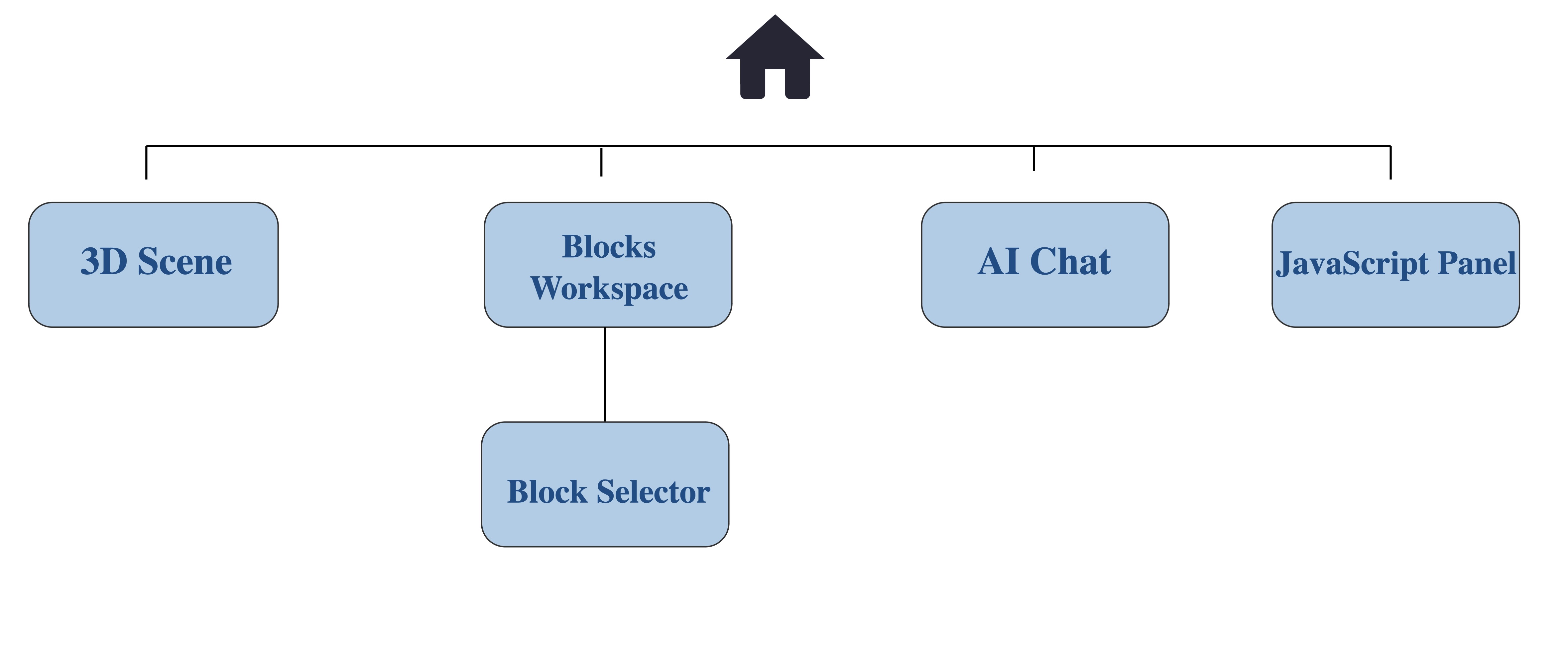
The Babylon Studio web application is designed to offer seamless navigation with clearly defined sections:
Section 4 - Data Storage
For data persistence, we utilized browser local-storage, leveraging simple methods such as:
localStorage.setItem("blocklyWorkspace", JSON.stringify(serialization.workspaces.save(workspace)));
localStorage.getItem("blocklyWorkspace");
This provided an efficient, client-side solution ideal for our educational application's requirements, eliminating the need for server-side complexity while still ensuring user progress could be saved and retrieved seamlessly. As the rendered Babylon.js scene is a direct representation of the user's workspace, it is not saved, and is instead regenerated on load. This significantly reduces our storage requirements, with no loss in functionality.