Research
Overview
As the field of 3D graphics and shader programming can be complex for beginners, limited tools are available to make these concepts more accessible to young learners eager to explore the 3D world. Existing platforms such as Blender and Unity, while powerful, have steep learning curves and are not beginner-friendly. To address this gap, we created Babylon Studio, a platform designed to simplify 3D graphics and shader experimentation through an intuitive, block-based interface. One project that closely aligns with our objectives is Babylon Playground, an interactive, browser based environment where users can experiment with and learn Babylon.js in real time. By offering immediate visual feedback and straightforward code editing, Babylon Playground empowers users to create and refine their own 3D experiences without needing extensive prior knowledge.
Babylon Playground is an official web-based 3D coding sandbox for the Babylon.js engine. It runs entirely in the browser with no setup, letting users write Babylon.js code on the left and see the 3D result on the right instantly[1]. As a live editor for Babylon.js WebGL and WebGPU 3D scenes[2], Babylon Playground serves as both a prototyping tool and a learning platform. It enables creators to experiment with 3D scenes in real time, share their code via unique URLs, and explore numerous examples – all within a simple, accessible interface[3].
Main Features of Babylon Playground
 Figure: The Babylon.js Playground interface with code editor (left) and real-time 3D view (right)
In-Browser Code Editor – Babylon Playground features a robust code editor where users can write in TypeScript or JavaScript – the Playground will compile TypeScript to JavaScript behind the scenes before running[1].
Real Time Rendering Canvas - As soon as you hit Run, the 3D scene renders on the right side canvas. Babylon Playground uses the full Babylon.js engine in real time, supporting WebGL by default and even WebGPU when available. This means you can create anything from simple shapes to complex scenes with physics, shaders, and animations, and see updates immediately. The canvas is interactive: you can use the default camera controls (e.g. drag to rotate view with an ArcRotateCamera or move with a FreeCamera) to explore your scene live[2].
Babylon.js API Integration - Since Playground runs Babylon.js, it has access to all of the engine’s APIs. You can call any Babylon.js function to create models, load textures, handle input, run physics, or even enter VR/AR modes. For example, creating a basic scene with a camera, light, sphere and ground is straightforward:
var createScene = function() {
    var scene = new BABYLON.Scene(engine);
    var camera = new BABYLON.FreeCamera("camera1", new BABYLON.Vector3(0, 5, -10), scene);
    camera.setTarget(BABYLON.Vector3.Zero());
    camera.attachControl(canvas, true);
    var light = new BABYLON.HemisphericLight("light", new BABYLON.Vector3(0, 1, 0), scene);
    light.intensity = 0.7;  // dim the light a bit
    var sphere = BABYLON.MeshBuilder.CreateSphere("sphere", { diameter: 2 }, scene);
    sphere.position.y = 1;  // lift sphere above ground
    var ground = BABYLON.MeshBuilder.CreateGround("ground", { width: 6, height: 6 }, scene);
    return scene;
};
This code could be run in the Playground to produce a simple scene with a hovering sphere on a plane. Because the full Babylon.js library is available, more advanced features like particle effects, skeletal animations, or node-based shaders can also be coded and tested directly in the Playground[1].
Interactive 3D Editing Tools - Babylon Playground features an interactive Inspector tool that allows users to edit and debug scenes directly in the browser. It provides real-time controls to adjust properties like position, color, and materials of meshes or lights, view scene data, take screenshots or recordings, and export scenes to formats like .babylon or .glTF[4]. This makes the Playground a lightweight in-browser 3D editor that simplifies experimentation and material editing without relying only on code.
Built-in Examples and Templates - Playground offers a library of pre-made examples and demos accessible via the Scene Selector and an Examples panel. Upon visiting, the default “Basic Scene” template provides a simple camera+light setup to get you started. Additionally, users can browse categorized examples (for instance, “Animation 101”, “Physics Samples”, “Materials”, etc.) that demonstrate specific features. The interface allows filtering examples and even links each example to relevant documentation. These examples serve as mini-lessons eg. you can load one, see the code that implements a given concept, and tweak it to learn further[3].
Performance and Tech Features – Because Babylon Playground runs Babylon.js in the browser, it benefits from the engine’s performance optimizations. You can create moderately complex scenes that run at interactive frame rates. The Playground has already been updated to leverage new tech like WebGPU (for better performance on supported browsers)[4]. It loads all Babylon modules by default, so everything is available; however, upcoming enhancements will allow selecting only needed modules for efficiency. The platform is also constantly improving – for example, in 2024 the Playground introduced a Code Generator feature that lets users insert common code patterns (like adding a camera or light) through a menu or shortcut instead of writing from scratch, making scene setup even faster for beginners. Overall, Playground keeps the developer loop very fast: write or insert code, run, and see results within seconds, which is ideal for iterative learning and creative experimentation[4].
In summary, Babylon Playground’s design – combining a live coding environment with accessible examples and tools – strongly supports learning by doing. It caters to multiple learning styles: reading examples, visual exploration via inspector, and pure trial-and-error. It’s equally welcoming for a complete beginner writing their first lines of 3D code and a seasoned developer prototyping an advanced shader (who might in turn produce an example that others learn from). This mix of immediate practicality and educational support is what makes Babylon Playground a great reference for any 3D learning platform[1].
Section 1.2 - UI Design Research
While designing the interface for Babylon Studio, we examined established 3D platforms such as Unity and Blender as conceptual frameworks that guided our design decisions. We took inspiration from these popular tools to make sure our interface is easy to use, beginner-friendly, and provides smooth introduction for beginners to the 3D world.
These platforms are widely used in the 3D industry and share a common layout structure that helps users efficiently manage scenes, assets, and properties[6]:
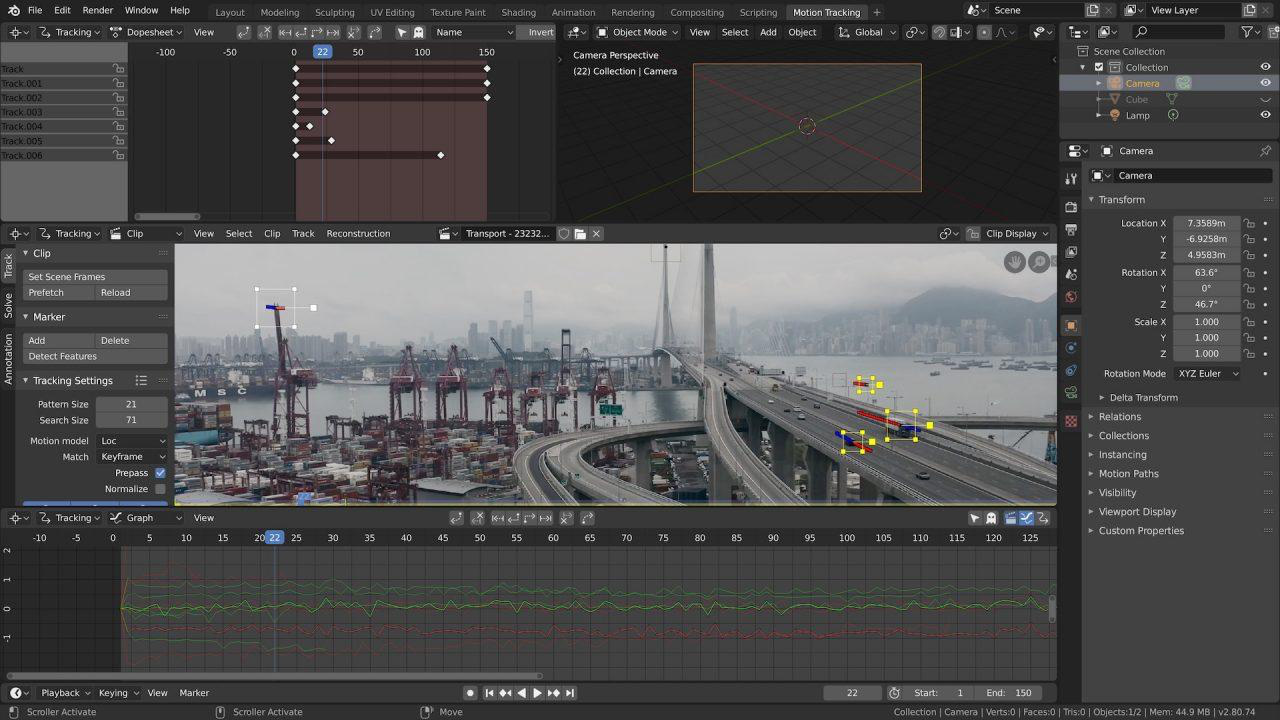
To provide a sense of familiarity and improve user experience, we mimicked this proven structure in our application. In particular, we adopted a split-panel design, where:
- The 3D scene is rendered and displayed on the left side, allowing real-time manipulation and interaction.
- The control panel, containing tools, object properties, color pickers, and layer settings, is placed on the right which is similar to the "Inspector" in Unity or Blender.
This layout not only promotes intuitive navigation, especially for users who may transition to professional tools in the future, but also mirrors the natural flow of 3D creation—from placing objects in a scene to fine tuning their properties.
Below are interface screenshots from Unity that served as a reference for our UI design decisions[5]:
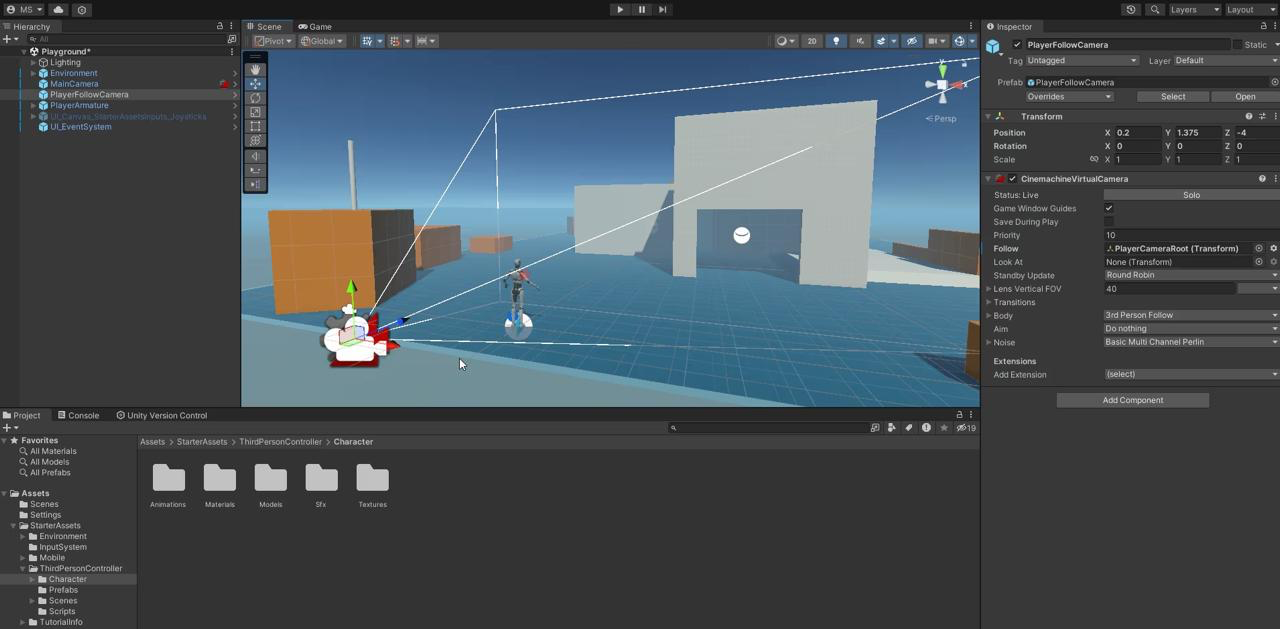
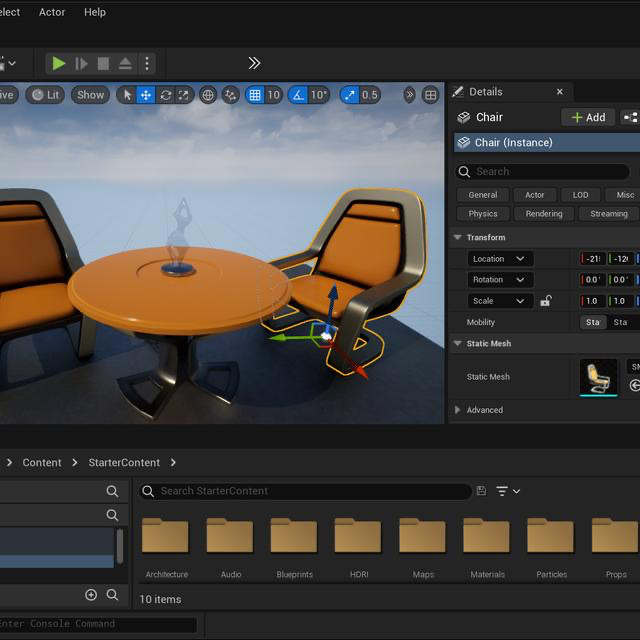
By aligning our interface with these familiar industry standards, we ensured that Babylon Studio feels both professional and accessible, while remaining designed to the needs of our beginner target audience.
Section 2 - Technology Review
Section 2.1 - Devices
| Option | Description | Pros | Cons |
|---|---|---|---|
| Local/Desktop App | Package an entire 3D environment and block-based features within a desktop application for Windows/macOS (which could also have the potential of an offline mode). | 1. High Performance. 2. Offline Operation – Doesn’t require a browser or internet connection for the core functionalities. | 1. Complex Installation – Each user, particularly children in schools, would need to download and regularly update a large application, which could be challenging or inconvenient. 2. Platform Specific – Windows/macOS differences, driver issues, etc. 3.Harder to Integrate Blockly – Additional setup or plugins needed for block-based UI. |
| Web-Based Solution | Deliver the 3D experience via a website accessible on typical browsers. Blocks are rendered with a JS library (e.g., React-Blockly), and real-time rendering is handled in a WebGL context. | 1. Broad Accessibility – Need of a browser - no installation. 2. Immediate Feedback – Easy for kids to share URLs, see real-time scene changes etc. 3. Block Editor Compatibility – JavaScript-based libraries - Blockly integrate smoothly. | 1. Potential Performance Limits – Dependent on browser/WebGL performance, might not handle extremely large scenes as well as a desktop engine. 2. Offline Use – Requires an internet connection. |
We chose a web-based approach using Babylon.js and Next.js as it directly aligns with our project's initial requirements, emphasizing accessibility, interactivity, and performance. Since we're creating this for young learners and beginners who are new to 3D programming, we needed a platform that's easy to use and provides immediate feedback. A web-based solution is perfect for this because it lets users experiment instantly right in their browser, without having to worry about complicated installations or setups.
Section 2.2 - Programming Languages, Frameworks, Libraries, & APIs
We decided to use TypeScript with Next.js because our app combines a dynamic block-based editor (Blockly) with a live 3D scene (Babylon.js), so it needs to be accurate and reliable. TypeScript helps us easily spot errors when working with Babylon’s complex API, making sure everything runs smoothly, especially important since kids will be using it. Next.js gives us an organized way to build our React interface, keeping things fast, clear, and easy to manage.
Creating an intuitive, high-performance educational platform for 3D learning requires a robust and flexible technology stack. Our focus was to identify tools that support real-time rendering, an interactive user interface, and seamless code integration for beginner-friendly experiences. Several front-end technologies were considered and compared based on factors such as rendering performance, developer experience, extensibility, and learning curve.
| Framework | Pros | Cons |
|---|---|---|
| Angular | • Strong structure beneficial for larger projects. • Good modularity as components are clearly separated and easy to manage. | • Adds extra complexity when managing the lifecycle of Babylon.js. |
| Vue | • Easier to manage simple UI interactions due to state management. • Code easier to maintain. | • Less integration with Babylon.js tools and less resources. |
| Next.js | • Automatic routing makes it easier to navigate through complex scenes. • Built-in optimizations enhance Babylon.js real-time performance. • Extensive libraries simplify integration with Blockly and Babylon.js. | • Might slow things down slightly if server-side features aren't used much. |
We chose Next.js for Babylon Studio because its built-in functionalities align closely with our project's requirements, specifically real-time interactive 3D rendering using Babylon.js and seamless integration with Blockly. The framework inherently supports advanced React features, including optimized rendering strategies critical for smooth, responsive 3D interactions within the browser environment.
Section 3 – AI Research
The primary objective of our platform is to educate aspiring young developers on the foundational concepts of 3D programming. To enhance this learning experience, we decided to integrate an AI-powered chat assistant where users could inquire about the program itself or 3D development in general.
In researching this feature, we compared various AI models from different providers, each with a unique parameter count and purpose. Our aim was to identify the model that balances speed, accuracy, and user-friendliness.
Section 3.1 - AI Models Overview
Below is a quick rundown of the models we evaluated:
- GoogleFlan T5 (80M parameters) An encoder-decoder model pre-trained on a variety of language tasks, heavily oriented around prompting. GoogleFlan T5 can handle summarization, classification, and other NLP tasks but is designed with a modest parameter count for efficiency[7].
- HuggingFace SmolLM (135M and 1.7B parameters) SmolLM focuses on being resource-friendly while maintaining speed and reasonable accuracy. Trained on a curated, high-quality corpus (including Cosmopedia v2 and Python-Edu), this model aims to stay both “small” and “smart.” The 1.7B version offers enhanced capabilities over the 135M variant but requires more resources[9].
- ChatGPT 4-o (8B parameters) GPT-4-o excels in text generation and knowledge-based Q&A tasks, featuring reduced hallucination rates and strong safety measures. This model consistently delivers coherent, context-aware responses without straining resources too heavily[8].
- ChatGPT o1 (175B parameters) Currently considered one of the most advanced conversational AI models, ChatGPT o1 provides very high-quality, well-reasoned responses. It often outperforms smaller models in both accuracy and depth of explanation, thanks to its substantial parameter count[8].
To determine which model would be optimal for our needs, we gave each AI the same base prompt defining our system’s features. We then simulated user queries to assess response speed and accuracy.
Section 3.2 - A Comparative Analysis of Response Times to User Queries Across Different AI Models APIs
| GoogleFlan (80M) | SmolLM (135M) | SmolLM (1.7B) | ChatGPT 4-o (8B) | ChatGPT o1 (175B) | |
|---|---|---|---|---|---|
| "How do I make a circle in this program?" | 40.2 | 10.1 | 19.2 | 18.2 | 58.2 |
| "How can I change the brightness of the sphere and make it seem more brigt" | 39.9 | 9.8 | 18.3 | 15.7 | 46.9 |
| "How can I add my own texture to make the sphere look like the sun, and how do I make another object orbit around it?" | 40.4 | 11.2 | 20.2 | 16.4 | 40.8 |
| "Can I make a torus?" | 42.4 | 10.3 | 18.9 | 17.8 | 49.6 |
| "What exactly does roughness mean in this program and in 3-D modelling?" | 39.8 | 12.2 | 19.1 | 17.5 | 43.7 |
Here is a graph representing the results of the table above:
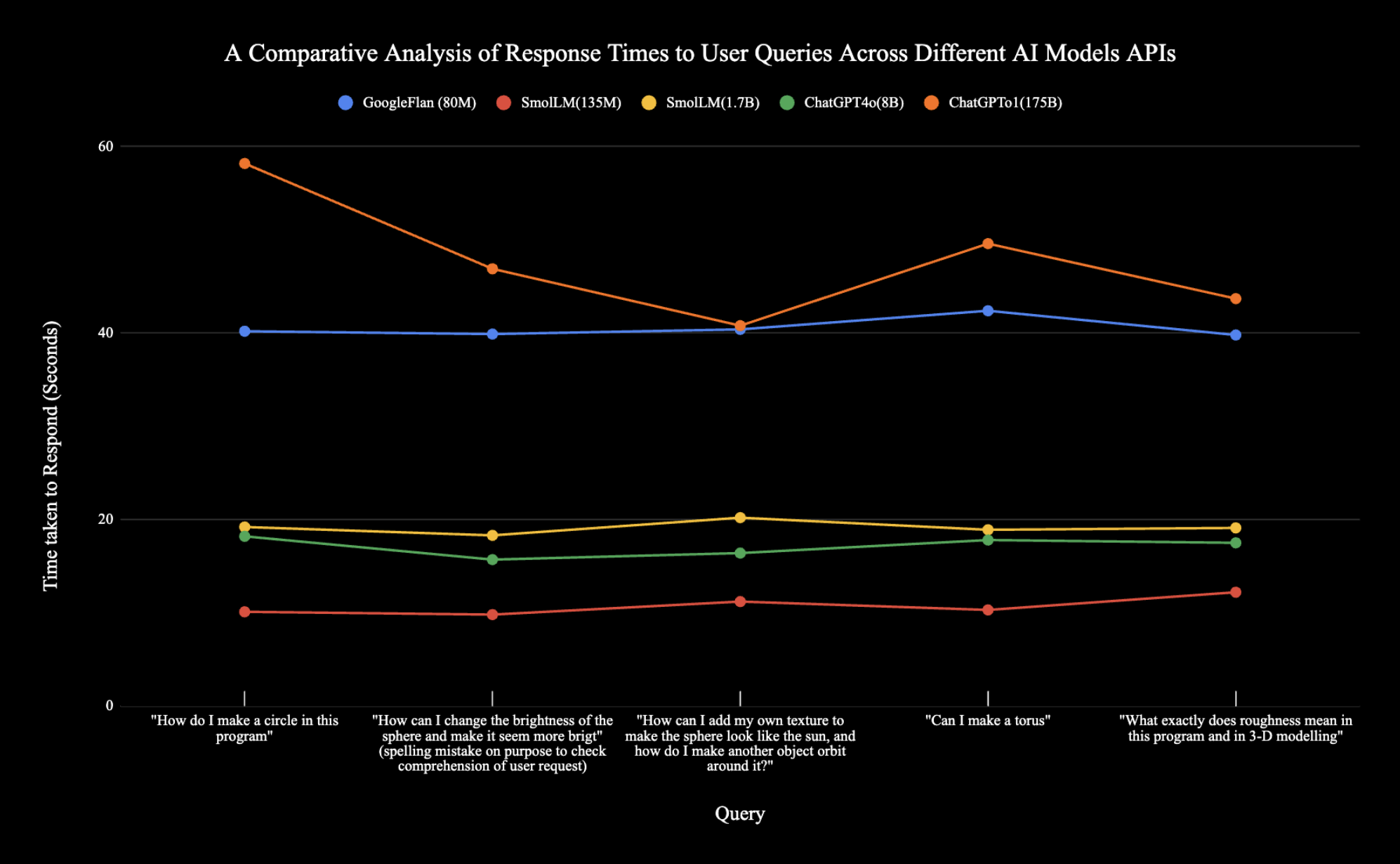
Predictably, response times tended to align with the number of model parameters, as larger parameter counts often introduce greater computational overhead[10]. Consequently, GoogleFlan T5—being the smallest model—consistently delivered the quickest replies. However, an interesting exception was the ChatGPT4-o model, which outpaced SmolLM despite having more than four times the parameters. This discrepancy may stem from ChatGPT4-o’s more advanced architecture, allowing it to efficiently handle complex prompts and refer back to the initial contextual information without significantly increasing latency.
However, speed alone cannot be our sole consideration. We must also compare how coherent, clear, and direct the responses were—in other words, the overall accuracy and usefulness of the answers.
Ranking the Accuracy of AI Models’ Responses:
1. ChatGPT o1 Consistently produced the clearest and most comprehensive answers, using a friendly tone and supplying helpful troubleshooting advice.
2. ChatGPT 4-o Almost as concise and direct as ChatGPT o1, with consistently clear explanations and straightforward guidance.
3. SmolLM (1.7B) Encountered issues with more complex prompts, occasionally fabricating new categories or features (“hallucination”).
4. SmolLM (135M) & GoogleFlan (80M) Both models frequently hallucinated or struggled to provide accurate responses, indicating their smaller parameter sizes limit their capacity for complex queries.
From these findings, it was evident that we needed a model exceeding two billion parameters to ensure accuracy, yet one that would maintain acceptable speeds for an optimal user experience. ChatGPT 4-o met these criteria by delivering solid, coherent answers while minimizing response latency compared to the larger ChatGPT o1 model.
One of our conditions was to use the Babylon.js library as we needed to leverage it for real-time rendering and integrate Blockly via React-Blockly to enhance visual effects through block-based controls, making 3D development accessible and exciting for young learners. We also incorporated AI/Transformers to generate color names dynamically for learners, allowing them to use familiar color names instead of complex RGB values. We chose these tools to make the development process smoother while also aligning with the project's educational goals of making 3D concepts accessible and engaging.
Section 4 - Summary of Technology Decisions
| Features | Details |
|---|---|
| Front-End UI & Languages | Next.js + React + TypeScript |
| Visual Programming | Blockly (via React-Blockly) |
| 3D Rendering Library | Babylon.js |
| AI Integration | ChatGPT 4-o (via OpenAI) |
| Storage | Local Browser storage |
References
- C. Noring, “A first introduction to building 3D applications with JavaScript or TypeScript using Babylon.js,” DEV Community, 2020. [Online]. Available: https://dev.to/softchris/a-first-introduction-to-building-3d-applications-with-javascript-or-typescript-using-babylon-js-135l. [Accessed: Mar. 27, 2025].
- HiGreg, “Playground ‘run and start video recording’ button?,” Babylon.js Forum, 2024. [Online]. Available: https://forum.babylonjs.com/t/playground-run-and-start-video-recording-button/55059. [Accessed: Mar. 27, 2025].
- BabylonGuide, “BabylonJS Guide.” [Online]. Available: http://babylonjsguide.github.io/begins/Using_the_Playground. [Accessed: Mar. 27, 2025].
- Babylon.js, “Improving the Babylon Playground,” Medium, 2024. [Online]. Available: https://babylonjs.medium.com/improving-the-babylon-playground-7d38b86dddb1. [Accessed: Mar. 27, 2025].
- Unity Technologies, “Unity Editor Interface Overview,” Unity Documentation, 2024. [Online]. Available: https://docs.unity3d.com/Manual/UsingTheEditor.html
- Blender Foundation, “Blender User Interface,” Blender Manual, 2024. [Online]. Available: https://docs.blender.org/manual/en/latest/interface/index.html
- “Google’s Flan-T5 Vs. OpenAI GPT-3: Which is Better?,” botpenguin.com. https://botpenguin.com/blogs/google-flan-t5-vs-openai-gpt-3
- C.Varner, “ChatGPT Models Explained with Comparisons,” TeamAI, Dec. 11, 2024. https://teamai.com/blog/large-language-models-llms/understanding-different-chatgpt-models/
- Kili, “What is SmolLM? A Guide to Hugging face’s small language model,” kili-website, 2023. https://kili-technology.com/large-language-models-llms/what-is-smollm-a-guide-to-hugging-face-s-small-language-model (accessed Apr. 04, 2025).
- G. Lawton, “The role of AI parameters in the enterprise | TechTarget,” Enterprise AI, Sep. 26, 2024. https://www.techtarget.com/searchenterpriseai/tip/The-role-of-AI-parameters-in-the-enterprise