
APPENDICES
This section contains supplementary materials including deployment instructions, legal documentation, and user manuals for our systematic review generation system.
User Manual
This tool helps researchers quickly create systematic reviews. Type your research question, upload PDFs, and generate summaries. Manage files with quick actions (delete, organize), review past projects, and export results as PDF. Check report quality with automated graphs. Supports multiple papers. Simple and efficient.
sidebar navigation
Start new research workflow
Click the 3 dots (...) toopen a menu to delete
Access previous research outputs
Input research question here
Upload supporting documents
Generate systematic review
User account settings
Click to toggle theinput files used
Click to view thequality check graphs.
Click to open the PDF in another tab
Click to export thesystematic review as a PDF
Deployment Instructions
Prerequisites
- Latest version of pip installed
- MySQL installed (database)
- Node.js and npm installed (frontend)
Installation Steps
-
Clone the repository:
git clone https://github.com/pgzqtss/RAG-project.git
cd RAG-project
-
Install backend dependencies:
cd backend
pip install -r requirements.txt
-
Install frontend dependencies:
cd frontend
npm install
-
Create a .env file in the root directory using .env.environment as a template
Running the Application
-
Start MySQL server:
# Mac
brew services start mysql

# Windows
net start mysql
-
Create the MySQL database:
cd backend
mysql -u root -p < schema.sql
-
Run the backend and the frontend at the same time
cd backend
python3 app.py
(Could run in terminal)
-
Run the frontend:
cd frontend
npm run dev
(Could run in Command Prompt (cmd) for Window)
Blogs
Hello!
This is the beginning of our development blogs where we will discuss our progress with the project as we move forward. Unfortunately, we have not yet been told what our project is. Instead, we have been learning the fundamentals of human-computer interactions. This includes discovering the requirements of users, sketching and prototyping through personas.
We were finally assigned to a project and were given our requirements for it by our client. Our team have begun discussing and researching how we should tackle each requirement.
During this process, we’ve sketched up a prototype for what our final product might look like, including the signup pages, the page for attaching PDFs and showing the result. Also, we created two personas that are akin to our project’s target users, including their backgrounds and how they might use our tool.

Figure 1: Persona displaying a doctor and her behaviours
Using the personas and sketches, we made a digital prototype and sequence diagrams of our product, which we can later refer to to help develop the final product for our end-users.
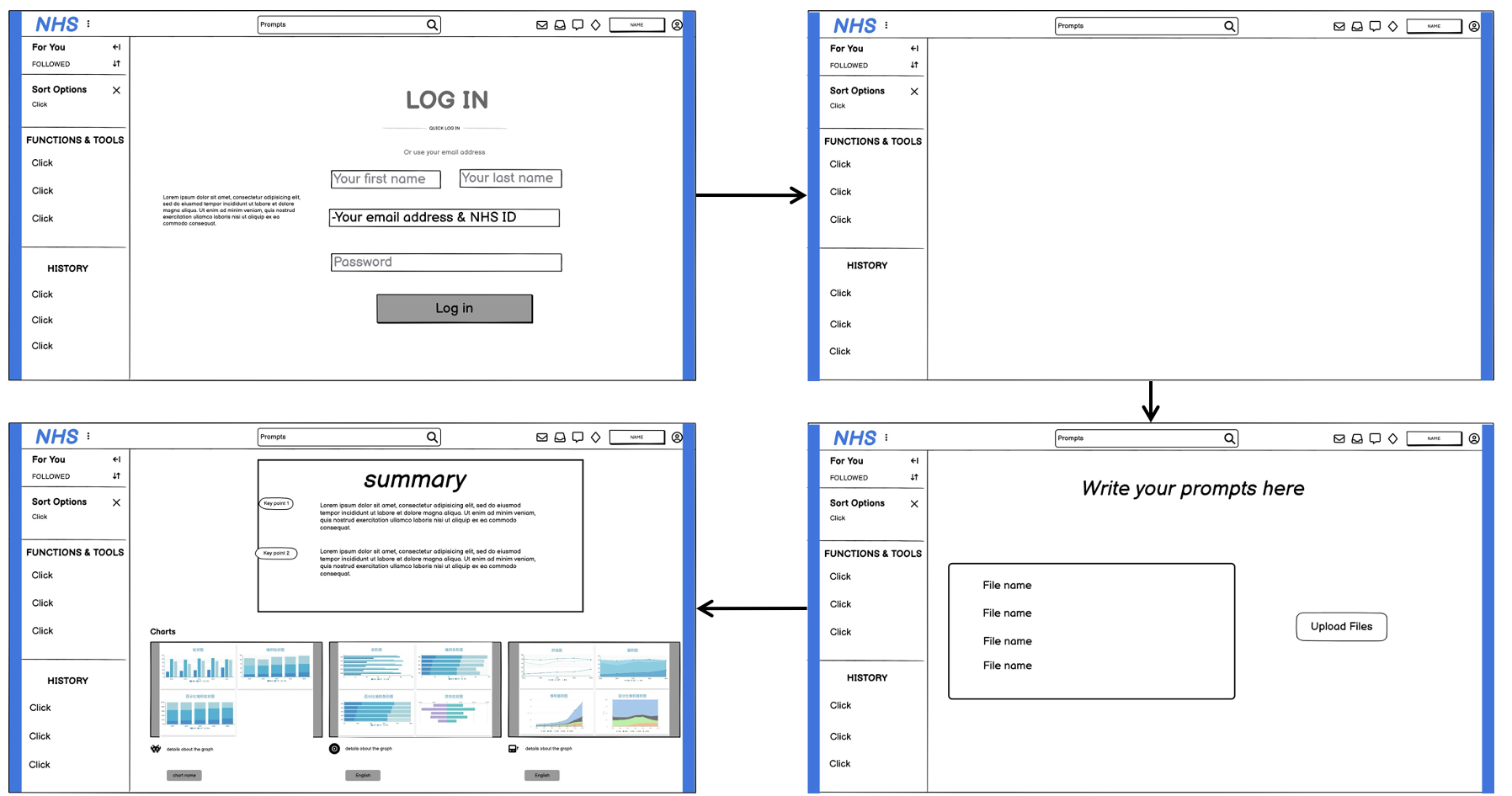
Figure 2: Prototype for the web application design
At the start of the month, we finished creating our HCI report and can now begin developing our project beyond the design phase. Our main focus for this month is to finalise all our requirements as desired by the client through online meetings, as well as adapting our previous plans accordingly.
We have created a MoSCoW document that outlines the importance of each specified requirement from highest to lowest priorities. This document will provide us guidance throughout the project to determine if we are on track as well as future steps.
In the latter half of the month, we began experiments on the backend pipeline for generating a full systematic review from PDFs of papers. We utilised a tool called Pipedream to test pipelines, which we can later implement as Python code.
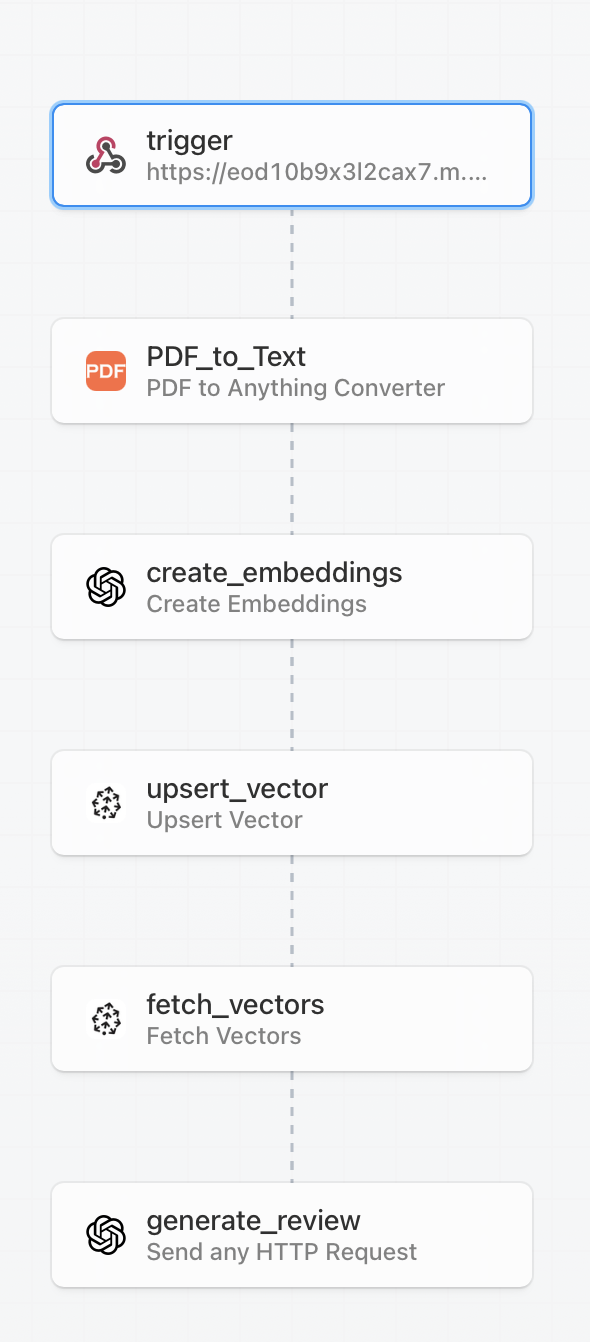
Figure 3: Pipedream pipeline diagram for the review generation process
Our tests found that we should be extracting text from PDFs into chunks, embedding those chunks with OpenAI’s embedding models, and then uploading them into Pinecone’s vector database. We can then fetch those chunks and generate a review using OpenAI’s LLM model.
By the end, we managed to retrieve text from PDFs and also upsert those text chunks into the vector database using the long-chain libraries in Python.
embeddings = OpenAIEmbeddings(openai_api_key="openapikey")
# initialize pinecone
pc = Pinecone(
    api_key = "pineconeapikey",
)

if 'my-index' not in pc.list_indexes().names():
    pc.create_index(
        name='my-index',
        dimension=1536,
        metric='cosine',
        spec=ServerlessSpec(
            cloud='aws',
            region='us-east-1',
        )
    )
index_name = "my-index"

docsearch = LangchainPinecone.from_texts([t.page_content for t in texts], embeddings, index_name = index_name)
From our last development blog, we have managed to make good progress on the project. We have been able to generate a summary of our sample research papers in PDF format using our pipeline. Our pipeline involved generating questions based on the user’s input on a review topic and then generating an answer for each question for each paper. Based on those answers per paper, we could generate a summary of each paper, and then combine them to generate a systematic review.
def main():
    # Get questions used for a systematic review
    questions = generate_review_questions(model=model)

    # Get all answers from each paper
    answers = generate_answers(questions=questions, namespaces=namespaces)

    # Get summary of each paper
    summaries = generate_summaries(answers=answers, namespaces=namespaces)

    # Filter each summary by accuracy
    filtered_summaries, scores = filter_low_accuracy_papers(summaries, model=model)

    # Generate systematic review from summaries
    systematic_review = generate_systematic_review(summaries=filtered_summaries,
                                                    query=review_question,
                                                    model=model)

    print(f'Systematic Review: {systematic_review}')
We have found that the output produced is not very accurate and leaves out a lot of detail that the user would’ve found useful. Therefore, we will need to modify the existing pipeline or implement a new pipeline soon.
During the Christmas holiday, we rested following the first term of university. Consequently, there have been no updates since the previous blog during the break.
After returning from the Christmas holidays, we decided to discuss how we were going to implement the frontend that users can easily navigate, as well as some features we will focus on.
Currently, we’ve experimented with methods of counting the number of authors in each paper, which we could use to compare the validity of the inputted papers. Furthermore, we’ve experimented with finding articles from an existing database and fetching them using API calls. The reasoning behind this is to potentially grab similar articles to a user’s input and generate a better systematic review.
We’ve finally reached the end of the first month of 2025! We have made significant progress towards the completion of this project. We’ve used Next.js, a React framework, to create the basic UI for our website because it contains useful functionalities from React as well as being very responsive. So far, there is a sidebar to show previous reviews and an area to input PDFs and the prompt. Currently, there is no functionality, but we aim to soon implement those features as well as a login system for the user.
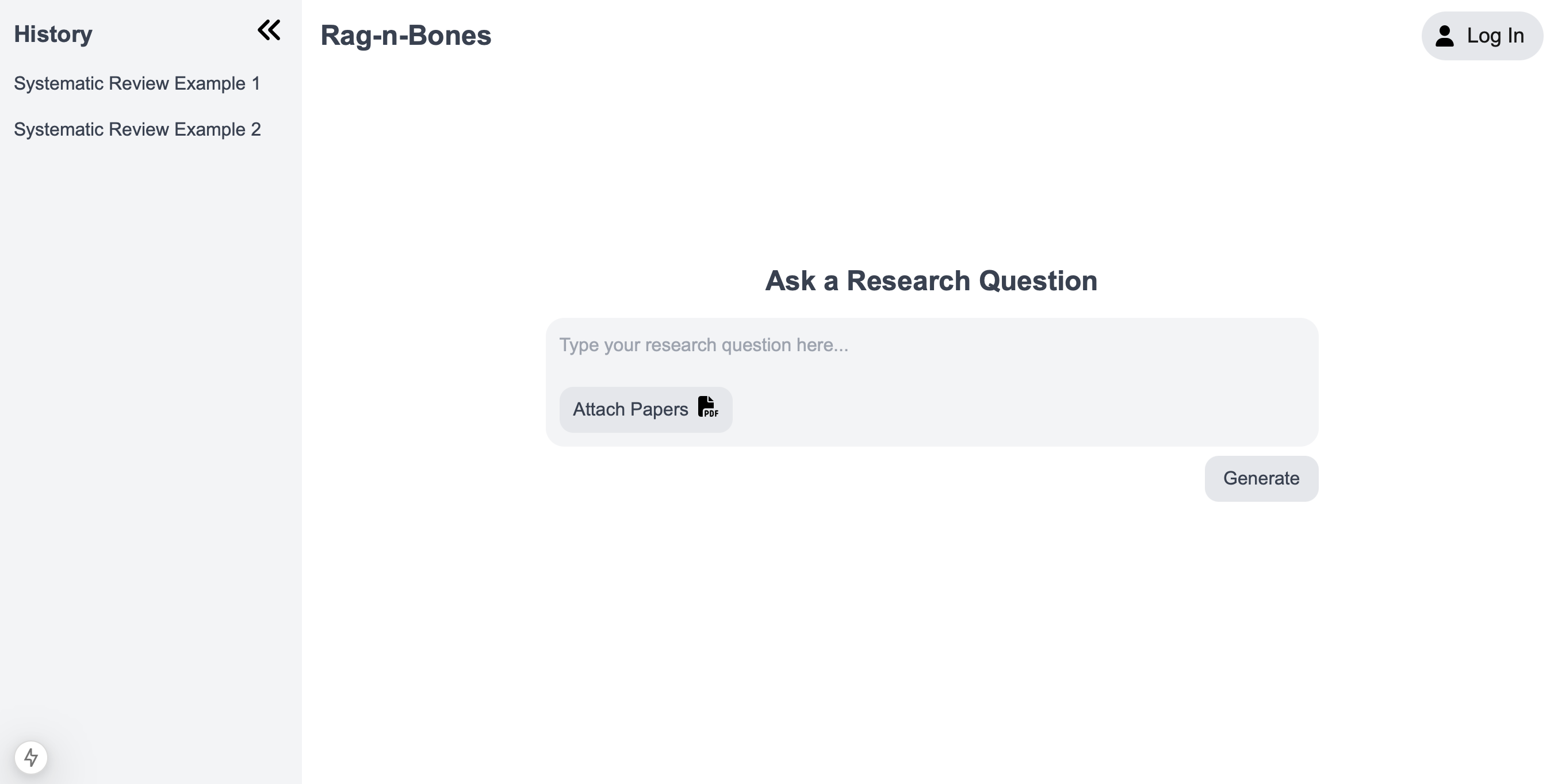
Figure 4: Basic UI for the Rag-n-Bones website
In addition, we have experimented with fine-tuning an existing open-source NLP model with medical data that we could use instead of using OpenAI’s GPT 3.5-turbo model. We’ve used Google’s t5-small model from HuggingFace as our base model because it has a high potential for text summarisation despite being a small NLP model. We are currently at the stage of testing to see if it can generate systematic reviews at a higher quality than the OpenAI model.
Welcome back to our development blog for our project Rag-n-Bones!
Over the past two weeks, we have been able to implement features of the backend into the frontend using Flask. Flask is a web framework that allows us to handle HTTP requests from the frontend and return responses back.
In terms of functionality, we have added the ability to login and sign up, display systematic reviews, and view the history of reviews linked with the user. We chose to use MySQL as our relational database to store user details and systematic reviews to easily retrieve data using id values.
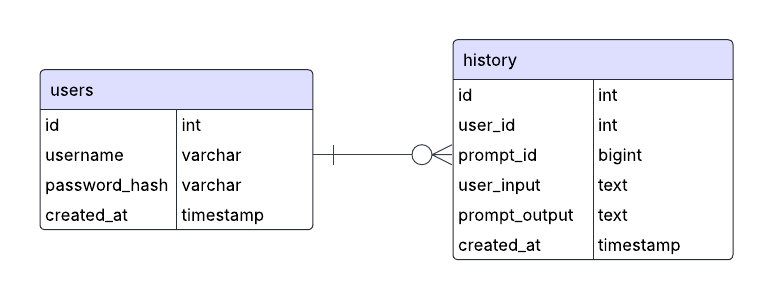
Figure 5: Entity-relationship diagram (ER) showing the SQL database
For each function, there are assigned Flask routes (API endpoints) that receive HTTP requests and return a response to the frontend using a JSON format. This implementation allows us to scale the project further with more functionality as we progress further.
@app.route('/api/login', methods=['POST'])
def login():
    data = request.json
    username = data.get('username')
    password = data.get('password')
# Authenticate username with password then return success or fail in JSON format.
The focus for the latter half of February month was to create a new pipeline for generating systematic reviews as there were several inaccuracies in the existing pipeline as mentioned in a previous development blog. Our solution to creating a more accurate and informative review was to generate each section of the review separately, including:
- Introduction
- Methods
- Results
- Discussion
- Conclusion
First, we would split the text of each PDF into smaller chunks and categorise them into each section of the review using OpenAI’s LLM model. Each chunked text, alongside its category, is uploaded to a Pinecone vector database. For each section, the relevant text chunks are retrieved and put into the prompt to generate text with previous sections (except for the Introduction) as context data. We concatenate each section and then return the completed systematic review.
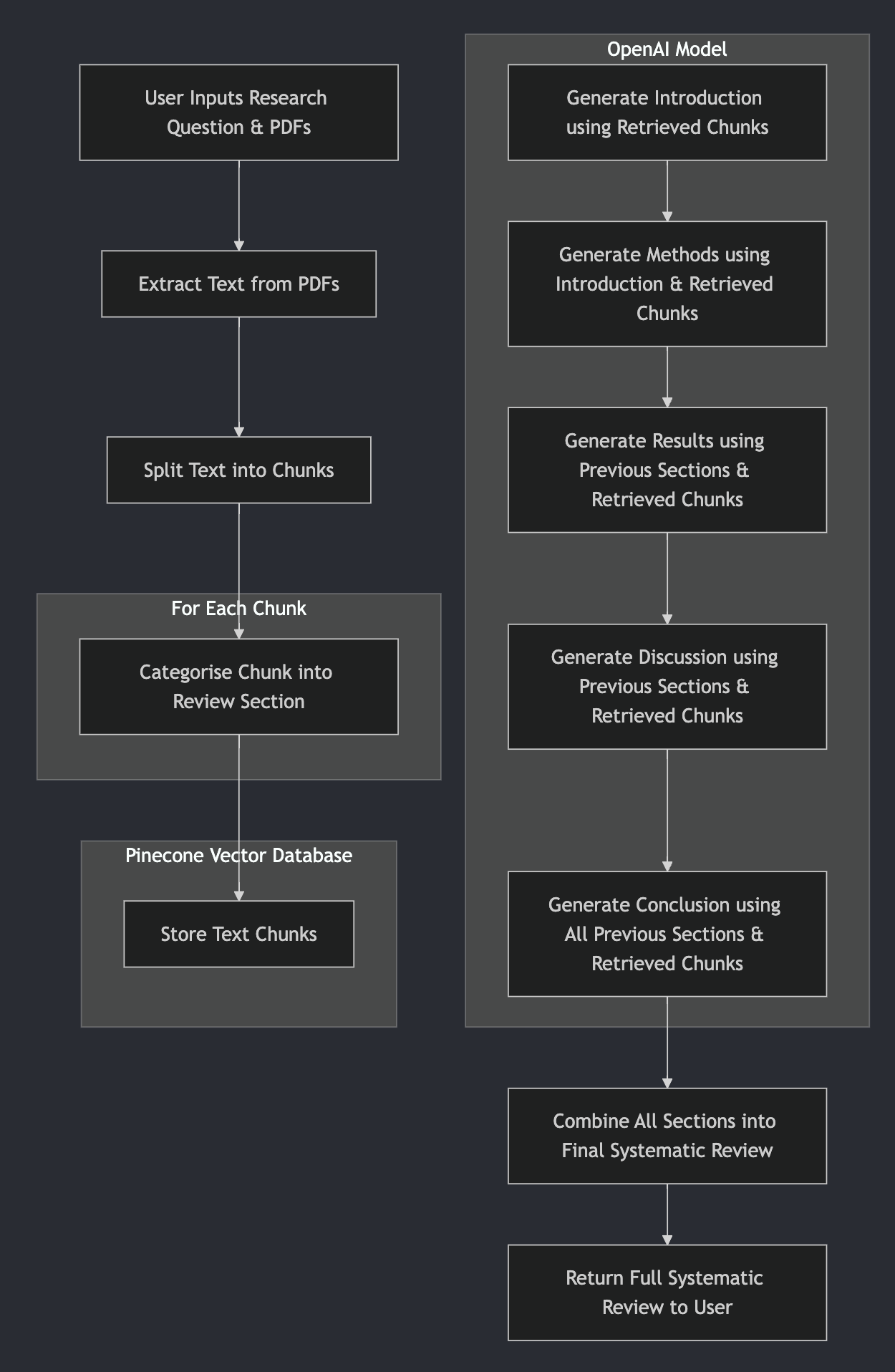
Figure 6: Flowchart for the new modified pipeline
Welcome to our last month in this development blog!
We are finally in the last home stretch and are finalising the small details of the project. This has included being able to export the systematic review as a PDF, being able to view the original PDFs used to generate and quality checks for the final generated review.
For the quality checks, we have generated graphs and diagrams for the following: most frequent authors, thematic area map, cosine similarity, TF-IDF and BLEU score for the papers. These give an idea for the quality of the output when compared to the original input.
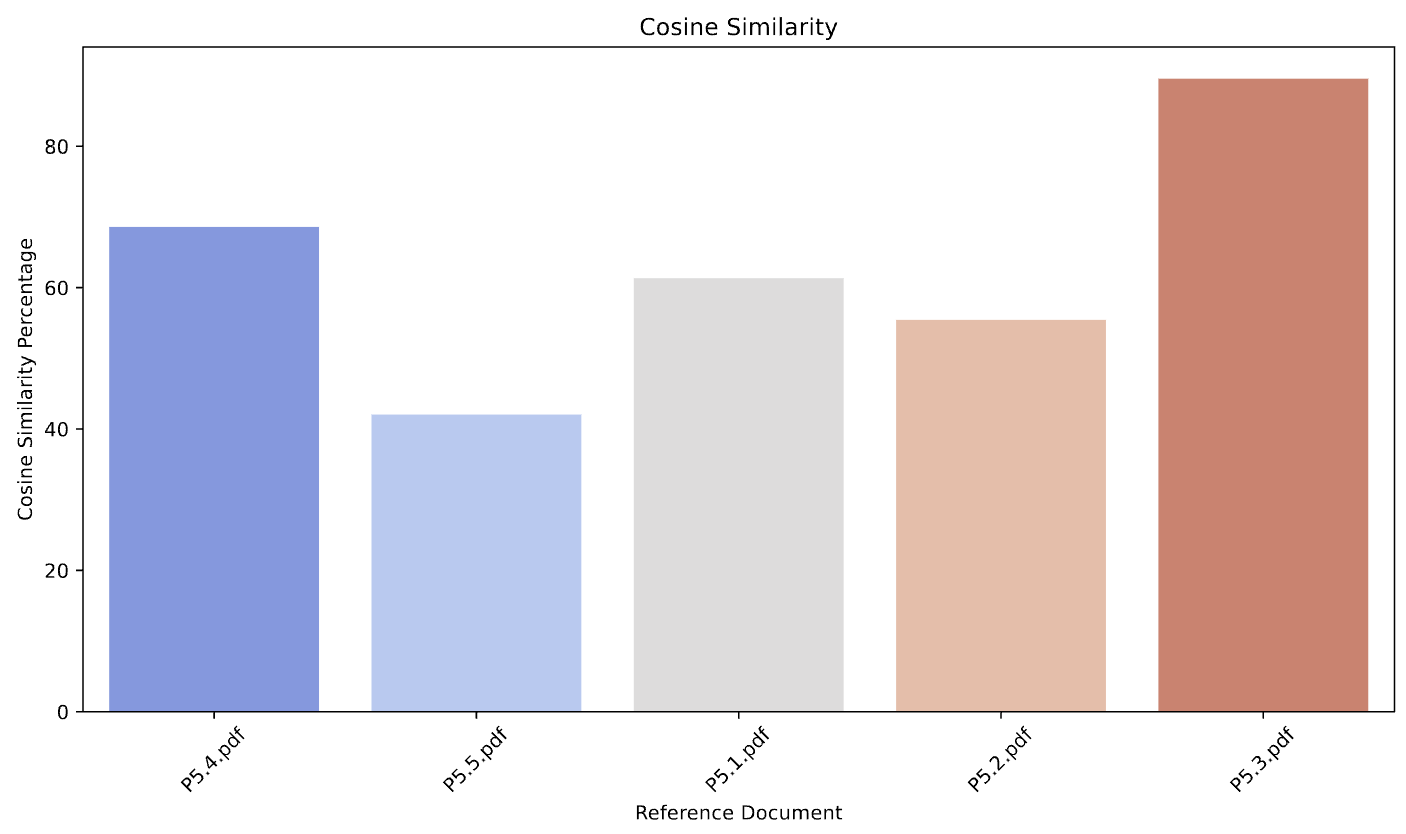
Figure 7: Cosine similarity graph to compare paper similarity
During a lab session, we had the great opportunity to show off our project to IXN partners and get some feedback on the current state and what we could potentially work on if we had more time allocated for the project. The session also served as the conclusion of our project as we passed our GitHub over to the client, who was pleased with our work.

Figure 8: Picture of our client, Joseph Connor, interacting with our product
Welcome back to our last development blog for the project.
During this time, we have been working hard to create a website report for the whole project. This includes the requirements, research, algorithm, UI design, system design, implementation, testing and evaluation. This gives a strong perspective on our design and development process throughout the project. Many thanks to our partner, Joseph Connor, from CarefulAI for assisting us throughout.
Monthly Videos
Legal Issues and Processes
Application End-User License Agreement (EULA)
Last Updated: March 24, 2025
This End-User License Agreement ("Agreement") is a legal document between You and Group29 ("Company", "We", "Us", "Our") concerning your use of this Application.
Definitions
Application refers to the software provided by Group29 downloaded by You to a Device.
Group29 refers to the development group responsible for the creation and provision of this Application.
Device means any device capable of accessing the Application, including computers, mobile phones, or tablets.
Content means all text, images, data, and other materials available via the Application.
Third-Party Services refers to any third-party software, services, or content integrated with or accessible through the Application.
You refers to the individual or entity accessing or using the Application.
UCL refers to University College London.
CarefulAI Limited refers to the collaborating client organization associated with this project.
Acknowledgment
By installing, accessing, or using the Application, You agree to be bound by this Agreement. If You do not agree to these terms, You must not install or use the Application.
The Application is licensed, not sold, to You by Group29 strictly under this Agreement.
License
Scope of License
Group29 grants You a revocable, non-exclusive, non-transferable, limited license to download, install, and use the Application solely for personal, non-commercial purposes strictly in accordance with this Agreement.
License Restrictions
- Modify, copy, or create derivative works based on the Application.
- Reverse-engineer, decompile, or disassemble the Application.
- Remove, alter, or obscure any proprietary notices, including copyright or trademark notices.
- Sublicense, lease, sell, rent, loan, or otherwise distribute the Application.
Intellectual Property
All intellectual property rights related to the Application developed under this project are owned by UCL, as agreed upon between UCL, Group29, and CarefulAI Limited. Group29 licenses the Application under terms consistent with the MIT License, subject to UCL’s ownership of the underlying intellectual property ("Studentship IP").
Third-Party Services
The Application may include or provide links to third-party services. Group29 assumes no responsibility or liability for Third-party Services and makes no representations regarding their accuracy, legality, or quality.
Termination
This Agreement remains effective until terminated by either You or Group29. Group29 may terminate this Agreement without notice if You breach any of its terms. Upon termination, You must cease use and delete all copies of the Application.
Indemnification
You agree to indemnify Group29, UCL, CarefulAI Limited, and their affiliates, employees, agents, and partners from any claims or damages arising from Your use of the Application or breach of this Agreement.
No Warranties
The Application is provided "AS IS" without warranties of any kind. Group29 disclaims all implied warranties, including merchantability, fitness for a particular purpose, and non-infringement.
Limitation of Liability
To the fullest extent permitted by law, Group29, UCL, and CarefulAI Limited shall not be liable for any indirect, incidental, consequential damages, including lost profits, data loss, or business interruption arising from or related to your use of the Application.
Governing Law
This Agreement is governed by the laws of the United Kingdom, excluding its conflict of law provisions.
Severability and Waiver
If any provision of this Agreement is deemed invalid or unenforceable, that provision shall be modified to reflect its intended effect to the greatest extent possible, and all other provisions remain effective.
Failure to enforce any right or provision under this Agreement shall not constitute a waiver of future enforcement.
Changes to this Agreement
Group29 reserves the right to modify this Agreement at any time. Notice of significant changes will be provided within the Application. Continued use of the Application after changes constitutes acceptance of the revised Agreement.
Contact
By installing, accessing, or using the Application, You acknowledge that You have read, understood, and agreed to be bound by the terms of this Agreement.
Data Privacy and Protection
This project is designed to comply with the General Data Protection Regulation (GDPR) and other relevant data protection laws. The following measures have been implemented to ensure the privacy and security of user data:
Data Collection and Processing
Our app only collects the necessary data for its functionality, such as usernames, passwords (hashed), and uploaded files. All data processing activities are conducted lawfully, fairly, and transparently.
User Rights
Users have the right to access and delete their data.
Data Security
Data is encrypted during transmission. Passwords are securely hashed using industry-standard algorithms.
Third-Party Services
Any third-party services or libraries used in the project, including OpenAI and Pinecone, comply with GDPR and other relevant data protection regulations. Data shared with third parties is anonymized.
Costing
Our app is totally free to use. However, users will need to have their own API keys for OpenAI and Pinecone, leading to the problem of pricing with OpenAI GPT-4o-mini, for which the model costs $0.04 per run.