
USER INTERFACE DESIGN
This section provides an overview of the design of the website used to generate the systematic review. You will find the design principles we aim to follow throughout developement, sketches and a wireframe of the prototype of the pages.
Design Principles
Simplicity
The design of the interface should be made as simple as possible while still keeping the main functionality. The user should not be overwhelmed by text and other buttons to allow them to easily navigate through the site. This can be done by splitting the site up into its components, such as a designated side tab for user history.
Consistency
Each component of the website needs to be made consistent to allow the user to intuitively navigate through the page. Through the use of conventional icons and typical button placement, we can keep the design of the website similar to the user’s past experience on the web.
Visibility
It is vital that users can easily view the important elements of the site, those being the user profile, user history and the generate section. By putting clear, bold labels and appropriate icons for buttons, users will be able to understand the outcome before clicking.
Feedback
The website should include appropriate responses to the user for their actions so it is clear what is happening to the end user. The most vital aspect of this would be to include a loading screen when generating a systematic review so the user is reassured an action is taking place. Positive and negative feedback is also important in file upload or the log-in system as well.
Efficiency
The user should be able to generate a systematic review quickly in a short number of clicks/interactions on the site. This process should only include the need for the user to input a prompt, their papers and a click to generate. Other aspects of the site should not involve a long chain of user interactions.
Affordance
Each element of the design should have its function be obvious at first glance to the user. Aspects of affordance would include buttons that look clickable and long text that looks scrollable. By including these, the user can seamlessly navigate through the site without issue.
Sketches
We have produced the following hand-drawn sketches to demonstrate what the different pages of the website should look like. This includes the home page for when a user has not signed in, the home page when the user has logged in, and the page that displays the systematic review alongside some graphs. As shown below, there is a bar on the side to display the user’s history. The home page contains an area for inputting a prompt and uploading files.
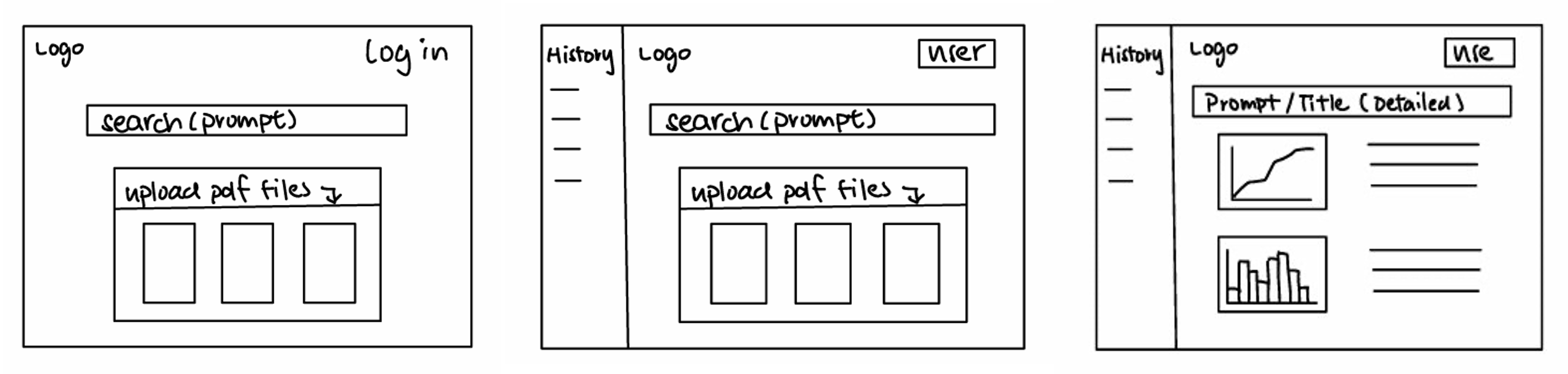
Figure 1: Sketches of the website design
Wireframe
Utilising the sketches and design principles, we have created the following interactive wireframe using Figma to showcase what our website will look like including interactions between pages.
There is a sidebar that shows the user’s previously generated systematic reviews. By clicking on one of them, the user is redirected to the systematic review and original prompt. Our wireframe also includes how a user will log in to be able to generate and save their review.