
Testing Strategy
To validate the correctness, robustness, and efficiency of our RAG pipeline system, we employed a combination of unit testing, integration testing, and efficiency benchmarking. Given the multi-stage nature of our backend system—including PDF processing, embedding generation, query-based summarisation, and history storage—each layer was tested independently and jointly to ensure end-to-end consistency. The system interacts with real files, vector databases (Pinecone), and a MySQL backend. As such, it was essential to both isolate logic during development, and test the entire pipeline during production-level simulation. We also implemented automated reporting using pytest-html and benchmark tests to measure how system performance scaled with increasing workloads (i.e., number of papers uploaded).
Testing Scope
Our RAG-based system handles PDF ingestion, semantic vector embedding, question-answering, systematic review generation, and user history storage. As such, the scope of our testing spans a variety of functional, boundary, and integration scenarios to ensure robustness, correctness, and a reliable user experience.
- PDF Upload and Preprocessing: Users can upload research papers in PDF format, which are then parsed, chunked, and processed.ensured the upload and parsing pipeline works correctly across edge cases without crashing or producing malformed data.
- Embedding and Vector Database Integration: The system relies on transforming parsed content into semantic embeddings and storing them in a vector database (Pinecone).We confirmed that each document chunk is processed and stored in Pinecone or gracefully handled in fallback mode if needed.
- Query Processing and Systematic Review Generation: We simulated realistic and malformed user queries to evaluate the end-to-end RAG pipeline, ensured that the system invokes the generation model correctly and returns structured outputs, covering sections such as Background, Methods, Results, and Conclusion.
- User History Storage and Database Integrity: Each completed review is saved to a MySQL backend for traceability, verified the system's ability to handle database writes reliably and reject invalid input gracefully.
Unit Testing
We utilized unit testing extensively to verify the correctness and robustness of individual components and functions within our backend system. Each function and route handler within our Flask application—such as database utilities, embedding modules, PDF processing functions, and route-level logic—were independently tested. These unit tests run in isolation, allowing us to quickly identify and resolve any issues early in the development process.
Testing Frameworks: We leveraged pytest as our primary unit testing framework, benefiting from its simple syntax, flexible assertion system, and rich ecosystem. To facilitate testing of external dependencies such as the database or Pinecone, we employed pytest-mock to mock these external services, simulating various behaviors and ensuring our code handled these conditions gracefully.
For example, in our route tests, we verified that each endpoint could correctly handle invalid inputs or missing fields without causing unintended crashes:
# backend/test/integration/test_save_history.py
    def test_save_history_wrong_types(client):
        payload = {
            "user_id": ["invalid_id"],  # should be integers
            "prompt_id": "invalid_prompt_id",  # should be integer
            "prompt": "Sample prompt",
            "systematic_review": "Sample review"
        }
        response = client.post("/api/save", json=payload)
        assert response.status_code == 400
Integration Testing
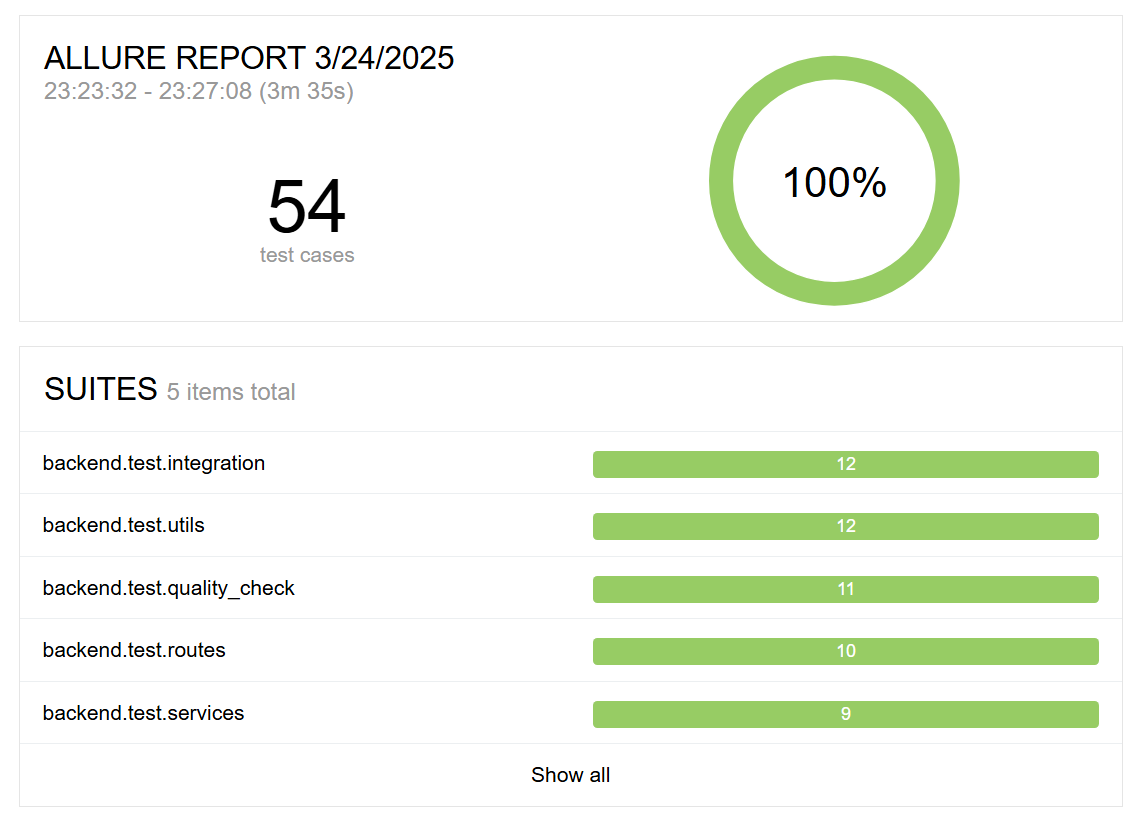
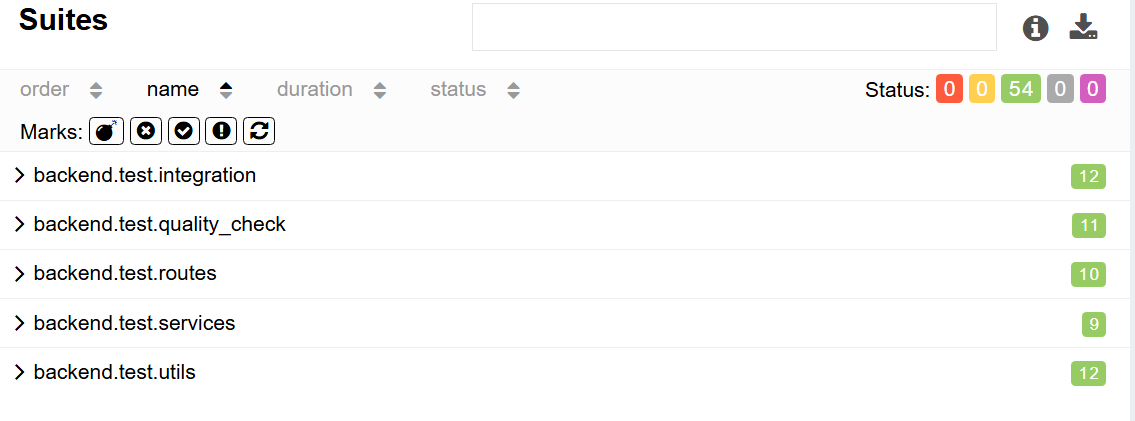
Integration tests were developed to verify the correct interaction between multiple components across the RAG pipeline—PDF upload, vector embedding, systematic review generation, and history storage in the database. These tests simulate realistic end-to-end scenarios, ensuring the entire system operates cohesively as intended.
Testing Frameworks: We primarily used pytest combined with Flask’s built-in test client to simulate HTTP requests to our API endpoints. Integration tests often involved multiple API requests sequentially, mimicking actual user interactions with our system. By creating dedicated test scenarios that included PDF file uploads, prompt queries, and historical data storage, we ensured comprehensive coverage of realistic workflows.
# backend/test/integration/test_full_pipeline.py
    def test_full_rag_pipeline(client):
        prepare_test_files()

        response_upsert = client.post("/api/upsert", json={"id": "test_user"})
        assert response_upsert.status_code == 200

        response_generate = client.post("/api/generate", json={"id": "test_user", "prompt": "Effects of MSCs in COVID-19?"})
        assert response_generate.status_code == 200

        review = response_generate.get_json().get("systematic_review", "")
        assert "background" in review.lower()

        response_save = client.post("/api/save", json={
            "user_id": [1],
            "prompt_id": 999,
            "prompt": "Effects of MSCs in COVID-19?",
            "systematic_review": review
        })
        assert response_save.status_code == 200
Test Coverage
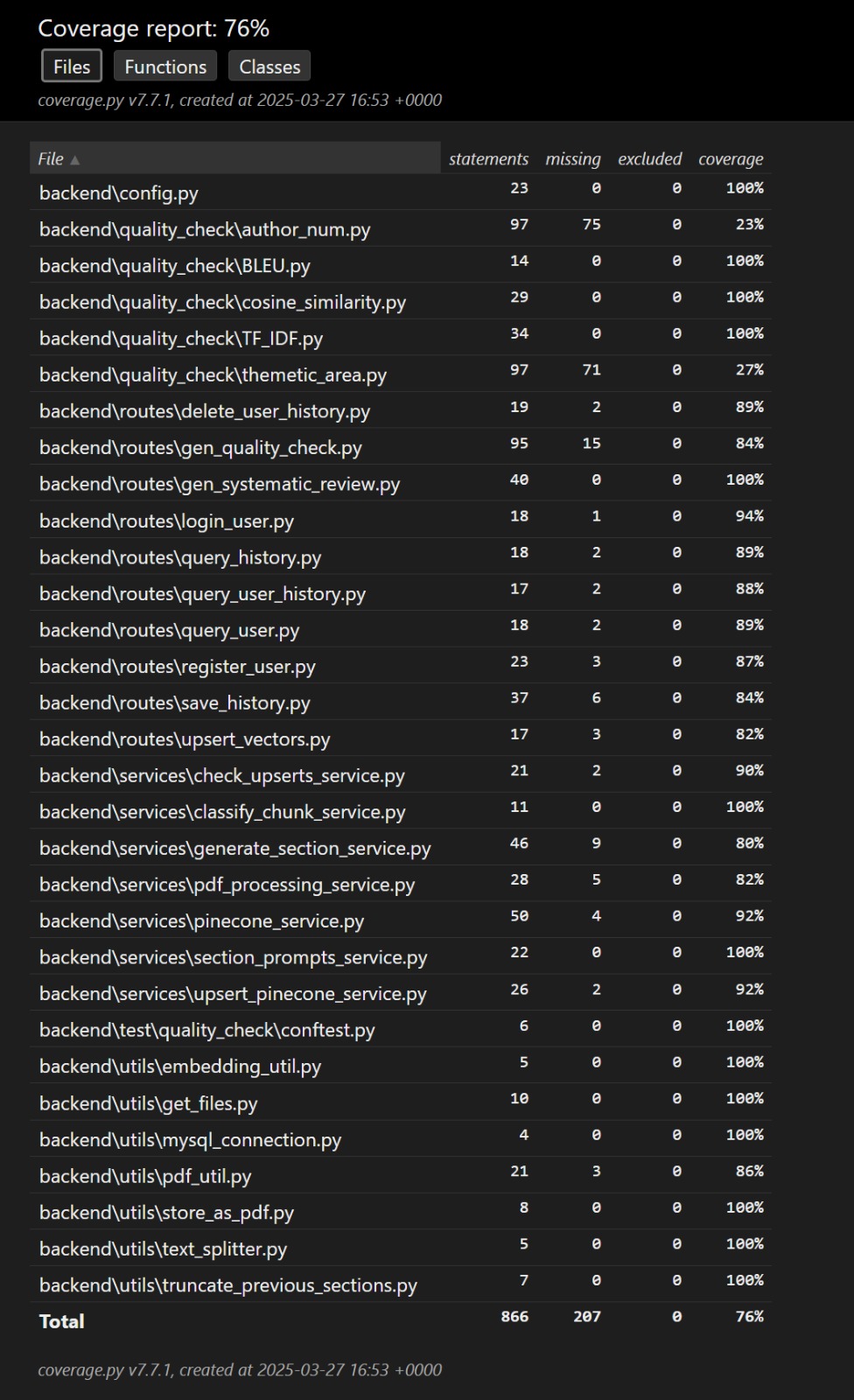
We used pytest for unit testing and used pytest-cov plugin to generate a test coverage report as below. The coverage report indicated that 76% of our codebase is covered by tests. This test coverage report also included testing with the APIs, which are covered in our intergration tests.
User Acceptance Testing
To gain a general understanding of how our application performs and to identify potential areas for improvement, we invited four individuals from diverse backgrounds to test our application. Their feedback was recorded and analyzed to inform future enhancements.
TESTERS
The testers include:
- Alice - 18 years old student
- Brian - 25 years old bank employee
- Cathy - 39 years old doctor
- David - 45 years old Researcher
Note: These are all real-world testers, however, their identities have been made anonymous.
TEST CASE
We divided the test into 4 cases, the testers would go through each case and give feedbacks. The feedbacks were based on the acceptance requirements given to the testers, where they would rate each requirement at Likert Scale as well as leave custom comments.
Test Case 1: We asked the testers to login and provided testers with 3 to 5 medical research papers in PDF format and asked them to upload the documents using the system interface.
Test Case 2: Testers were instructed to input a valid prompt or any questions related to the papers and generate a systematic review.
Test Case 3: Once the review was generated, testers were asked to save it and review both the written summary and the accompanying visualizations.
Test Case 4: We also provided testers with intentionally flawed input, such as blank PDFs or vague prompts to simulate some extreme use cases.
Feedback from Users
| Acceptance Requirement | Strongly Disagree | Disagree | Agree | Strongly Agree | Comments |
|---|---|---|---|---|---|
| Is the UI navigation easy? | 0 | 0 | 0 | 4 | + The navigation bar makes it easy. |
| Interface is clean and workflow is clear | 0 | 0 | 0 | 4 | + The layout is intuitive. |
| Clear response to every user action | 0 | 0 | 1 | 3 | + Suggest adding animations or visual cues |
| Attachments can be uploaded successfully | 0 | 0 | 0 | 4 | + Single and multiple PDFs both worked |
| Systematic review output is well-structured | 0 | 0 | 0 | 4 | + Surprisingly coherent across prompt styles |
| Cross-browser compatibility | 0 | 0 | 0 | 4 | + Chrome and Edge tested successfully |
| System response speed | 0 | 0 | 2 | 2 | - Chart rendering takes slightly longer |
| Save history and view past reviews | 0 | 0 | 0 | 4 | + Convenient to access previous Q&A |
Overall Feedback & Advice
“It would be nice if it can be not only used in medical papers, but also in legal documents or more fields.”
“It is nice and impressive. The review and charts can save huge amounts of time compared with reading through all papers.”
“Compared with using GPT, this system can generate conclusions more well-structured and the text is richer in content. It is helpful for me to understand the papers quickly and in-depth.”
Conclusion
Testers have expressed satisfaction with the tool and overall interface. However, there is room for improvement in generation speed and scope of use.