Testing
Testing Strategy
We utilize unit testing, integration testing and user acceptance testing during our development to make sure codes work as intended.
We choose these forms of testing so that small, repeated tests are automated codes that can be re-run,
and systematic functional tests are done manually to simulate a use scenario and allow small adjustments between tests.
User acceptance tests are also important for us to obtain feedback on the system.
Unit tests allow easier debugging, narrowing down sections of code that may cause bugs.
They are done automatically with written test codes, testing all functions of the backend to make sure individual components are working correctly.
This plays an important role given the large scale and interleaving structure of our project.
Integration testing is performed manually using different test cases. We run both the backend and frontend, and test the project as a whole.
With the help of built-in developer tools of our browers, we can check that our frontend is working and debug any errors.
The backend console and debugging tool built-into our IDEs is used to debug any backend errors, and the use of test cases makes sure possible use scenarios are covered.
User acceptance tests are done in lab sessions with clients. Their feedback is valuable and influential to our further development.
Unit Testing
Unit tests are performed using pytest. Since our project is a flask app, we need 'conftest.py' to configure a 'test app' fixture for pytest.
Individual tests of functions are then written normally, using mock functions and database fixture to simulate an isolated environment for the tested function as close as possible.
Each function is also tested multiple times for different branches if applicable.
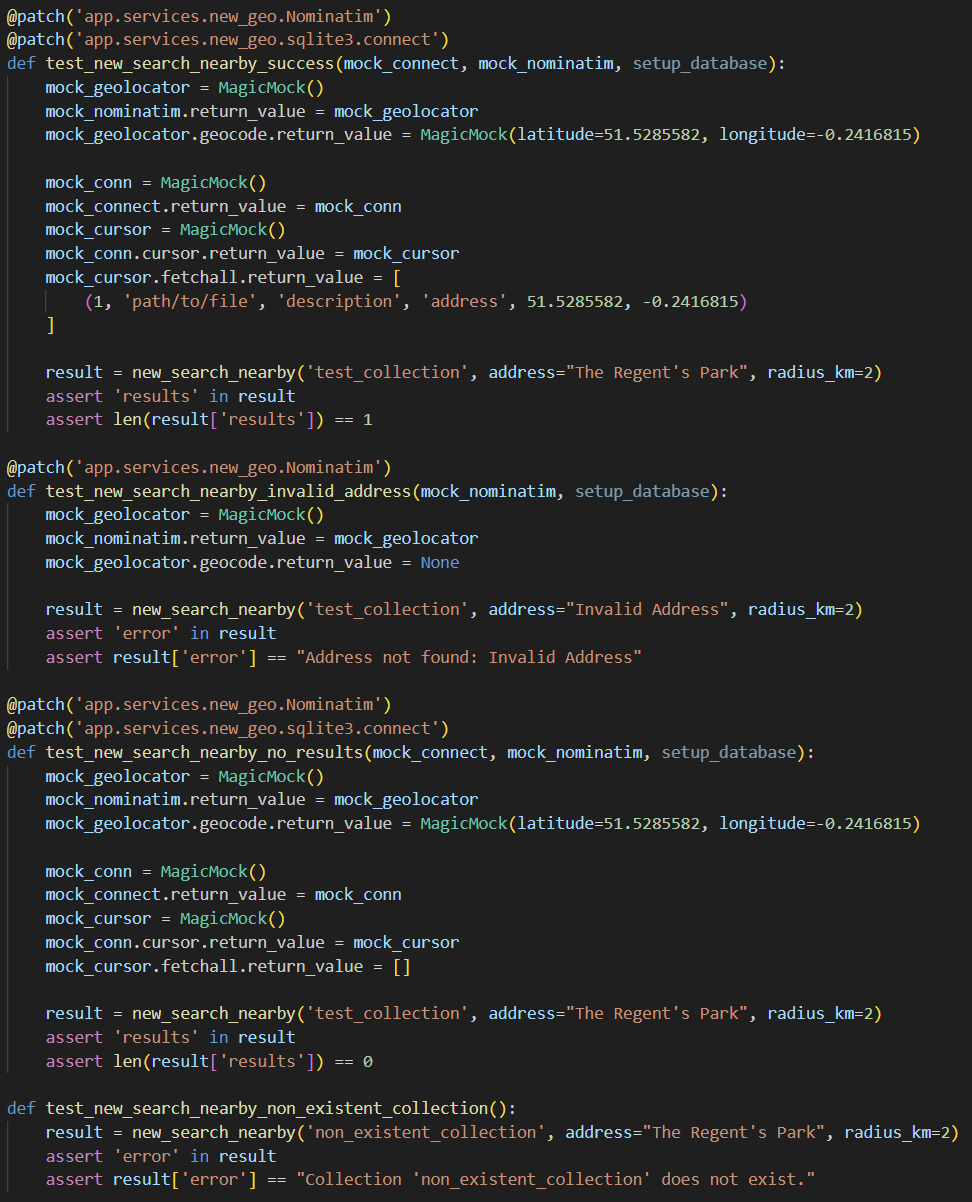
A unit test example showing multiple test cases for a function.
The file structure of the test folder aligns with the 'backend/app' folder. Functions in each file of the backend have their tests in the corresponding test file in the test folder.
After writing each section of tests, we use command line in the 'test' directory to run 'pytest', for which pytest automatically collects and runs all test functions in the folder.
This is to make sure that previously written code still works, and is a handy benefit of automatic testing.
Ultimately, we run 'pytest --cov=app --cov-report=html' to get a test coverage report of the project.
This helps us in analysing the results of our tests, and to check for any untested branches of code.
As a conclusion of our project before implementing the 'video chat' function, our tests achieve above 90% test coverage, both overall and per file.
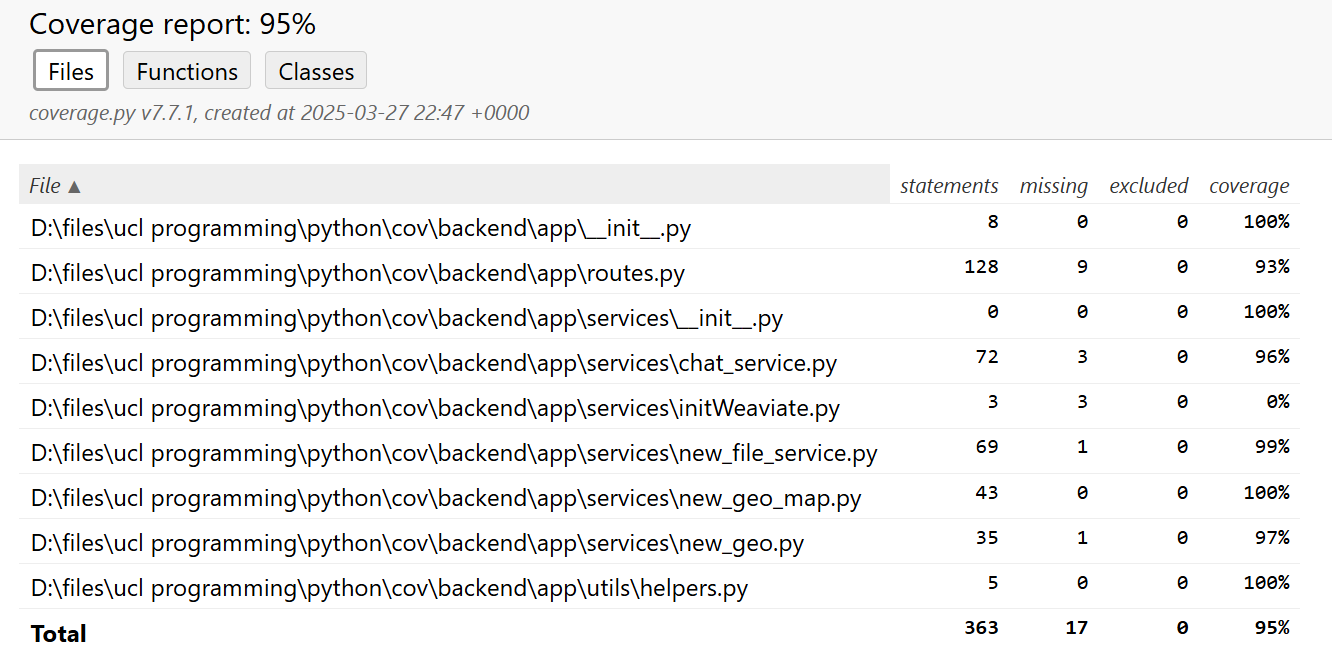
Test coverage report of the project.
From this result, we can say that individual parts of the project are working as intended.
Integration Testing
Integration tests are performed manually using web browsers.
They are done just after a functionality has been implemented, to ensure the new functionality works as intended and does not break the existing code.
We test the system with different test cases that try to cover all possible use scenarios.
An example of test cases to test the 'chat' function is as follows:
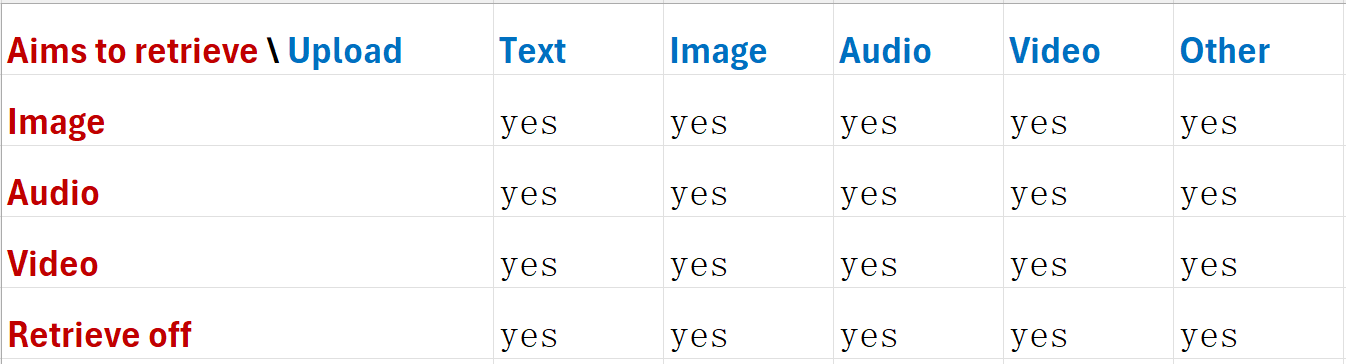
Similarly for 'map', 'upload' and 'dashboard' functions, we have different test cases to test their functionality.
All results are positive, so we are confident that our system is working as intended under most use scenarios.
User Acceptance Testing
User acceptance tests are conducted to collect feedback from potential users of the system.
This is to help in improving the functionalities and interface of the system to make it more user-friendly.
We have conducted user acceptance tests with 5 participants, who are potential users of the system.
They are asked to try all parts of the system, and provide feedback on their experience.
Some of the feedbacks we received are:
- "This is a nice piece of work. I can see its many uses. But maybe you can consider adding an API for the application, so that its data source is not limited to human input, and can be imported from other programs or databases."
- "The overall interface is nice and clean. But I find this 'retrieve off' button quite confusing. Like, does it turn off retrieval after I click it? Or is it already off when the button name is 'retrieve off'?"
- "These are some great work from you guys. And after seeing this and the other two groups' projects, I am seeing how we can integrate them together to a very powerful and useful system."
- "It would be nice if you can let the user know what file is uploaded. And maybe you can show the uploaded files in the chat history, so that it makes more sense when you scroll up to see the chat history."
From these feedbacks, we adjust our program to include many new features and improve the interaction experience. They are very valuable and necessary for making the system usable and useful. Many decisions of our final product are made based on these feedbacks. Thus giving us confidence in users accepting the application.