Appendices
User Manual
Team Report - Page 1
We have split our Power BI dashboard into two pages to reduce clutter and ensure a more organized display of charts and graphs.
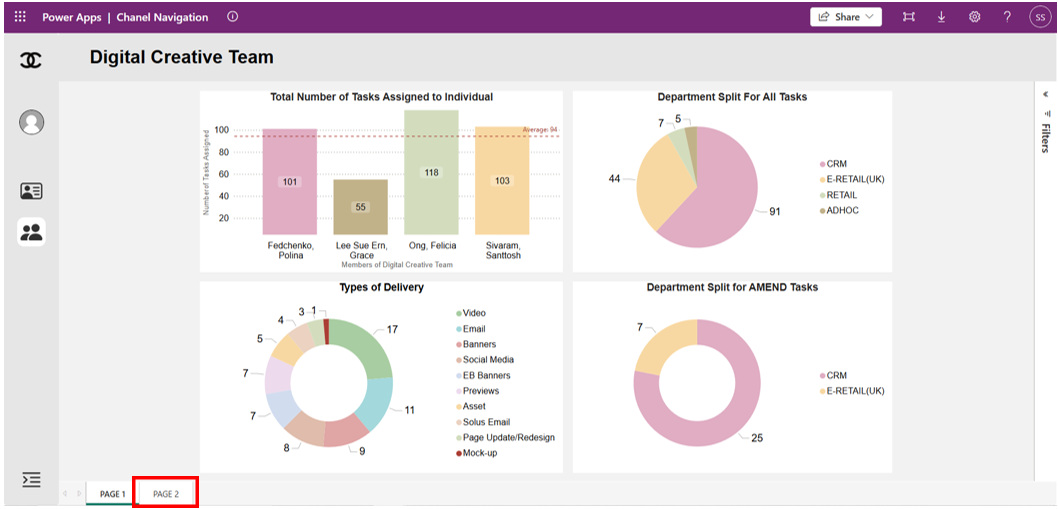
To view the second page of the dashboard, click on the Page 2 button as highlighted in the red box.
Team Report - Page 2
This is the second page of our dashboard, which showcases the remaining charts and graphs for a comprehensive overview.
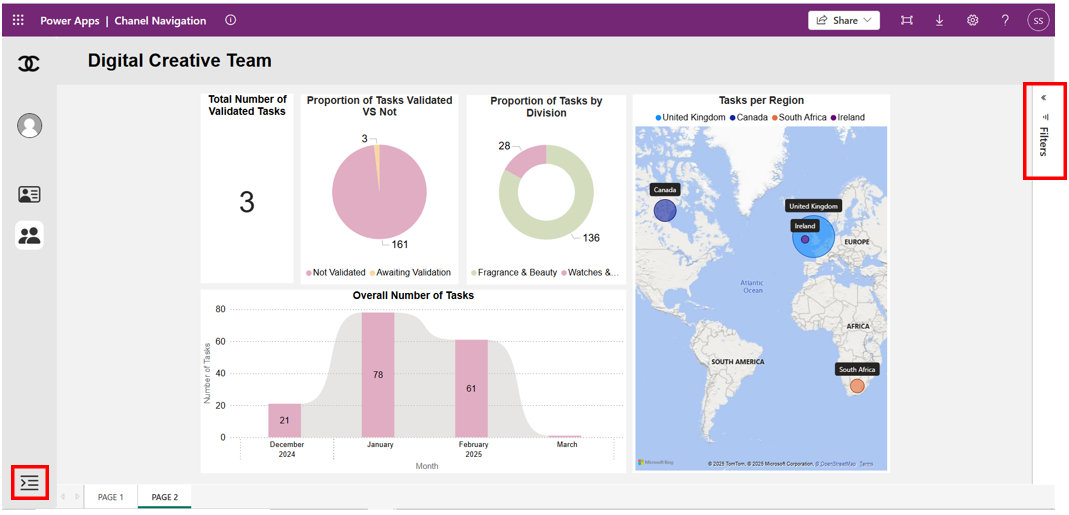
To view the menu, click on the icon highlighted in the red box at the bottom left corner of the dashboard.
To apply filters to the dashboard, click on the filters pane as highlighted in the red box at the top right corner of the dashboard.
Menu & Filters
This is a detailed view of how the menu and filters appear when users interact with them by clicking on the respective icons.
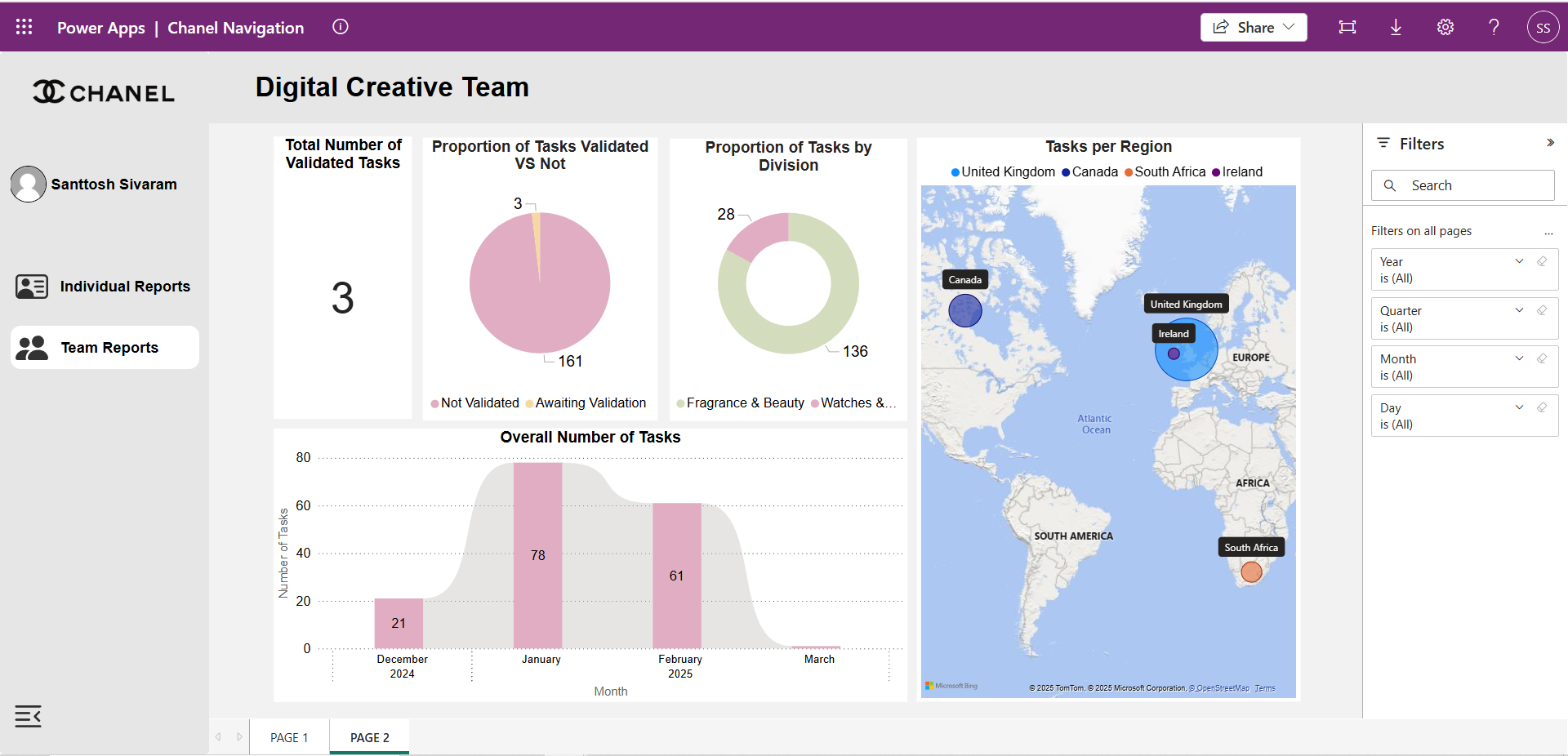
Users can filter the dashboard and view specific data based on various timeframes, including Year, Quarter, Month, and Day.
To view the individual report, click on the Individual Report icon in the menu on the left hand side of the dashboard.
Individual Report
This page displays metrics tailored to an individual team member and it can only be accessed by this specific team member.
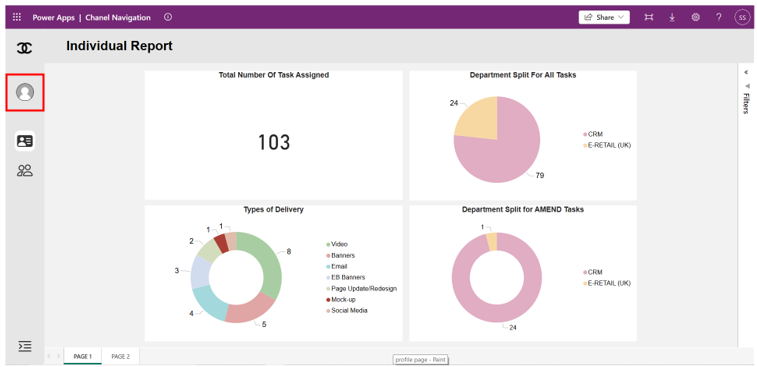
There is also a second page, which is similar to the team report but it shows the metrics for this specific team member.
To view the profile page, click on the profile icon as highlight in the red box on the left hand side of the dashboard.
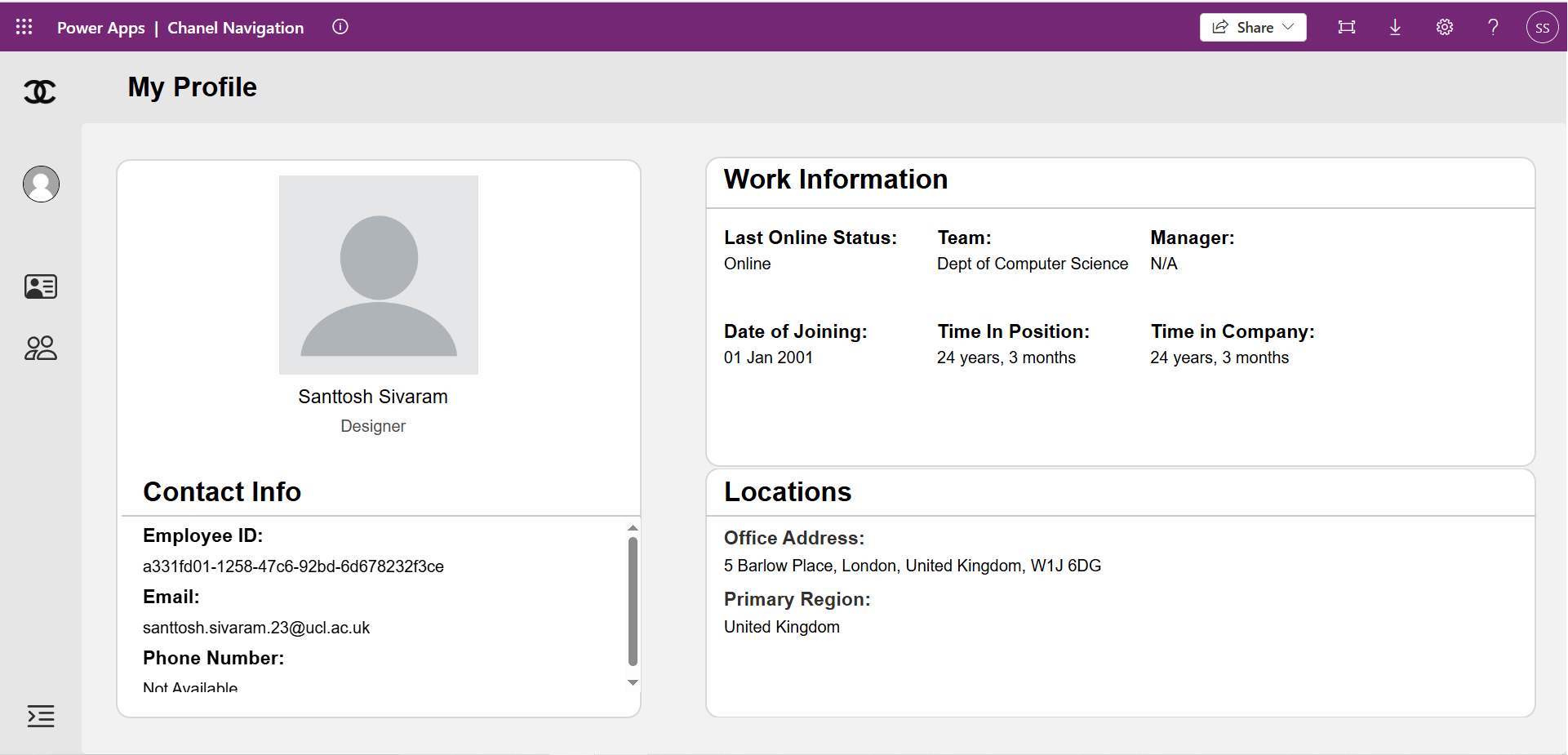
Profile Page
This page shows basic information about the specific team member, which is automatically retrieved from the Microsoft account they used to log into the dashboard.
Deployment Manual
We have created comprehensive documentation that provides a detailed, step-by-step guide on how to rebuild our system from the ground up. To ensure clarity and ease of implementation, we have structured the documentation into four main sections:
Documentation Testing: To verify the accuracy and reliability of our documentation, we asked a few of our coursemates to follow our guide and rebuild the system independently. They were able to replicate the exact same setup that we originally built, confirming that our documentation is clear and effective in guiding users through the process.
Legal Issues & Processes
GDPR & Data Privacy Statement
Data Collection
Our product utilizes Microsoft’s Power Automate, Power BI, and Power Apps, which may process user data in real-time for task management and reporting purposes. However, it is important to note that the data collected is minimal and strictly necessary for the operation of the system. Specifically, we only collect user-related information such as usernames, email addresses, and task details necessary for managing weekly tasks, deadlines, and project progress.
All user data is processed within Microsoft’s cloud infrastructure, where it is encrypted both in transit and at rest. No personal data is shared with third parties unless explicitly authorized by the user. Moreover, no sensitive data is collected or retained beyond what is necessary for the purpose of task tracking and project management.
Legal Basis for Processing
The legal basis for processing user data is primarily based on user consent. Users must explicitly consent to provide their data when registering or logging into the system. This consent is sought at the point of interaction with the platform, such as task assignment or report generation. Users also have the right to revoke consent at any time, which would halt further processing of their data.
Data Security
We take the privacy and security of our users seriously. All personal data is stored in compliance with industry-standard security protocols:
- User data is stored within Microsoft’s cloud platform, which adheres to strict security measures, including encryption, authentication, and access control.
- Data is only retained for as long as necessary for task management purposes. Any unnecessary or outdated data is securely deleted according to our data retention policy.
User Rights
Under the General Data Protection Regulation (GDPR), users have several rights concerning their personal data:
- Right to Access: Users have the right to request access to their personal data and obtain a copy of it.
- Right to Rectification: Users can request correction of any inaccurate or incomplete personal data.
- Right to Erasure: Users can request deletion of their personal data when it is no longer necessary for the purposes for which it was collected.
- Right to Restrict Processing: Users can request restriction of processing their personal data under certain conditions.
Source Code License Declaration
Source Code Licensing
Our project’s source code is licensed under the Microsoft Software License Terms, which allows for modification, distribution, and use within the scope of the agreed terms. This means you can use, modify, and distribute the code for non-commercial purposes, provided that you comply with the terms outlined by Microsoft. The software is provided "as is," without any warranties or guarantees of any kind.
Attribution Requirements
We acknowledge and fulfill all attribution requirements set forth by Microsoft for the use of their tools and services in our product. In addition, any third-party assets or libraries included in our product will have proper attribution in accordance with their respective licenses.
Limitations and Liabilities
- Warranty Disclaimer: This software is provided "as-is," without any warranty of any kind, either express or implied. We do not guarantee the software’s functionality, nor do we warrant that it will meet specific expectations or requirements.
- Liabilities: To the fullest extent permitted by law, we are not liable for any damages arising from the use or inability to use the software, including but not limited to loss of data, business interruption, or loss of profits.
Terms & Conditions
User Responsibilities
By using our product, users agree to:
- Use the platform for its intended purpose of task and project management.
- Report any issues or bugs encountered during use to our support team.
- Comply with all applicable laws and regulations regarding data privacy and usage.
Acceptable Use Policy
The product may only be used in a manner that:
- Complies with all applicable data privacy regulations, including GDPR.
- Does not interfere with the platform’s operation or access for other users.
- Does not attempt to reverse engineer or modify any part of the source code.
Termination Conditions
We reserve the right to suspend or terminate a user’s access to the system if they violate these terms and conditions. Termination may occur without prior notice for reasons such as misuse of the platform or violations of applicable laws.
Copyright Notice
© 2024-2025 UCL Systems Engineering Group 16. All Rights Reserved.
This software contains assets from third-party sources, including Microsoft tools and services, each of which is subject to its own copyright and licensing terms.
Accessibility Statement
Compliance with Accessibility Standards
Our product is designed with accessibility in mind, ensuring that users with disabilities can fully utilize the platform. We have taken steps to comply with relevant accessibility standards, including:
- Web Content Accessibility Guidelines (WCAG) 2.1
- Microsoft Accessibility Guidelines
Known Limitations:
We acknowledge the following limitations:
- Performance on Low-end Devices: While the platform is optimized for most devices, performance may vary on older or low-powered devices.
- Device Compatibility: Some features may not be fully optimized across all devices, particularly those with smaller screen sizes.
Planned Improvements
We are committed to making continuous improvements to enhance accessibility, including:
- Further optimizing the platform for screen readers and other assistive technologies.
- Expanding customization options for users with cognitive or motor impairments.
Conclusion
Our commitment to adhering to legal requirements, protecting user data, and providing accessible digital experiences is integral to our product's development and success. The considerations outlined here demonstrate our ongoing dedication to user privacy, data security, and compliance with industry standards. As laws and accessibility standards evolve, we will continue to review and update these policies to ensure that our platform remains compliant and user-friendly.
For questions or further information, please contact UCL.
Development Blog
Discover the key milestones and challenges of our development journey.
Click the button below to explore our blog, where we share breakthroughs and lessons learned along the way.
Visit Blog