Requirements
Partner Introduction & Project Background
CHANEL is a globally renowned luxury fashion house known for its timeless elegance, innovation, and creativity. The UK Creative Design Team plays a vital role in shaping the brand’s regional identity, overseeing digital and physical creative output across visual merchandising, graphic design, copywriting, and digital experiences.
At a company as large and dynamic as Chanel, tracking and evaluating employee contributions—especially within the Creative Department—is essential. However, the current process relies on manually filtering through Excel data, which is time-consuming and lacks clarity. Without an automated tool to quantify work performance, it becomes difficult to measure collaboration or recognize individual efforts. This lack of visibility prevents project managers from identifying who is overworked and who is underutilized, leading to poor task distribution and delays in key projects.
The primary objective of this project is to centralize reporting within a single digital ecosystem using Microsoft Office 365 and Power Platform tools. This integration aims to streamline task management, standardize reporting, and enable project managers and employees to better understand and analyze their work, focusing on optimizing workflows and creative execution.
Project Goals
This project aims to enhance reporting efficiency within CHANEL UK’s Creative Design Team by developing an automated solution that replaces manual report creation. The objective is to reduce time spent on administrative tasks, allowing project managers to focus on creative execution, coordination, and resource planning.
The system consolidates data from multiple creative teams into a single reporting platform, delivering real-time insights into projects, team workload, and performance metrics. By standardizing reporting practices across the Creative Department, our system has the potential to expand beyond the UK, enhancing transparency and supporting data-driven decision-making. Built using Microsoft Power Apps, Power Automate, SharePoint, and Power BI, the platform ensures seamless data flows and interactive dashboards, tailored to CHANEL’s operational needs.
Gathering Requirements
To gather the necessary requirements for the project, we initially sent Chanel a set of carefully prepared questions ahead of our meeting.
Open-ended questions were used to gather detailed, qualitative insights, allowing us to explore the teams challenges and needs more deeply
Some of the questions asked included:
- System Features & Functionalities: What are the key features and functionalities that our system should include to avoid redundant work and provide value to the users?
- Functional Requirements: What aspects of the current data collection process need improvement? What features should our system include to enhance data collection, improve accuracy, and better meet business needs?
- Technical Requirements: What are the necessary software, hardware, storage, and security requirements for the system?
- Reporting: Could you describe how reports should be implemented in the system? What types of reports should the system be capable of generating, and how should they be formatted?
- Design & Usability: Do you have any specific preferences or guidelines for the user interface design? Are there any examples of designs or platforms you admire that we should consider in the design process?
During our follow-up interviews, we engaged in detailed discussions, capturing their responses, which allowed us to refine and finalize the requirements to ensure alignment with their needs.
Personas
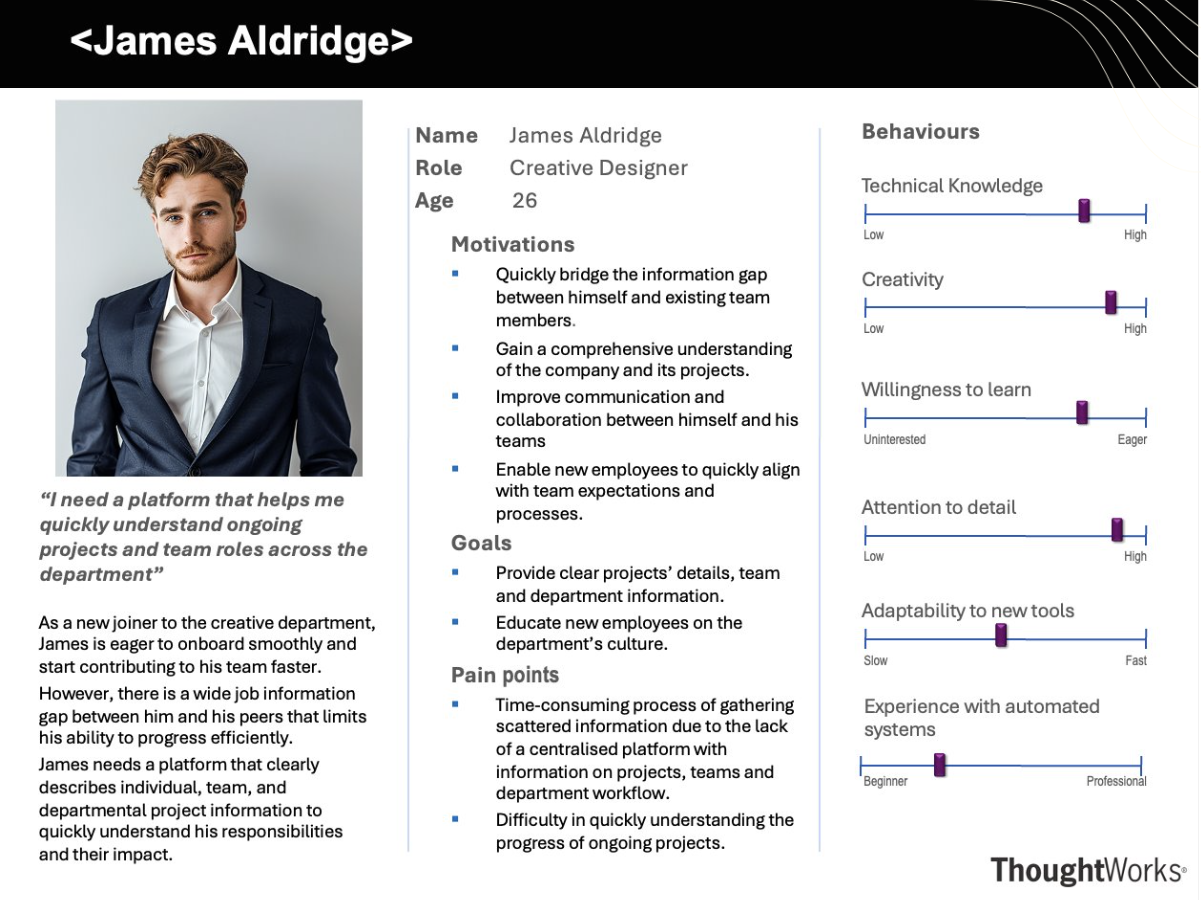
James Aldridge
Creative Designer
James is a creative designer starting his first week at Chanel’s Creative Department. He wants to learn as much about his department as possible to begin his tasks. He is able to navigate through the department’s interactive platform and learn about ongoing/completed projects, individual and team-wide responsibilities within the projects, and the department’s culture. While on the platform, he expands on one of the projects he's involved in and notes the project's brief description, timeline, team members involved and how his responsibilities connect to the project's objectives. He then goes to his profile page, where he sees the projects assigned to him, his individual responsibilities, along with their deadlines. Though initially unfamiliar, the platform’s intuitive design enables him to navigate it easily and James can now take on tasks more confidently.
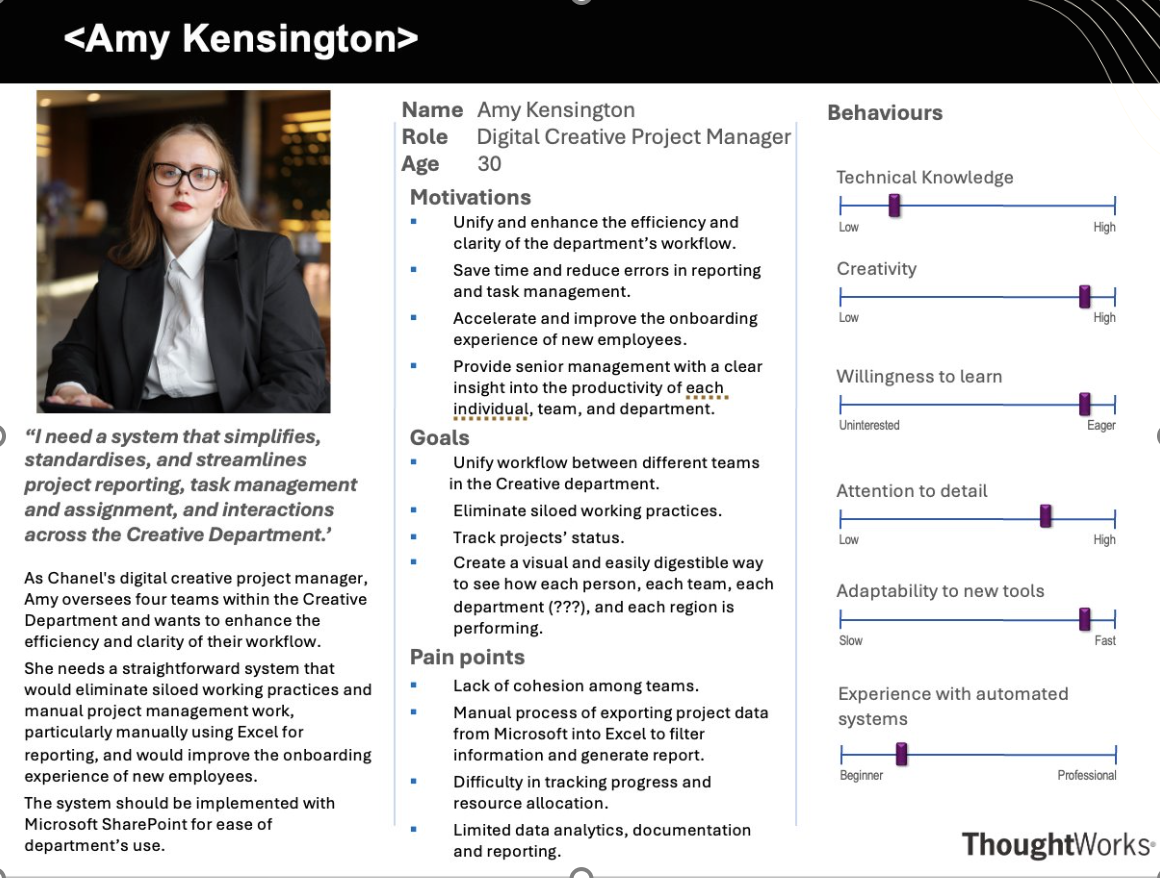
Amy Kensington
Digital Creative Project Manager
Amy, a Digital Creative Project Manager at Chanel, oversees several teams within the Creative Department. When she logs into her profile on the platform, she can check and manipulate essential project details, such as task deadlines. The project data is neatly organised, allowing her to quickly access the status of all ongoing projects and, when necessary, redistribute tasks among the team members. Overall, she feels assured knowing that the platform has set clear permissions to control who can view or edit information. Additionally, the platform automatically generates detailed project reports based on data inputted by Amy, making it quick and easy for her to provide updates to senior management on the status of ongoing projects.
MoSCoW Requirement List
Functional Requirements
| ID | Description | Priority |
|---|---|---|
| 1 | Dashboard that provides insights into overall team metrics within the Creative Department | Must |
| 2 | Dashboard that provide insights into the performance of each team member | Must |
| 3 | Security Authentication to ensure that team members can only access reports relevant to themselves or their respective team(s) | Must |
| 4 | An interface that allows users to navigate through each report efficiently | Must |
| 5 | A customised workflow to process the data exported from Microsoft Planner for ease of data visualisation | Must |
| 6 | Automatically export data from Microsoft Planner using Microsoft Power Automate and store in SharePoint Lists | Must |
| 7 | Functionality that automatically converts the data from Planner to charts and graphs using Power BI | Must |
| 8 | Functionality that allows the data and dashboard to be refreshed daily | Must |
| 9 | A filter function to sift through the reports available for each team | Should |
| 10 | Use minimal wording for each report | Should |
| 11 | Use a consistent colour scheme for the charts and graphs | Should |
| 12 | A profile page to show the details of each team member | Could |
| 13 | An expandable navigation menu at the side of the dashboard | Could |
| 14 | A function to move specific reports around without affecting the dashboards of other individuals | Could |
| 15 | A brief description of each team within the Creative Department so business-wide employees can learn more about the department | Won't |
| 16 | A function to allow team members to comment on each report | Won't |
Non-Functional Requirements
| ID | Description | Priority |
|---|---|---|
| 1 | Dashboard complies to Chanel’s branding guidelines, including typography and colours | Must |
| 2 | Visualisations reflect data accurately, with a tolerance of less than 1% error in calculations | Must |
| 3 | Dashboard functions seamlessly on the latest versions of Chrome, Edge and Safari | Must |
| 4 | Dashboard is responsive and functions on different screen sizes | Should |
| 5 | Dropdown menu for users to customize the type of visualization for a specific report | Could |