Project Background

The world of digital creation is increasingly accessible, yet many children, eager to express their creativity through game development, face significant hurdles. The complexity of modern game engines and the overwhelming array of programming concepts can be daunting, leading to frustration and a sense of inadequacy. This lack of accessible guidance and intuitive tools often stifles the potential for young minds to explore and develop their technical and artistic skills.

Recognizing this gap, our team has developed PixelPilot, an AI-powered copilot designed to empower children to create their own games with ease. PixelPilot aims to demystify the game development process by providing a user-friendly, conversational interface that guides children through every stage of creation. By leveraging advanced AI capabilities, PixelPilot can generate all the necessary code, assets, and resources, effectively eliminating the technical barriers that often hinder young creators.

PixelPilot is envisioned as a personalized creative companion that allows children to focus on their imagination rather than complex technical details. It should enable them to:

Conceptualize and design games through simple, natural language interactions

Generate all required code snippets and scripts automatically, eliminating the need for extensive programming knowledge

Create custom game assets, including sprites, and backgrounds, through AI-driven generation

Receive real-time suggestions, fostering a learning environment that encourages experimentation and creativity

Ultimately, PixelPilot seeks to make game development accessible to children of all backgrounds, fostering a new generation of digital creators and empowering them to bring their imaginative worlds to life.

Client Requirements

After understanding the Project Background, we scheduled an online meeting with our client, Mr. Christoffer Noring from Microsoft. This meeting helped us understand the main requirements of the project and what exactly do our clients need from us. These are the basic requirements that our clients wanted:

Visual Studio Code Extension built on top of Github Copilot

Game Logic Assistance

Content Moderation for classroom safety

Project Goals

Our aim is to develop a Visual Studio Code extension that can be downloaded directly from the Visual Studio Marketplace and run on a wide range of operating systems. This extension should bundle children friendly features and be easily extensible to support new models in the future. We hope this extension makes a young game developer's journey exciting and accessible while also improving their skills which is important in the longer run.

User Interviews

We knew that in order to create something truly beneficial, we needed to know what our users truly needed. We began by considering who they might be and what they might want rather than merely speculating. In order to truly listen to and learn from them, this assisted us in coming up with some insightful interview and survey questions. Due to the legal and ethical constraints of the project, we could not interview children. Hence, we decided to conduct semi-structured interviews on individuals (Parents and Headteachers) that would buy the product for our target users. By using semi-structured interviews, we were able to explore particular subjects in depth and, more importantly, to ask for more specific information whenever a user's response indicated that more research was required. These are the general results of the interviews we conducted:

USER_INTERVIEWS.TXT

Parents
Headteachers

Q.

What motivates your child to create games?

Many parents mentioned that their children are excited by the idea of combining creativity and logic. Some want to build games like Minecraft to impress their friends or gain recognition, while others simply enjoy the satisfaction of creating something interactive from scratch.

Q.

Why don't children use game engines to develop their games?

A common reason cited was the lack of programming experience. Game engines can appear too complicated or intimidating, especially for younger learners. Parents noted that without guidance, their children often feel overwhelmed trying to navigate these tools on their own.

Q.

What would make it easier for your child to learn how to use a game engine?

Parents expressed a strong interest in having a learning assistant—ideally one that could offer help when their child gets stuck. Whether AI-based or human, an accessible and interactive mentor would be highly beneficial, especially one that could teach programming concepts in a practical, game-oriented way.

Q.

What interests you about game development for your students?

Games are what children are interested in nowadays. I want to use it to introduce students to coding, as a way of meeting the needs of the digital age.

Q.

Do you have any concerns about a potential AI tool?

Yes, I want to make sure that all interactions are safe, age appropriate, and educational.

Q.

What goals do you have for your students?

I want my students to be able to explore their own interests and passions, and I want to expose them to all the career opportunities associated with programming.

User Personas

In order to better understand our target users' needs, goals, and requirements, we developed personas and scenarios based on the interview results.

USER_PERSONAS.PNG
Persona 1
Persona 2
Persona 1

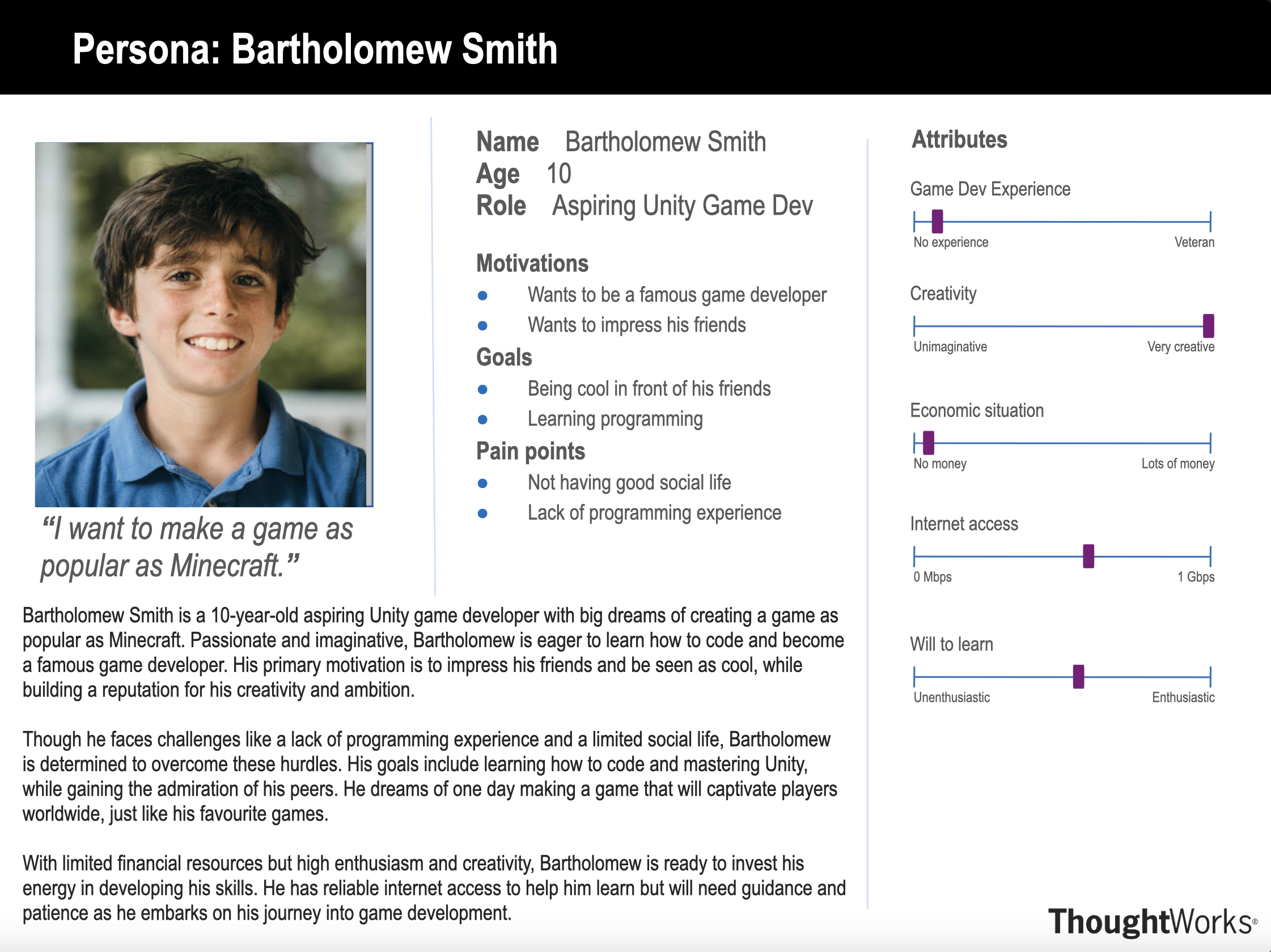
Bart is a young boy trying to get into game development, his main motivation for doing so being that he wants to impress his friends and create a game as popular as Minecraft. He uses VS Code, the most widely-used code editor to write code for his game logic. Within VS Code he uses our extension to help him create assets, textures and code for the game logic. Bart is a novice and so needs all processes to be as streamlined as possible to facilitate easy game development, and to help him learn what's important. Bart loved using the visualiser as it enabled him to quickly see what was happening in the game, and the effects his code changes were having.
Persona 1

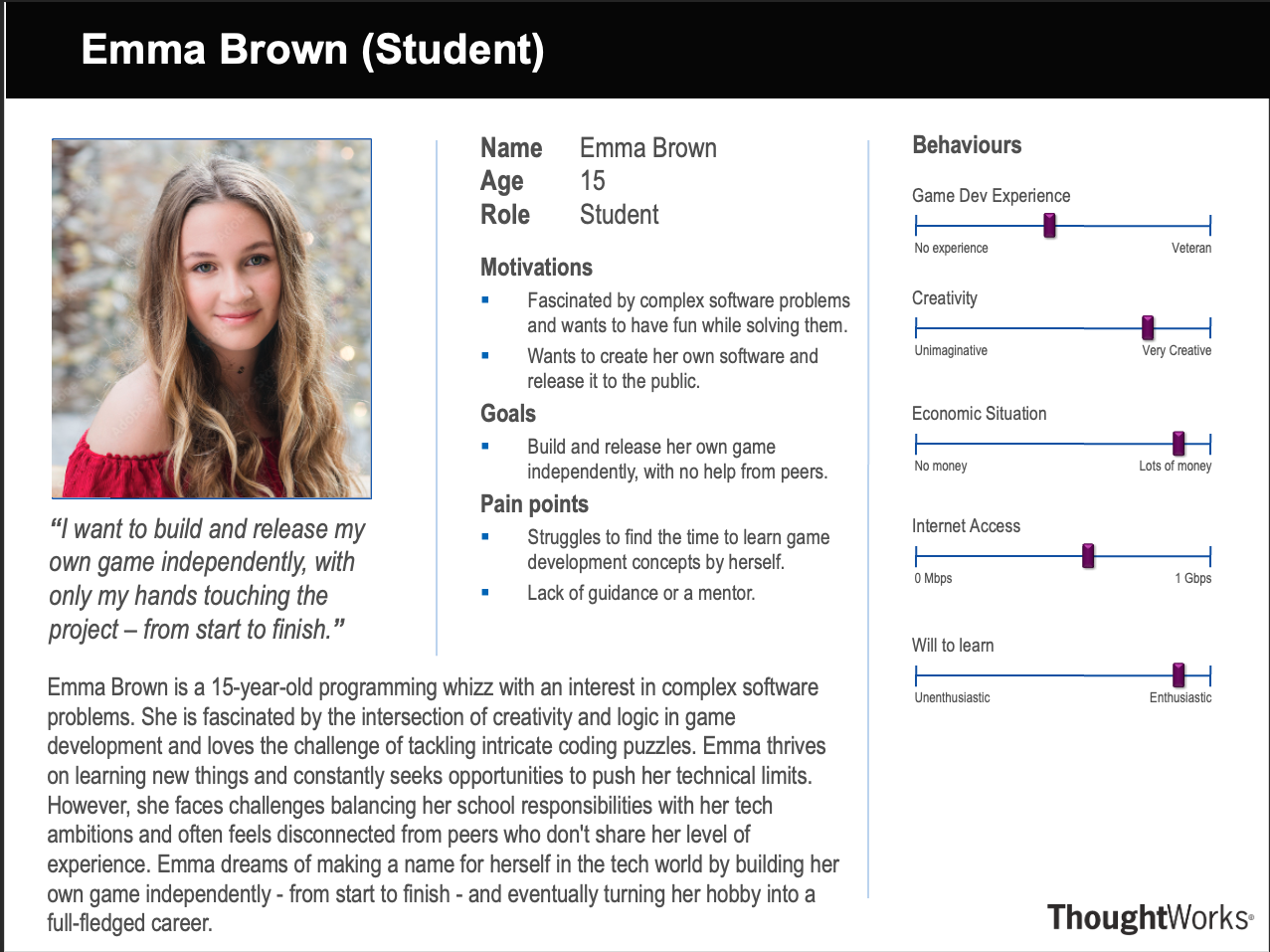
Emma is a student that loves to delve into complex software problems and challenge herself by tackling intricate coding puzzles. She is fascinated by the intersection of creativity and logic in game development and has used our tool as a resource for learning about game development and also to more easily facilitate the development process. She now knows the fundamentals of game development such as assets and object-oriented code, and is currently using this to develop her own game, from scratch - one of her many aspirations.

Use Cases

Based on the requirements and goals of the project, we have identified several key use cases that our extension should support. These use cases outline the primary interactions and functionalities that PixelPilot will provide to its users.

USE_CASES.TXT

> LOADING USE CASE TABLE...

ID Actors Use Case Result
UC1 User Initiate Walkthrough The extension generates and saves the basic code files and assets required to make the game that the user wants. This helps children narrow down on what game they want to develop (works both online and offline).
UC2 User Ask any question Our chat participant uses the selected AI Model to deliver an answer to the prompt. This is possible as our chat participant is built on top of Copilot.
UC3 User Change Chat Completion Model The model used for replying in the chat is changed to the selected model.
UC4 Users Change Code Generation Model The model used for generating code is changed to the selected model.
UC5 User Change Mastery Level The mastery used for replying to prompts is changed to the selected model.
UC6 User Generate an Image If the current directory does not have an assets folder, the folder is made and an images folder is made inside the assets folder. The selected image is saved within this images folder.
UC7 User Replace an Image Our extension checks if the image you want to replace does not exist, if not it will just save the selected new image in the assets/images/ folder. If the image you want to replace exists, it will delete this older image, save the new image in the assets/images/ folder and go through all your code files and replace the code so that now the code uses the new image’s destination instead of the older image’s destination.
UC8 User Explain basic coding fundamental concepts A window pops up with the basic coding fundamental concepts used in the code and their basic explanations. It also provides 3 youtube video links to explain each fundamental concept visually.

> USE CASE LOADED SUCCESSFULLY

> CLICK ON A ROW TO SEE MORE INFORMATION ON THE USE CASE

MoSCoW Requirements List

MOSCOW_REQUIREMENTS.TXT

Functional
Non-Functional

Functional

Must-Have(M) - Critical

Game Logic Assistant

  • Provide code templates for basic game mechanics
  • Suggest key game features and mechanics
  • Offer explanations for methods, classes, and code sections

Real-time, Context-aware Suggestions

  • Provide suggestions tailored to MakeCode and Unity
  • Detect errors and suggest corrections in real-time

Platform Support

  • Full support for MakeCode (2D)
  • Unity support for both 2D and 3D

Image Asset Generation

  • Generate high-quality game assets using AI (e.g., Stable Diffusion)
  • Allow description-based, iterative asset generation

Pre-built Templates and Demonstrators

  • Ready-to-use game templates
  • Example projects showcasing key features

Should-Have (S) — Important, but not Critical

Beginner-Friendly Tutorials

  • Step-by-step guides for MakeCode & Unity
  • Structured for beginners
  • Tutorial progress tracking (pause/resume)

Output Validation

  • Ask clarifying questions about user intent
  • Ensure alignment of AI outputs with user goals

Advanced Real-Time Suggestions

  • Enhanced context-awareness for complex game mechanics

Could-Have (C) — Nice-to-Have Features

Live Game Viewer

  • Live updates upon saving changes
  • Real-time testing and optional debug info

Voice Accessibility Support

  • Voice command interaction
  • Immediate feedback for command execution

LM Model Options

  • Choose between models (GPT-4o, Phi-3, etc.)

Generative Special Effects

  • AI-generated in-game visual effects

Content Moderation

  • Classroom-safe content moderation layer

Won’t-Have (W) — Out of Scope for Now

  • Integration with game engines beyond MakeCode and Unity
  • Multiplayer logic or backend multiplayer support
  • Platform-specific deployment for mobile or consoles

Non-Functional

Must-Have(M) - Critical

  • The system must provide clear, easy-to-understand guidance tailored to the user's mastery level
  • Generated content must be suitable and safe for users under 18, with explicit moderation to exclude inappropriate content

Should-Have (S) — Important, but not Critical

  • The system should have a responsive user interface with minimal latency for suggestions and interactions
  • Feedback provided by the AI must always match the user's skill level to enhance learning and reduce frustration

Could-Have (C) — Nice-to-Have Features

  • System interactions through voice commands should have low latency and high accuracy
  • The system could optionally allow configuration of different AI model parameters for advanced users

Won’t-Have (W) — Out of Scope for Now

  • Detailed analytics and comprehensive user-tracking features beyond basic user feedback

NEXT_STEPS.EXE

Ready to Explore Our Research?

Discover the research that informed our requirements and shaped the development of Pixel Pilot.