
Our partners in the accessibility industry who helped us develop our user-friendly widget.

The Wheelchair Alliance works to provide critical resources that empower individuals who use wheelchairs, along with their families and caregivers. Their wheelchair services data and practical insights have significantly shaped the development of our accessibility widget.

The UCL academic research center specializing in disability innovation and accessible technology. GDI Hub has provided valuable insights into inclusive design principles and helped us organize invaluable testing sessions with members of the visually impaired community.
A leading innovator in accessibility solutions for visually impaired individuals. Soundscape's expertise helped us design features that enhance the widget's voice interface and make the design visually-impaired friendly.

A global leader in geographic information system (GIS) software and location intelligence. Esri's insights helped us develop scalable and easy-to-use mapping technology.
We are also very thankful to have been able to work with Team 15's SightLinks and to have been able to use their product.
The lack of reliable, up-to-date accessibility information in urban environments is a challenge millions face with every day. While mainstream navigation providers such as Google Maps provide substantial data sets on data layers such as restaurants or car parks, individuals with mobility challenges struggle to navigate cities due to missing or inaccurate data about zebra crossings, wheelchair ramps, and obstacle-free pathways.
By leveraging Team 15's expertise in machine learning and satellite imagery analysis, as well as using a Wheelchair-alliance wheelchair services data set, we are tackling this problem directly. Integrating these insights into our widget ensures that users receive real-time, precise data, reducing uncertainty and frustration when planning routes.
Our project aims to create a comprehensive database for accessibility, filled with charity-backed data sets, empowering users to navigate urban environments with confidence and ease. We will develop an intuitive widget that developers can seamlessly integrate into their websites, supported by detailed documentation.
This widget will incorporate advanced location services and data visualization tools to enhance usability, as well as have a variety of accessibility focused features to suit everybody's needs.
Solving Existing Problems
The Bigger Picture
We conducted semi-structured interviews on users of our product - software engineers and visually impaired people to gather insights into their needs. Software engineers discussed technical challenges and API requirements, while visually impaired individuals focused on accessibility needs, especially the ones connected with colours and different themes. Regular consultations with our partners helped judge and integrate their feedback effectively.
We faced several challenges during our interviews. We especially had difficulties in judging which accessibility features to implement first (some visually impaired users found the Focus Mode functionality useless, while others found it incredibly useful). We also realized that a voice interface should be added to the requirements, even though it wasn't one of our core requirements in the beginning.
One of the biggest challenges is the lack of information about my surroundings. It's difficult and scary to navigate an area that you are not familiar with.
I use common applications like Google and Apple Maps, but they don't provide enough information about things like locations of staircases, entrances, barriers, etc. There isn't enough for people with special accessibility needs.
Yes, that would be very helpful.
A mobile interface would be most convenient and portable for me. In addition, I would prefer if there was an audio description feature accompanying a UI with accessibility features (e.g., large text, contrast in colours, etc.).
Handling varying data sources and making sure it is accurate, structured data for different use cases is a major challenge. Especially when dealing with different resolutions or temporary obstacles.
I use APIs like Google Maps and OpenStreetMap, along with tools like what3words for precision. The challenge is integrating and presenting this data, especially with varying resolutions.
An API should support multiple data layers, allow querying by location, handle grid-based data with adjustable resolutions, and support metadata like reliability or expiry dates.
A map interface with clear markers, voice input, and location-based search would be ideal. Users should easily toggle between layers.
Yes, these features would enhance usability and ensure accurate, dynamic data, especially in real-time environments.
Here we present our potential users of our technology.
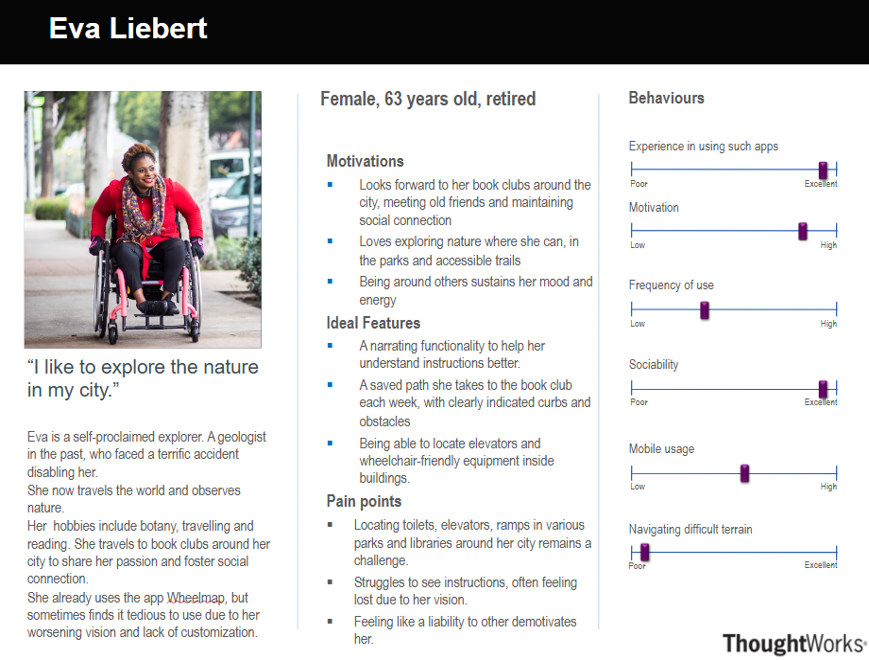
"I like to explore the nature in my city."
Eva is a retired geologist who enjoys exploring parks and accessible trails. She values tools that help her navigate with ease and locate wheelchair-friendly facilities.
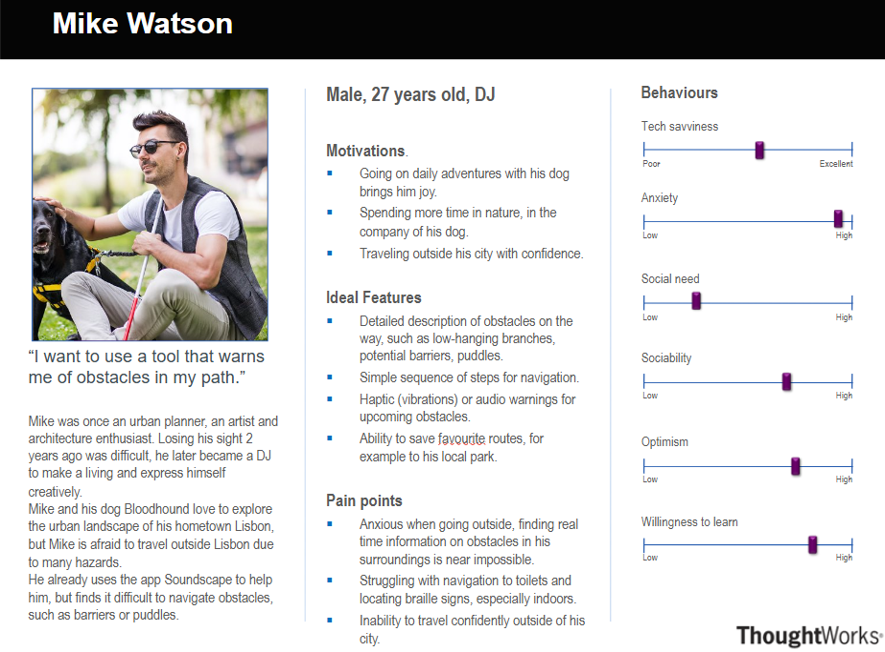
"I want to use a tool that warns me of obstacles in my path."
Mike is a visually impaired DJ who loves exploring urban landscapes with his guide dog. He seeks tools that provide real-time obstacle warnings and accessible navigation.
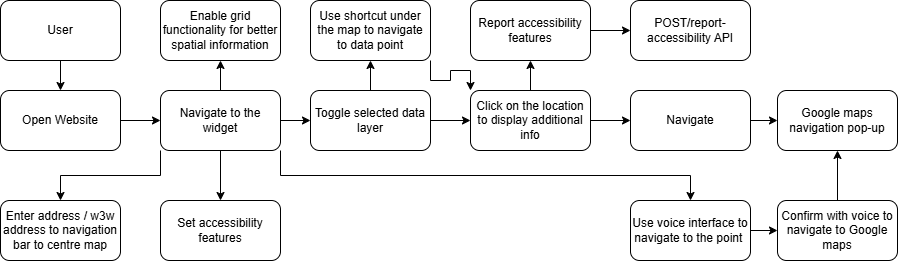
Here we present a diagram which depict how the users will interact with our final product as well as describe use cases in more detail separately.
| ID | UC1 |
|---|---|
| User | User |
| Description | Viewing nearby facilities / hazards |
| Flow |
|
| Result | The user is able to see and navigate to nearby accessibility facilities. |
| ID | UC2 |
|---|---|
| User | User |
| Description | Navigating to a particular destination |
| Flow |
|
| Result | The user's map is centered at a particular destination, with loaded accessibility information displayed on the widget. |
| ID | UC3 |
|---|---|
| User | User |
| Description | Adjusting visual features |
| Flow |
|
| Result | The user is able to personalize their experience. |
| ID | UC4 |
|---|---|
| User | User |
| Description | Report accessibility feature |
| Flow |
|
| Result | The accessibility feature is reported successfully |
| ID | UC5 |
|---|---|
| User | User |
| Description | Use the voice interface for hands-free navigation |
| Flow |
|
| Result | Navigation to selected data layer completely hands-free |
| ID | UC6 |
|---|---|
| User | Developer |
| Description | Embedding widget in a website |
| Flow |
|
| Result | The widget is successfully set up on the website |
Prioritized requirements using the MoSCoW method (Must have, Should have, Could have, Won't have).