
Our system architecture provides an overview of the components and their interactions in the system.
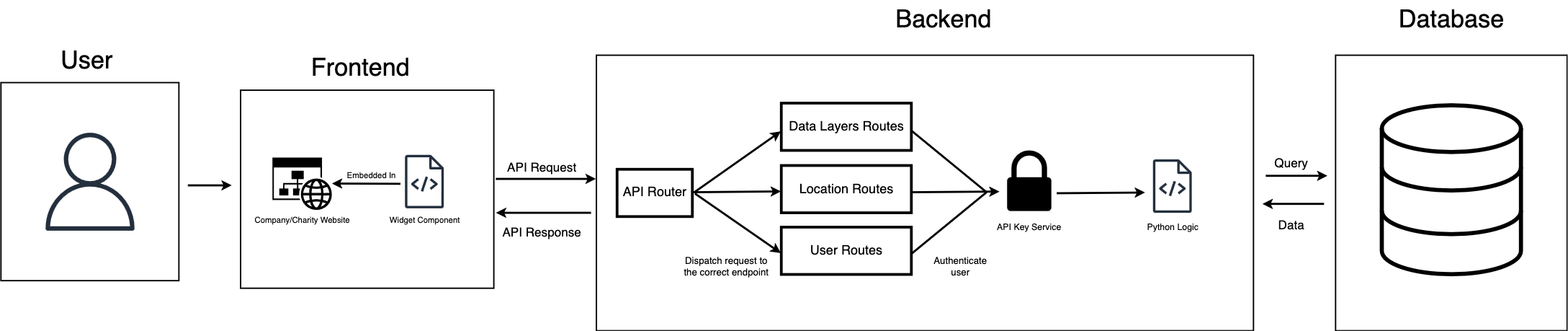
NaviGo is a multilayered software that consists of frontend, backend and database components which are all fully integrated. The data and requests flow between the components efficiently, optimised for lowest possible latency.
We have adopted several design patterns to ensure scalability, flexibility, and maintainability of the system.
| Design Pattern | Description |
|---|---|
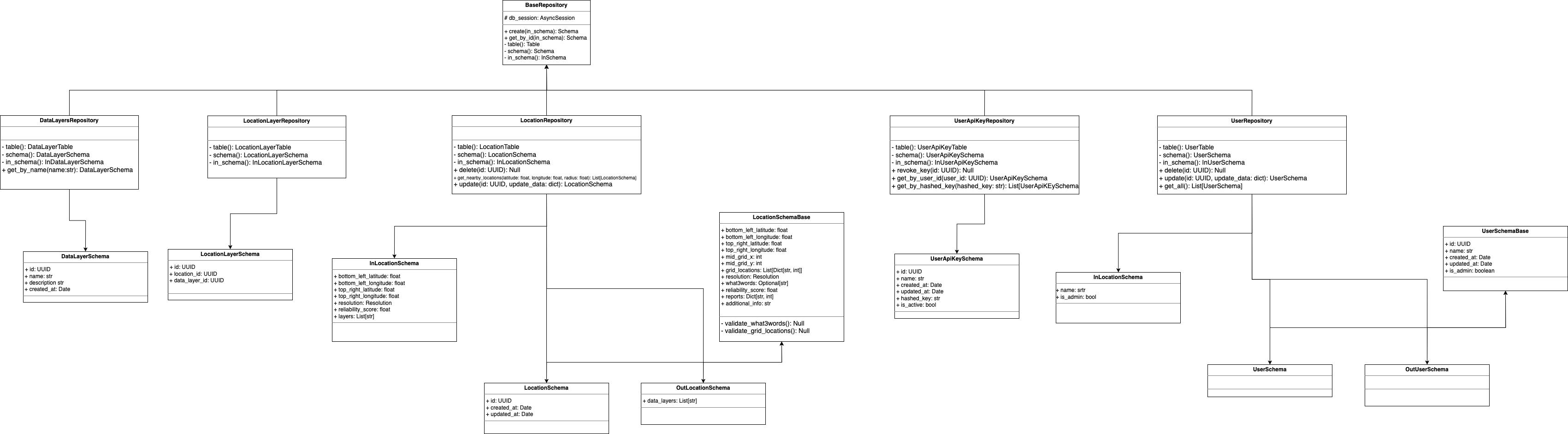
| Repository Pattern | Each of the database tables had a repository class. This design pattern implies separate data access logic. Each of the repository classes had particular methods used to access and handle data on the database. This means that the API didn't directly have any SQL queries/operations, that task was delegated and performed through the repository classes. |
| Dependency Injection Pattern | Used extensively in API routes with FastAPI's Depends() function. Example: db: AsyncSession = Depends(get_db) and _=Depends(get_current_user). Allows for easier testing and decoupling of components. Ensured that the API endpoint wouldn't run unless certain dependencies were satisfied (e.g. access to the database or provision of a valid API key by the user). |
| Data Transfer Object (DTO) Pattern | Implemented via Pydantic models like ReportUpdateRequest and OutLocationSchema. Defines clear contracts for data exchange between API and clients. |
| MVC Architecture |
Models: Database models as well as API schema models.
View: The frontend widget UI. Controllers: The API endpoints. |
| Object Relational Mapping | This pattern allows to interact with database entities via classes and objects. Used extensively in the backend through the sqlalchemy package as each table was defined as an ORM class and each field as an object. |
The UML diagram mainly demonstrates the classes used for the repository design pattern as well as associated schemas for the database and the API. The diagram does not show all of the classes created due to space limitations but provides a good abstraction of the general design.
Our database schema consists of five primary tables that store location data, user information, and API access keys. Below are the detailed schemas for each table.
Stores geographical locations and their accessibility features
| Column | Type | Constraints | Description |
|---|---|---|---|
| id | UUID | Primary Key, Indexed | Unique identifier for the location |
| bottom_left_latitude | Float | Not Null | Bottom left latitude of the bounding box |
| bottom_left_longitude | Float | Not Null | Bottom left longitude of the bounding box |
| top_right_latitude | Float | Not Null | Top right latitude of the bounding box |
| top_right_longitude | Float | Not Null | Top right longitude of the bounding box |
| mid_grid_x | Integer | Not Null | Middle grid X coordinate |
| mid_grid_y | Integer | Not Null | Middle grid Y coordinate |
| grid_locations | JSONB | Not Null | Array of JSON objects representing grid locations |
| resolution | Float | Not Null | Resolution of the grid |
| what_3_words | String | Nullable | What3Words location identifier |
| reliability_score | Float | Not Null | Reliability score of the location data |
| wheelchair_ramp_reports | Integer | Default 0, Not Null | Count of wheelchair ramp reports |
| island_zebra_crossing_reports | Integer | Default 0, Not Null | Count of reports about zebra crossings with an island |
| tactile_paving_reports | Integer | Default 0, Not Null | Count of reports about tactile pavings |
| cycling_lane_warning_reports | Integer | Default 0, Not Null | Count of reports about cycling lane warnings |
| curb_reports | Integer | Default 0, Not Null | Count of reports about curbs |
| total_reports | Integer | Default 0, Not Null | Total count of all reports for this location |
| additional_info | String | Default null, nullable | Additional information of importance |
Links locations to data layers with status information
| Column | Type | Constraints | Description |
|---|---|---|---|
| id | UUID | Primary Key, Indexed | Unique identifier for the location layer |
| location_id | UUID | Foreign Key, Not Null | References location.id |
| data_layer_id | UUID | Foreign Key, Not Null | References data_layers.id |
| status | Enum | Not Null | Status: "temporary" or "permanent" |
| expires_at | DateTime | Nullable | Expiration date for temporary layers |
Defines different layers of accessibility data
| Column | Type | Constraints | Description |
|---|---|---|---|
| id | UUID | Primary Key, Indexed | Unique identifier for the data layer |
| name | String | Not Null, Unique | Name of the data layer |
| description | String | Nullable | Description of the data layer |
| created_at | DateTime | Not Null, Default | Creation timestamp |
Stores user information for authentication and authorization
| Column | Type | Constraints | Description |
|---|---|---|---|
| id | UUID | Primary Key, Indexed | Unique identifier for the user |
| name | String | Not Null | User's name |
| created_at | DateTime | Not Null, Default | User creation timestamp |
| updated_at | DateTime | Not Null, Default | User update timestamp |
| is_admin | Boolean | Not Null, Default false | Admin status flag |
Stores API keys for user authentication
| Column | Type | Constraints | Description |
|---|---|---|---|
| id | UUID | Primary Key, Indexed | Unique identifier for the API key |
| name | String | Nullable | User-defined name for the API key |
| user_id | UUID | Foreign Key, Not Null | References users.id |
| hashed_key | String(255) | Default empty string | Hashed API key for security |
| is_active | Boolean | Not Null, Default true | API key active status |
The database structure implements multiple relationships to ensure data integrity:
Our API is fully documented using Swagger UI, providing an interactive interface for developers to understand and test all available endpoints.