Overview
Our project required research from numerous areas so that we would be well informed to design a cohesive system that would form well together effectively and efficiently. Some of the areas that we had to look at:
- Motion input in other mediums (e.g., WII, VR)
- Classic game controls
- MediaPipe Hand and body tracking
The following two categories made up a large part of our initial literature review:
MotionInput in Other Mediums
Motion Input in the context of gaming is nothing new, over the last two decades many large gaming companies have attempted to include some form of Motion Input in their games and consoles with vastly different approaches from one another. Here is what we found about the different mediums:
Kinect
The Kinect was originally launched for the Xbox 360 and aimed to bring motion capture gaming to the domestic market. It was often bundled with the game Kinect Adventures, which was the best-selling game for the system.
Kinect Adventures had multiple minigames which familiarised players with the uses of the Kinect:
- It was able to track users in 3D space, applicable in minigames where the user could move their in-game player around a 3D room
- It could track a variety of motions, including jumping, leaning and limbo-ing
- Two users could be tracked at the same time
The Kinect is a 3D imaging sensor [1], using IR projectors to analyse patterns of returned light and hence constructing a depth map. Motion is detected much easier in thanks to the multiple cameras in use, allowing the Kinect to view depth with parallax. The software fills in the rest using machine learning models, which is what the Kinect has in common with MotionInput.
A (standard) webcam only has access to 2D image so many of the principles that the Kinect uses cannot be transferred over easily. [2] The data that the webcam will have access to will not be as accurate, but the advances in motion learning may bridge the gap. The gestures that the Kinect, the most widely used camera-based motion-input gaming device, have set a standard for the design of motions. Users have reflected that they are well accustomed to the inputs required for the Kinect and hence it would optimise user familiarity if we followed a similar approach to the Kinect.
Nintendo Wii
The Nintendo Wii was originally released in 2006 and instantly was one of the pioneering consoles in motion controls. The Wii was controlled by the wireless Wii remote that was equipped with an IR sensor for pointer precision and a gyroscope that, despite the lack of joysticks, allowed for a high level of precision within games.
What was revolutionary about the Wii was how beginner friendly, it was commonly known in the industry at the time that as gaming was progressively getting more complex, it was becoming less user friendly for beginners. The wii however was a different take that provided “Product simplicity” [3] and was gave “Product availability to non-skilled gamers (could be not familiar with complex keyboard/joystick control)”.[3]
The capabilities were clear, you could use the Wii remote as a steering wheel in Mario Kart, a hand simulator for Just Dance and Wii Sports and many more applications. Some key take aways from the Wii are as follows:
Positives
- Fairly accurate for its capabilities
- Many applications
Negatives
- Required a gyroscope and IR sensor which were both proprietary.
- Required a physical remote for motion capture.
- Limited set of moves used in reality; ultra-low thresholds were used for limited move sets in each game.
The Nintendo Wii overall, is quite far from the context of our project but provides a very useful lesson. The Wii was effective because each game would use only a limited number of movements and a result could use low thresholds to detect motion. This will be important for our project as we may have to balance gesture detection accuracy with number of gestures available. This will be important went implementing the algorithms that we’ll use in our gesture detection.
PS-Move
In September 2010 Sony launched their motion control project to compete with the likes of the Wii and the Kinect. It was designed to work as a periphery of the PlayStation 3. As far as motion input works, the system intended to be a direct rival of the Wii with a very similar system.
The system comprises of two PS-Move remote controls and a PlayStation Eye Camera for 3d positioning
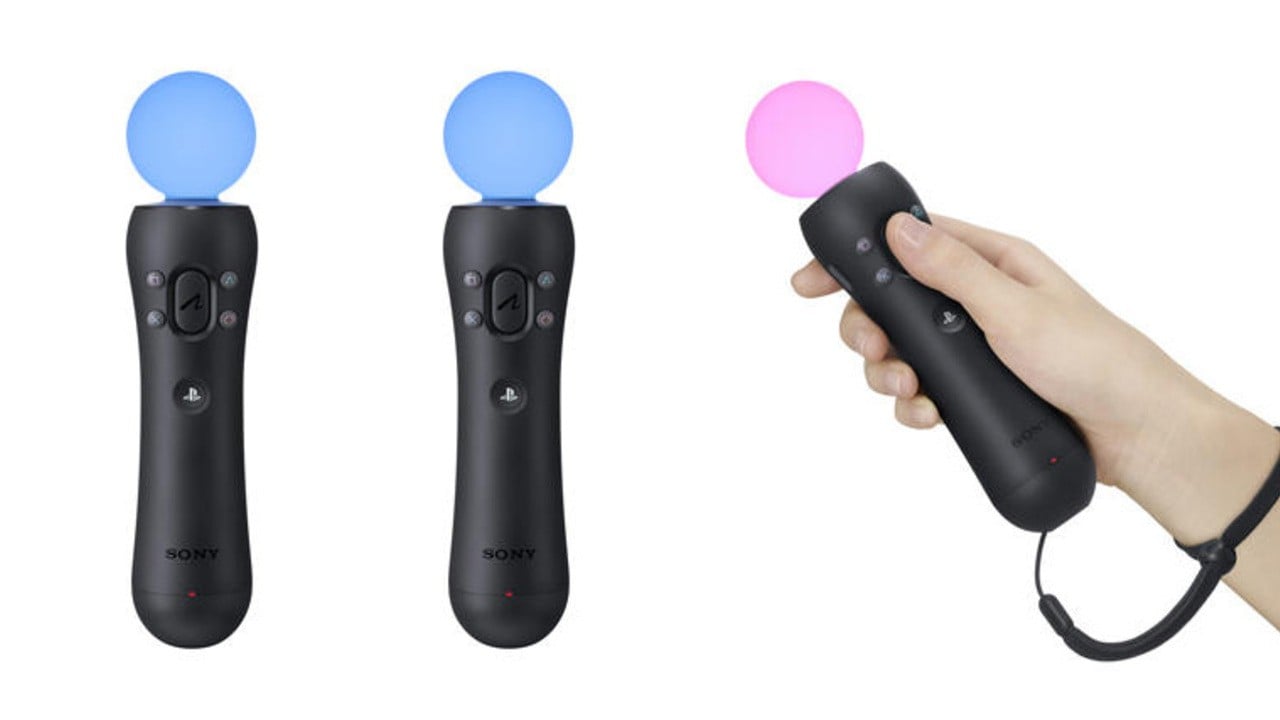
Each controller has a very large glowing sphere at the top of each of them. The controller works in tandem with the PlayStation Eye Camera to allow for 3d motion tracking in real time. [4]
Each controller has a RGB LED in each sphere. The colour of the sphere changes to distinguish between each controller (4 controls can be used at one time), however the primary function is to provide a visual reference for the PlayStation Eye. The controller, like the Wii Remote has a gyroscope for orientational information. [4]
The Eye captures video at a resolution of 640 x 480 at 60 frames per second, frame rate is prioritised to have a very quick response time and have minimal delay. The Eye has been programmed to recognize the exact size and shape of the ball and can detect the 3d positioning of the controller. All calculations are done all inside the PlayStation 3. This combination of orientational information from the remote and positional information from the camera provides a very accurate detection of motion of the remote. However, the PS-Move suffers from the same issues as the Wii with the requirement of a physical remote and camera. [4]
The unique way motion is captured is very useful information for our project. The PS-Camera is very similar to the camera that will be used with MotionInput and by having bold visual references in the form of a glowing orb is a smart way to track position in 3 dimensions. This idea of visual landmarks will be useful for our project.
Virtual Reality
VR has been around for a while but full body tracking in VR is a relatively new technology. Some of the best Body and Finger tracking is using the HTC Vive body tracker and the valve index relatively. For finger tracking the valve index has its controllers track finger movement and the HTC Vive has sensors the user attaches to their legs and belt to track let movement as well as body positioning. [5]
The HTC Vive uses these body trackers along with their ‘base stations’ [6], which contain a rotating infra-red laser to track where the user is moving. This information is then sent to the computer, headset and controllers to relay the user’s location in-game; the two base stations also keep track of the playable space for the user, similar to how the Xbox Kinect measures the playable area the user can move around in.
For the Valve index the finger tracking all comes from the 87 sensors built into the controllers2, which pickup on fine movement in the hands of the users and then output these signals into fine-tuning software and algorithms to accurately predict how the user is holding the controller and their intentions are when moving their hands (e.g., hand closing – fingers trying to grab an object in game, or three fingers clasped around the controller – pointing with the index finger). [7]
The way the HTC VIVE does full body tracking is a very good lesson into what becomes important in full body tracking as well as the importance of less nuanced ideas like finger tracking. The hands make extremely intricate movements with distinct movements. Perhaps seeing how the software tracks hand movements to predict hand movements may be useful for us to be able to map gestures more intuitively or use hand tracking in its entirety as individual gestures.
Other details such as tracking devices aren’t relevant to our project however the idea of a bounding box for the play area could be a great idea to implement into our project. This would allow us to focus on a certain sector where we take inputs from, meaning that the user would have an easier time being tracked by our software as well as decreasing the chance of errors taking inputs from outside sources (e.g., someone walking outside the bounding box).
Classic Games and Controls
Of course, when looking at the theme we need to decide which games would be appropriate to implement into our solution that fit with the action game theme and vary in style so that we can fully demonstrate our solutions capabilities. We came to the original decision of these games:
- Spider man (2018) – Perfectly captures the superhero spirit of the project. Some of the moves in the game are quite easy to map into MotionInput such as swinging through the city with L shift on PC. Gestures can be used to track the start and end of this motion. There are many more examples.
- Batman Arkham Asylum – Again perfectly captures the superhero theme of the project. A lot of the controls require single button mappings so again would be easy to map into MotionInput.
- Minecraft – This does not fit the superhero theme as well but is still great to implement due to its simplicity and child friendly nature. There a very limited set of controls for Minecraft that are easy to implement and allow the player to have most of the functionality that they need to play the game.
- God of war (2018) - Sort of fits in with the superhero theme to a certain extent. Furthermore, the game was originally a PlayStation Exclusive Game when it released and since we have an important contact with PlayStation it will be a bit easier for us to implement a solution for the game.
Upon further review we also included the game Horizon Zero Dawn (2016) for the same reasons as God of War. We decided to investigate and research into necessary games for it and Spider Man. They can be found in their own documents below:
What’s important to note about these key mappings is that we can learn a lot about generic key bindings for PC games and notice patterns between which keys are used the most and see if generic modes can be made using this sort of information. Overall, this research provides important information on how games are controlled on PC and will be used throughout our mapping process.
References
- MacCormick, "How Does the Kinext Work?," 25 November 2013. [Online]. Available: https://pages.cs.wisc.edu/~ahmad/kinect.pdf.
- C. Tim, "How Motion Detection Works in Xbox Kinect," WIRED, 3 November 2010. [Online]. Available: https://www.wired.com/2010/11/tonights-release-xbox-kinect-how-does-it-work/. [Accessed October 2022].
- IvyPanda, "Nintendo Wii as an Innovative Product," IvyPanda, 2020.
- F. Wesley, "How PlayStation Move Works," HowStuffWorks, 29 September 2010. [Online]. [Accessed October 2022].
- K. Eric, "How HTC Vive Accidentally Created Mo-Cap Tech 10 Times Cheaper Than the Industry Standard," IndieWire, 10 October 2021. [Online]. Available: https://www.indiewire.com/2021/08/htc-vive-trackers-motion-capture-filmmaking-1234657119/. [Accessed October 2022].
- Vive, "About the Vive Base Station," HTC, [Online]. Available: https://www.vive.com/uk/support/vive/category_howto/about-the-base-stations.html. [Accessed October 2022].
- Valve, "Controllers," Valve, 30 April 2019. [Online]. Available: https://www.valvesoftware.com/en/index/controllers. [Accessed October 2022].