Testing Strategy
We needed to make sure that all our functionalities were effective, efficient and user friendly. During development we tested each functionality thoroughly to see if they worked properly and to the standard that we expected. We also asked members of other teams and potential users to provide extensive feedback on how they felt about different parts of the system and what they thought was comfortable and uncomfortable. Furthermore, we did many performance tests to see if the system worked as efficiently as intended. Overall, we completed user tests with 15 users and received reviews from 6 of them.
Performance testing
For context we did all of our performance tests on 4 different Windows PCs on each equivalent performance mode on each PC. For simplicity in this section, we will allocate numbers to each PC to distinguish which PC was used in each test. Their specs are as follows:
- PC 1: AMD Ryzen 4500u CPU @ 2375 Mhz, 6 core(s), 8GB RAM (3200Mhz), Integrated AMD Radeon Graphics, integrated 720p camera
- PC 2: AMD Ryzen 4600H CPU @ 3001MHz, 6 core(s), 24GB RAM(2400Mhz), NVIDIA GeForce RTX 3050 Graphics, Integrated 720p camera
- PC 3: AMD Ryzen 3900x CPU @ 3800Mhz, 12 core(s), 64GB RAM(3200Mhz), RTX 2080 Super Graphics Card, Sony ILCE-7M4 camera
- PC 4: AMD Ryzen 3800x CPU @ 3900MHz, 8 core(s), 16GB RAM(3200Mhz), RTX 2070 Super Graphics Card, iPhone 12 as webcam
Test 1: Time taken to launch the MotionInput API from MFC
Method: Using a timer, time how long it takes for the MotionInput API window to open from the MFC. Judge by eye and test 10 times for each PC.
| Test (in s) | PC 1 | PC 2 | PC 3 | PC 4 |
|---|---|---|---|---|
| 1 | 18.16 | 13.4 | 9.23 | 9.47 |
| 2 | 7.28 | 9.53 | 6.25 | 4.14 |
| 3 | 7.23 | 9.56 | 6.56 | 4.24 |
| 4 | 7.24 | 9.29 | 6.10 | 4.03 |
| 5 | 7.13 | 9.43 | 6.40 | 4.06 |
| 6 | 7.28 | 9.35 | 6.54 | 3.97 |
| 7 | 7.11 | 9.44 | 6.34 | 3.97 |
| 8 | 7.60 | 9.39 | 5.59 | 4.03 |
| 9 | 7.14 | 9.31 | 6.20 | 4.07 |
| 10 | 7.19 | 9.35 | 6.82 | 4.01 |
| Average | 8.33 (7.24*) | 9.81 (9.41*) | 6.67 | 4.6 (4.06*) |
* Excluding for anomalous first results
Clearly from the results we can see depending on the specification of the PC used, the time taken to launch the MotionInput application varies. However, it is also easy to see that for each PC, that time taken stays fairly constant and varies minutely from test-to-test with this being strongly seen for PC 1 and PC 2. Furthermore, there seems to be a consistent observation that the first test for all the PC’s were considerably longer than the rest of the tests, the fact that the MotionInput is being loaded for the first time behaving differently it very important to note. Internal automated caching by the PC may be the reason why every test after the first test is considerably faster. Either way we would classify these timings as acceptable but not perfect; ideally, we would want that time under five seconds, but this performance is just about acceptable.
Test 2: Time taken to launch the Pose Recorder from the MFC
Method: Using a timer, time how long it takes for the pose recorder window to open from the MFC. Judge by eye and test 10 times for each PC.
| Test (in s) | PC 1 | PC 2 | PC 3 | PC 4 |
|---|---|---|---|---|
| 1 | 15.38 | 3.59 | 3.39 | Null |
| 2 | 9.28 | 3.67 | 2.35 | Null |
| 3 | 9.33 | 3.58 | 2.56 | Null |
| 4 | 9.09 | 3.61 | 2.78 | Null |
| 5 | 9.14 | 3.64 | 2.19 | Null |
| 6 | 9.25 | 3.66 | 2.10 | Null |
| 7 | 8.97 | 3.68 | 2.37 | Null |
| 8 | 9.20 | 3.65 | 2.12 | Null |
| 9 | 9.06 | 3.67 | 2.45 | Null |
| 10 | 9.21 | 3.65 | 2.47 | Null |
| Average | 9.79 (9.17*) | 3.64 | 2.48 | Null |
*excluding anomalous first result
This test paints a similar picture to the previous test, however it looks to be that apart from PC 1 performance is very good, those times were within 5 seconds. This is largely due to the higher computing power in all aspects from all of those PCs. However, it must be considered that most users of our solution will be using slightly less powerful machines and therefore PC 1 does give an important insight in what the realistic environment would be for our solution. All the times from PC 1 are below 10 seconds but is still a lengthy duration.
Test 3: Time taken to launch the Gesture recorder from the MFC
Method: Using a timer, time how long it takes for the gesture recorder window to open from the MFC. Judge by eye and test 10 times for each PC.
| Test (in s) | PC 1 | PC 2 | PC 3 | PC 4 |
|---|---|---|---|---|
| 1 | 29.48 | 5.57 | 4.22 | Null |
| 2 | 29.64 | 5.45 | 4.24 | Null |
| 3 | 28.66 | 5.59 | 4.10 | Null |
| 4 | 29.45 | 5.47 | 4.17 | Null |
| 5 | 28.58 | 5.56 | 4.29 | Null |
| 6 | 29.47 | 5.59 | 4.20 | Null |
| 7 | 28.82 | 5.47 | 4.15 | Null |
| 8 | 29.39 | 5.61 | 4.11 | Null |
| 9 | 28.51 | 5.54 | 4.18 | Null |
| 10 | 29.20 | 5.50 | 4.20 | Null |
| Average | 29.12 | 5.54 | 4.19 | Null |
Again, this shows similar results to the previous test. However, it is glaringly obvious that PC 1’s load time is significantly slower than that of the other PCs. Being the least powerful of all four this should be expected but the load time is many times more than any other PC. If we go by these timings, then this is unacceptable as a result these times should be evaluated to see if they can be made faster.
Test 4: Accuracy of “Hadouken” Gesture
Method: Do the “hadouken” gesture 100 times and count how many times were detected. The “hadouken” gesture is one of the most responsive and functional gestures that we have loaded and therefore would provide a good basis for our gestures in the future. This test is done on PC 1 and PC 2 and at a distance of 1.5 m from the laptop. Here are the results:
PC 1 (medium light): 88/100
PC 2 (medium light): 87/100
As seen from the results, the “hadouken” gesture is highly effective in medium light with an overall success rate of 87.5% which is very good; if applied to the rest of the gestures, this would mean that gesture detection efficiency is very high. In the future, we would want to increase this percentage even more for a more complete system and to allow for the inclusion of more concurrent gestures.
Test 5: Detection distance of Poses in different Lighting Conditions
Method: Using the pose recorder as a visual reference, we measured the minimum and maximum distance from the camera to get a pose to work in different lighting conditions. This is a limitation of MediaPipe’s hand detection model, but we still wanted to see how that affected our project specifically. For testing we used the “thwip” gesture and was done only on PC 1 and PC 2. We had 3 different lighting conditions: very low light, medium light and very high light. Here are some examples of those lighting conditions:
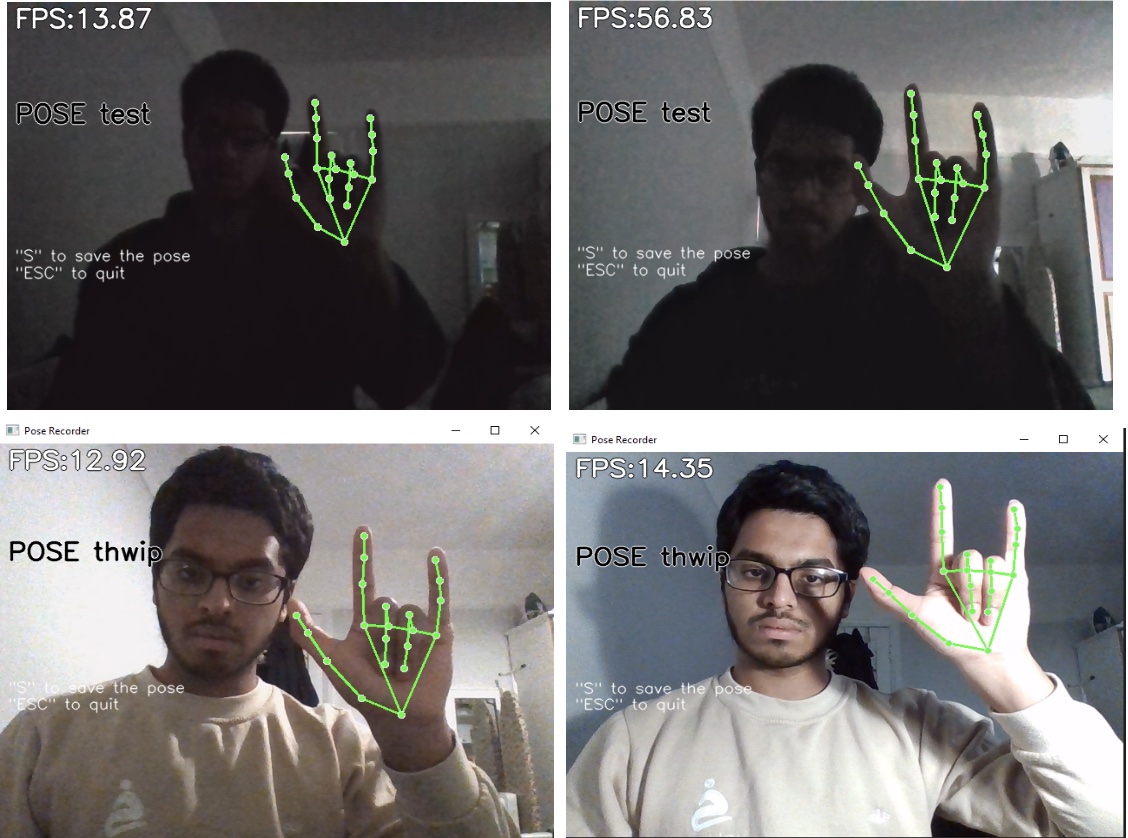
Here are the results:
PC 1 PC 2
| Min distance (cm) | Max distance (cm) | Min distance (cm) | Max Distance (cm) | |
|---|---|---|---|---|
| Very low light | 14 | 59 | 16 | 114 |
| Low Light | 14 | 190 | 16 | 273 |
| Medium Light | 14 | 310 | 16 | 240 |
| High Light | 14 | 342 | 16 | 227 |
A key observation from this is that it is probably unfair to categorise the low light and very low light categories in the same table as the values taken for them were only achieved after a substantial time getting the recorder to detect the presence of the hand in the first place; whereas for the latter two categories, detection of hand presence was almost instant. However, after getting that to work, the values taken were fairly accurate.
As expected, the results show that when there was more light pose detection was better and hence increasing the maximum distance for pose detection. The only anomaly was the high light max distance for PC 2. The reason for this happening is largely because if the light in the background is extremely intense then it could flush out the hand on the camera feed, hence not detecting it at all. This is why the system should realistically have constraints on both minimum and maximum light intensity for working functionality. However, another key observation is that in general, PC 2’s max distance was a lot higher than PC. Therefore, it should be noted that the specification of camera used makes a large difference in pose (and likely gesture) detection.
User Acceptance Testing
A key part of our testing required us to see how users would find using the system through different games and modes. We got each tester to see how easy it was for them to do different things in games and then received feedback from them.
Here are the following games that we tested with each individual test:
- Spider Man (Sitting, Joystick)
- Navigate the camera to the top of a building in view
- Move from one block in game to another block
- Sprint from one block to another in reasonable time
- Use the ‘Thwip’ gesture to try and swing through the city for 200m (in game) without touching the ground
- Zip to a point
- Boost whilst swinging
- Beat a bunch of low-level enemies in game
- Extra: Using the shoot action to their advantage
- Extra: Use the Strike action to their advantage
- Extra: Use the throw action to their advantage
- Extra: Yank an enemy in game (Hold Attack then hold strike)
- Minecraft (Standing, Joystick)
- Navigate the camera around
- Use the walking gesture to walk forward
- Mine 3 blocks of wood using the mining gesture
- Throw an item Using the throwing gesture
- Open the menu using voice
- Craft wood planks from dragging items to the craft box
- Craft a wood pickaxe using the crafting table via any method
- Switch between item positions using voice
- Street Fighter V (Standing)
Note: All within three attempts
- Move left and right
- Perform a light punch
- Perform a medium punch
- Perform a heavy punch
- Perform a light kick
- Perform a medium kick
- Perform a heavy kick
- Perform a combo
- Perform a hadouken (energy ball)
- Perform a shoryuken (uppercut)
- Perform an ultimate move
- Perform a senpunyaku
All tests were done on PC 2 to allow for uniformity of experience
Testers
We had four main testers compete in most of our tests. We weren’t able to get all testers to do all the tests due to time constraints but were able to get most tests done by most testers. We have decided to keep our testers names anonymous for confidentiality reasons.
| Tester Number | Details |
|---|---|
| 1 | 51, IT manager |
| 2 | 20, UCL Computer Science Student |
| 3 | 30, Office worker for a hospital |
| 4 | 19, UCL Economics Student |
Test Results
Here is a table of all the results we gathered. We also asked each tester to rate their experience out of 5 for both how easy it was to do, as well as how engaging it was to do and then averaged the scores. We also received comments about the experience from some testers.
| Test No. | Success rate (out of 4) | Engagement rating | Usability rating | Comments |
|---|---|---|---|---|
| 1.1 | 4 | 4.25 | 4.75 | None |
| 1.2 | 4 | 3.75 | 4.75 | None |
| 1.3 | 3 | 4.50 | 4.25 | It’s quite difficult to hold down the pose for that long a time |
| 1.4 | 2 | 4.75 | 2.25 | Very difficult with all the things you have to keep track of. My aim kept on going all over the place. Can’t hold pose for that long |
| 1.5 | 3 | 4.00 | 4.50 | None |
| 1.6 | 2 | 3.5 | 3.00 | It’s quite difficult to switch poses so quickly |
| 1.7 | 4 | 4.5 | 3.50 | Felt like I had to keep using the same move. It was hard to change the camera to see who was around me |
| 1.7.1 | 3 | 3.5 | 4.00 | Took me a while to properly position myself to aim at the enemy |
| 1.7.2 | 3 | 3.75 | 4.50 | Very easy to do |
| 1.7.3 | 3 | 3.75 | 3.25 | The pose was quite hard to do and I felt it kept on releasing when I was trying to hold it |
| 1.7.4 | 1 | 2.25 | 1.00 | Found it very difficult to complete the launch initiate |
| 2.1 | 4 | 4.25 | 4.75 | None |
| 2.2 | 4 | 2.00 | 2.75 | Felt unprecise and jerky since there was a delay between each step. |
| 2.3 | 3 | 3.75 | 3.25 | Very hard to aim. A bit annoying to turn off the mining otherwise it just continues |
| 2.4 | 3 | 3.50 | 3.25 | None |
| 2.5 | 4 | 3.75 | 5.00 | Very responsive |
| 2.6 | 1 | 2.25 | 2.50 | Felt like very precise movements were needed |
| 2.7 | 1 | 2.25 | 1.50 | None |
| 2.8 | 4 | 3.50 | 5.00 | None |
| 3.1 | 3 | 4.5 | 3.50 | Can’t see this be a very useful solution if I have to keep on raising my leg to do the action. I feel like the movement is quite limited |
| 3.2 | 4 | 4.00 | 4.25 | None |
| 3.3 | 4 | 3.75 | 4.50 | None |
| 3.4 | 3 | 4.25 | 3.75 | None |
| 3.5 | 2 | 4.00 | 3.00 | Had to try a lot of this action |
| 3.6 | 3 | 4.00 | 2.75 | Wasn’t clear how specifically I should do the action |
| 3.7 | 1 | 4.25 | 1.00 | Cool but took a lot of tries |
| 3.8 | 3 | 4.50 | 3.50 | None |
| 3.9 | 4 | 4.75 | 4.25 | That’s really cool. Wow that’s easier than using the controller |
| 3.10 | 4 | 4.75 | 4.75 | None |
| 3.11 | 4 | 5.00 | 3.75 | None |
| 3.12 | 4 | 4.25 | 4.75 | Felt like this was getting misfired a lot when trying to do other moves |
Results of User Acceptance Testing
The results from the user acceptance testing varied a lot across all tests. The testers were able to complete most of the tests with the key issues coming in the kicking gestures in the Street Fighter tests and some complex actions in the Minecraft tests.
For Spider-Man, the testers were engaged in most of the activities with all but one activity having an engagement rating of or above 3.5. We are happy that the testers found their experience engaging for the most part. On average, they found the system slightly less usable. Test 1.4 was one of the low points for usability which is disappointing since swinging through and navigating through the city was one key feature that we really tried to focus on. A common theme with this and the other game tests is that in general, the necessary complex actions were engaging but tough as shown here with test 1.4, which has an average 4.75 engagement rating and yet a 2.25 usability rating. The solution to these complex actions is discussed below.
Minecraft standing mode was overall the least usable system; a big issue testers had was that the combination of gestures and aim boxes did not gel well together. We understood this issue before and had therefore substituted the use of a hand box for movement and replaced it with the walking gesture. However, the aim hand box would still get in the way of the gestures whereby completing a gesture would cause the aim to go in a completely random direction. As a result, in this instance the testers found many of the actions less engaging due to the reduced usability of the system.
Street Fighter Five, despite also being a gesture focussed standing mode, was significantly more usable and more engaging for the testers. Many of the moves were completed by all the testers, especially all the special moves described by tests 3.9 to 3.12. Our gesture focus was really precise on this game, and it paid off with the testers saying that a lot of the gestures were really impressive and saying that they were very usable.
Overall, we learnt some valuable lessons from these user tests. One key thing is that gestures in standing mode with gestures is very difficult to do; the conflict between both actions makes it very difficult to do one without controlling the other. This will have to be evaluated to see what we can do to avoid this issue. However, we can largely say this user acceptance test has been successful. The users seemed to really enjoy the experience and were impressed by what they could do.
Gesture Classification Testing
To test the accuracy of our gesture detector, we also conducted some tests to optimise our parameters and measure the accuracy of how well it can detect and classify different gestures.
Method: Using the Kinect Activity Recognition Dataset [1] , we created a profile using 4 gestures: Throw, Clap, Kick and Wave.
The dataset contains 18 actions in total, but we chose these 4 as a good representation of what a real game situation may look like. Each action is performed 3 times by 10 different subjects, and the RGB video is saved in a 640x480 mp4 file, mocking our usual conditions.
We calculate the signals of all videos per action and calculate the one with the smallest average distance to all other action. This becomes the video that is used to model the gesture. An alternative approach that we could have tried is using the average signal of all videos.
To test, we loaded all gesture models and played back each performance of each action, recording which gesture is detected first. We constructed confusion matrices from the results of varying parameters.
Results: Our threshold parameter followed the equation a + bx. We vary the a and b variables to get the following results:
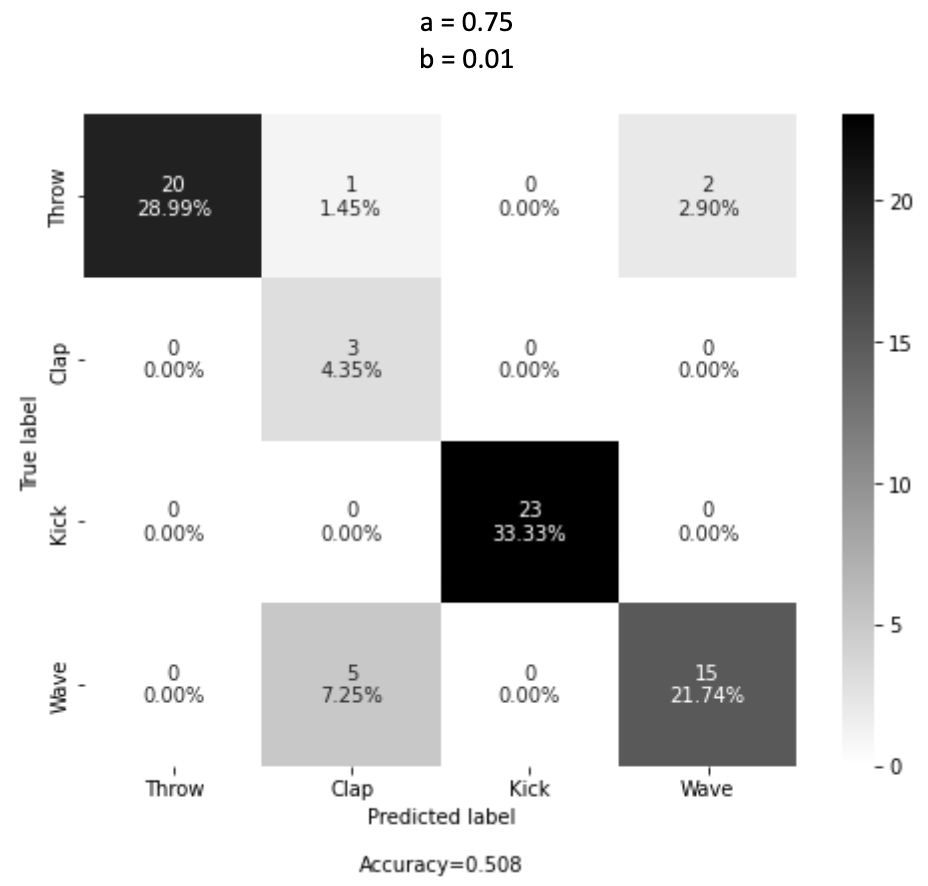
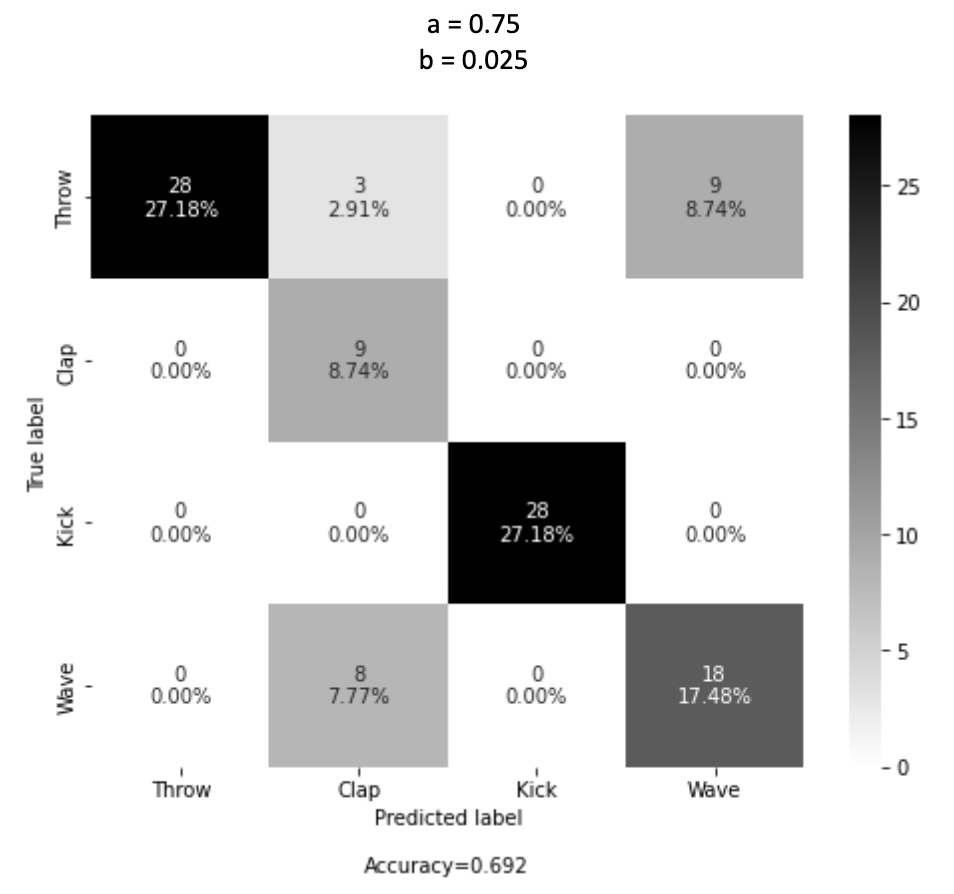
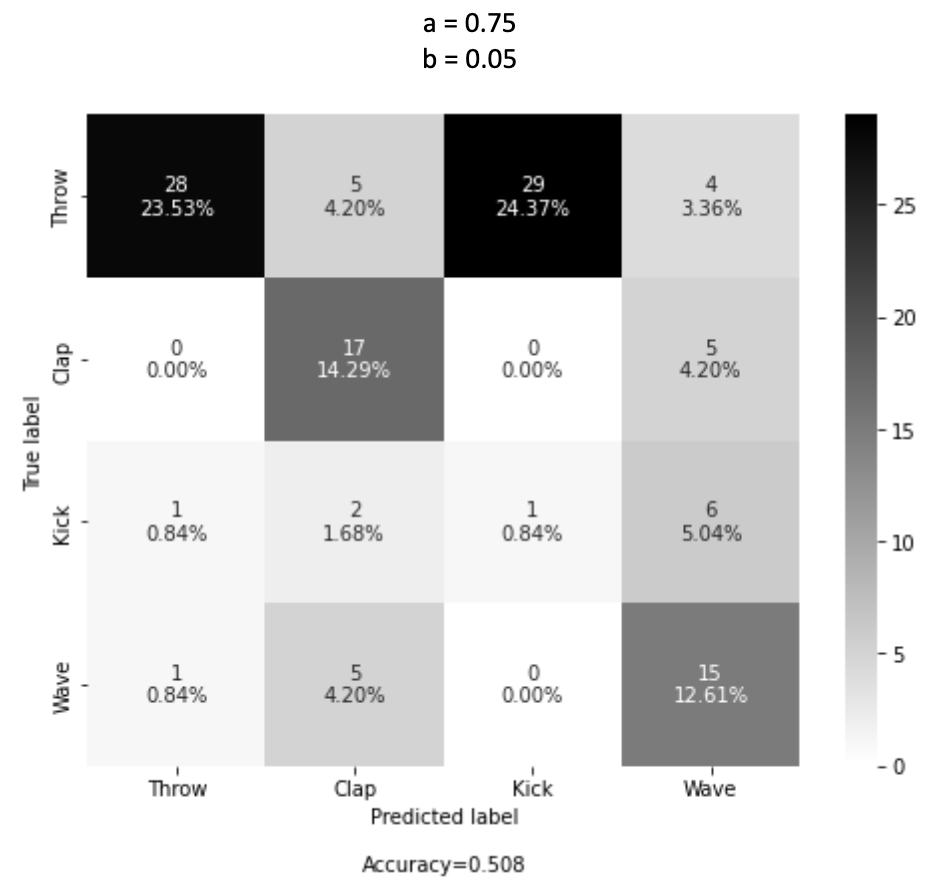
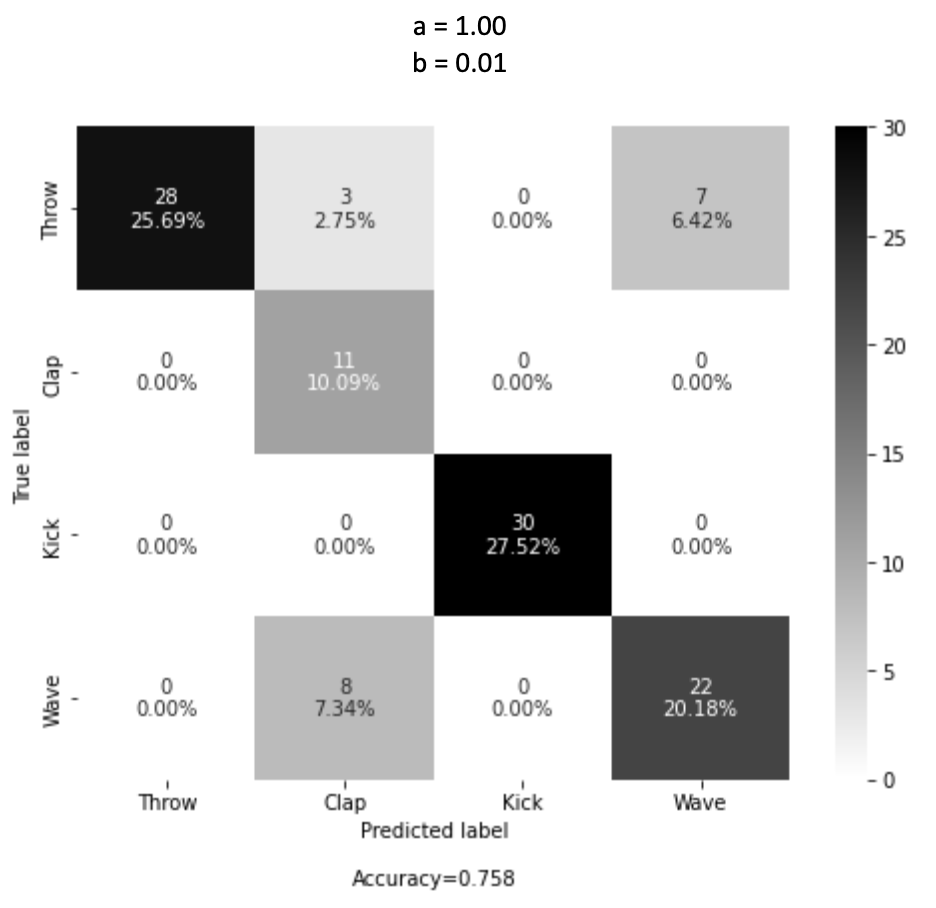
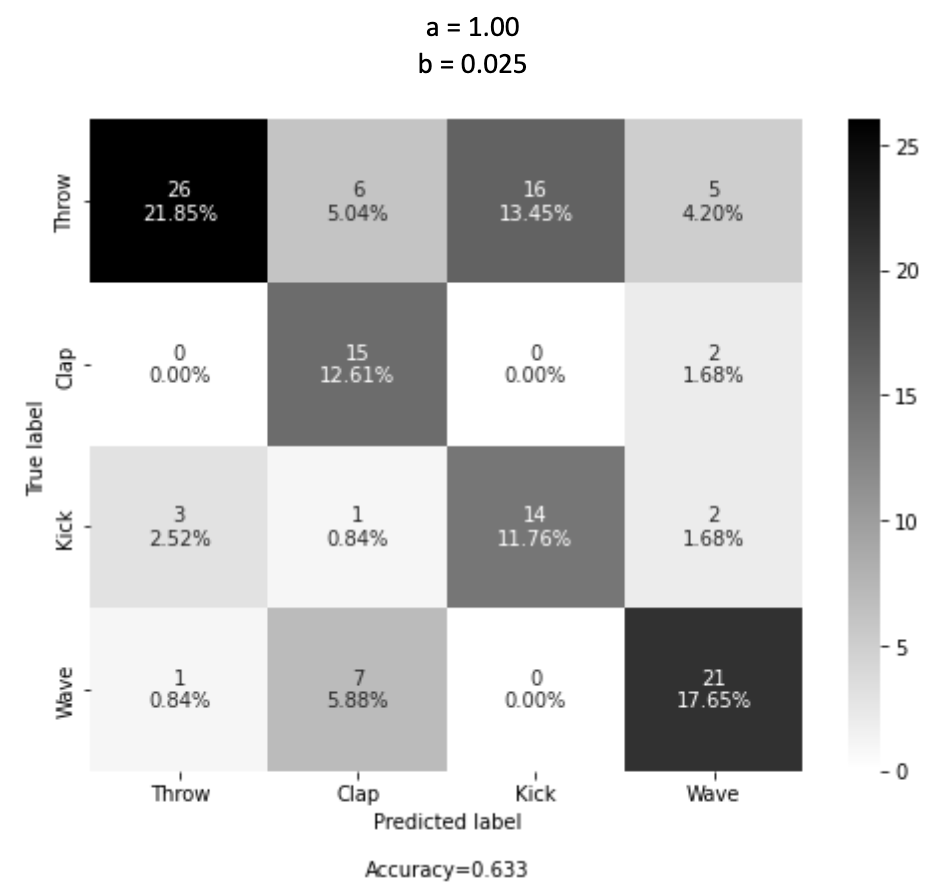
From our results, we found an optimum accuracy of 75.8% with the values a = 1.00 and b = 0.01. Compared to the previous work done using a similar method which achieved a peak accuracy of 77.4% [2], we achieve a result within a similar range. However, our work can run in real-time, and the tests record the first gesture detected. Using a method where we combine pose detection and gesture detection to return the gesture with the lowest distance from the input, we can achieve an accuracy of over 89%:
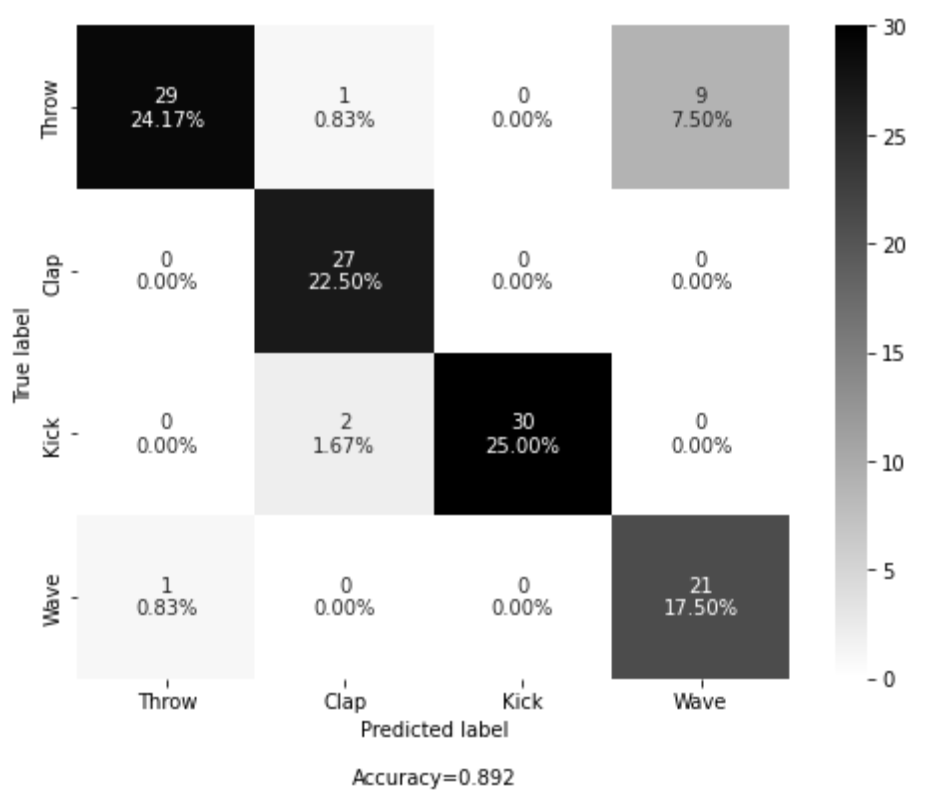
This approaches accuracies that were only previously achievable with 3D data capture. With more refining and optimisation, these methods could become viable options to use in the real world, classifying gestures from nothing more than just one trained 2D video.
References
- S. Gaglio, G. Lo and M. Morana, "Human Activity Recongnition Process using 3-D posture data," IEEE Transactions on Human-Machine Systems, no. 45(5), pp. 586-597, 2015.
- Schneider, P., Memmesheimer, R., Kramer, I., & Paulus, D. (2019). Gesture Recognition in RGB Videos Using Human Body Keypoints and Dynamic Time Warping (pp. 281–293). https://doi.org/10.1007/978-3-030-35699-6_22