Requirements
Client

Technology and medicine have gone hand-in-hand for centuries and the perpetual development of both fields mean that the quality of healthcare and life expectancy is ever-increasing [1]. The National Health Service (NHS) is the United Kingdom’s public healthcare provider and is free at the point of use. Decades of innovation within the service has continuously raised the standards expected of British healthcare and, as such, the British people see it as the responsibility of the NHS to deliver on these expectations.

This is demonstrated through the announcement made in 2013 that the NHS will invest £1bn into technological advancements. As stated by the King’s Fund website, one of the major roles of technology within healthcare and the NHS is in “providing and storing information and advice” [2]. This is where NeuroRespone comes in, a team from the NHS, who deal with patients with long term neurological conditions, approached our group to build a system that can monitor and track data inputted by their patients.
Project
Our group was tasked with building NeuroResponse Mobile, a mobile application designed specifically to enhance the quality, efficiency and experience of patients symptom and side effect tracking. This project is one of the two pillars that fit together to form an overall system for dealing with the problem. The other pilar is a web clinician portal that was developed during the last summer, tailored for clinicians to manage and track their patients' evolution.
One of the main aims of the whole system is to provide better care to patients with multiple sclerosis. Our mobile app will play the role to offer patients the patients the possibility to input data such as how they are feeling on certain days and what side effects they are currently experiencing. From the clinician's perspective this is essential because it will dramatically increase the efficiency of communication between the clinician and patient, since the clinician will have available a wide spectrum of data to analyse, which in the past was unimaginable.
However, apart from all this collection of data that will result really useful to the clinician and for research, it is also worth mentioning that there exist patients' motivations to track their data. This was shown in a research conducted by at UCLIC and University of California, Irvine [3] where it was proved that self-tracking practices can make multiple sclerosis patients feel better and gain a sense of control over the disease.
Approach to the project
All team members actively took part in each stage of development of the project. Initially, the key objectives were to meet with our client and to establish an agreed upon direction to take the app. This involved requirement gathering and finding out the specific information we had to include once the structure of the app was built. We created a wireframe and designed the use cases and confirmed these with the client before we moved on to implementation.
Requirement gathering
Identifying and understanding the exact requirements was rather long process, especially when it comes to mutiple sclerosis (MS) because there is a plethora of variables to consider. One of initial meeetings was with our NHS client and this involved identifying the exact specifics that needed to be included in the mobile app – we also discussed the feasibility and timescale of achieving particular requirements. We also held weekly meetings with Dr Delmiro Fernandez-Reyes, which we spent discussing the technicalities and design structure of the app.
We had a meeting with our NHS client, where she took us through the science behind MS and showed us diagrams and how the side effects of particular treatments are caused. This gave us an insight into how we should be designing and structuring our app and gave us useful background information and context.
The final step of the requirement gathering process was to bring everything together and organise it all in a way in which we could easily implement. It was important here to recognise that the requirements we had were essentially feasible and correct.
Main deliverables
Cross platform mobile health tracking app.
Specifically designed for patients with multiple sclerosis, therefore it is not a generic self-tracking app.
It has to allow patients them to keep record of their symptoms (these will be given by the NHS).
It has to allow patients them to keep record of the side effects of the drug course they are on through a questionnaire. This questionnaire will be linked with the patient's treatment.
It should have a simple and accessible design, with just the essential features.
Personas
A summary of what would be two different types of user that would make use of our app. Steve, a patient recently diagnosed with multiple sclerosis and Sarah, another patient with long experience with the disease. These two patients mainly differ in the experience they have with the disease and the way they cope with it.
Steve Smith

“I didn't know what was going on, I didn’t know where I was going next. I suppose that I just started to write stuff down as some sort of record, really, of what was happening to me.”
Demographics
- Age: 22
- Occupation: student
- Status: single
- Tier: millennial
Background
He's a philosophy university student. He isn't a sportive person, > although he likes eating healthy. He has been recently diagnosed with > MS. He feels frightened and overwhelmed with the randomness of relapses.
Technologies
- Samsung S8
Motivations
- Afraid of losing his physical and cognitive abilities at some later point in life.
- Wants to track the disease but at the same time he’s scared to see a worsening of the symptoms.
Goals
- Grasp the nature of MS.
- Take control over the relapses.
- Find some tool to record his symptoms on the fly, to later be able to communicate to his doctor how he feels.
- Be notified when he has appointments with the clinicians.
Sarah Miller

"Like any good scientist, I went: OK, I am going to try this experiment now and I am going to record what I measure and see if it helps.”
Demographics
- Age: 48
- Occupation: cook
- Status: married
- Tier: Gen X
Background
She has one son. Although she has a busy lifestyle, she really emphasises the importance of exercise. She was diagnosed MS 10 years ago, she has experience in self-managing the disease and she can cope with the symptoms.
Technologies
- MyFitnessPal
- Apple Watch
- NokiaBody +
- Nokia BPM
- iPhone
Motivations
- Wants to stay as healthy as possible to be eligible for a cure in the near future.
- Uses self-tracking to keep a control of her symptoms (spreadsheet to centralise all the data).
- Considers that data-tracking it is essential for her mental wellbeing.
Goals
- Wants an app where all the data is centralised.
- Wants to explore and see causal relationships between symptoms and everyday actions.
- Wants to have a better idea of what is going on in her body.
Storyboards
Steve

Steve is worried about MS Symptoms. He remembers that his doctor recommended him an app. He records all his symptoms in the app. If Steves tracks the symptoms, his doctor will be able to see how Steve feels in that moment. Steve sends the records to his doctor and now he feels safer.
Sarah

Sara just finished her run. She feels more tired than usual. She checks the correlation between heart rate and sleeping hours/medication. She notices a correlation between heart rate and the medication she is taking. She fills in and sends the Side-Effect Check questionnaire to be sure if it because of the treatment's medication.
MoSCoW requirements
The following requirement list went under multiple cycles of scrutiny by both our team and our client to ensure we would deliver a high-quality yet feasible product by the deadline. The list includes the must haves, the should haves and the could haves.
The must haves and should haves are the core functionalities of the app and what needs to be completed first to have a minimum viable product, and the could haves are optional requirements that would be desirable for future stages of the development process before deploying the complete app.
Functional
| No. | Requirement | Type |
|---|---|---|
| 1 | The app should allow users to track their symptoms, such as related to vision, cognition, physical impairments and mental health (symptom tracker). | Must |
| 2 | The app should allow users to respond different sets of questionaries to the treatment they are on (side-effect check). | Must |
| 3 | The app should allow users to set up custom notifications regarding future medical appointments and notify them accordingly. | Must |
| 4 | The app should allow users to send both symptoms records and side-effects checks to their clinicians. | Must |
| 5 | The app should allow users to comment on each symptom tracker and side-effect answers with a designated scale. | Should |
| 6 | The app should allow users to authenticate themselves via the NHS number and an specific code that will be given to them from their clinicians. | Must |
| 7 | The app should allow users to grab data from their clinical records (the clinical will specify the kind of data and its accessibility). | Could |
| 8 | The app should allow users to visualise the whole spectrum of collected data (symptoms). | Could |
| 9 | The iOS app should offer Active Tasks from the Research Kit framework. | Should |
Non-functional
| No. | Requirement | Type |
|---|---|---|
| 1 | The app should be accessible by users with colourblindness and impaired performance of motor skills. | Must |
| 2 | The app should follow an easy-to-read and intuitive layout with specific colour tones. | Must |
| 3 | The app should automatically handle when users don’t have internet connection, to send the results when connection is reestablished. | Could |
| 4 | The initial system should be deployed to be tested with 10 users. | Must |
| 5 | The iOS app should be integrated with Research Kit. | Should |
| 6 | The system should offer and end-to-end encrypted API. | Must |
| 7 | The system should encrypt all patient data stored in the database. | Must |
| 8 | The app must be a metric device and record its interaction with the user (accelerometer data, multi touch and finger position). | Could |
| 9 | The app should be avaiable for iOS and Android. | Must |
The functional requirement 7 depends if the hospital has an accessible API or some other internal protocol in order to retrieve the data.
There are also some external constrains regarding where our server is going to be deployed. Initially, our client, told us that it would be the Royal Free Hospital and the University College Hospital, both of them in London. This will affect the infrastructure of the server (RESTful API) and we will need to take into consideration in the development process.
Use cases
Diagram
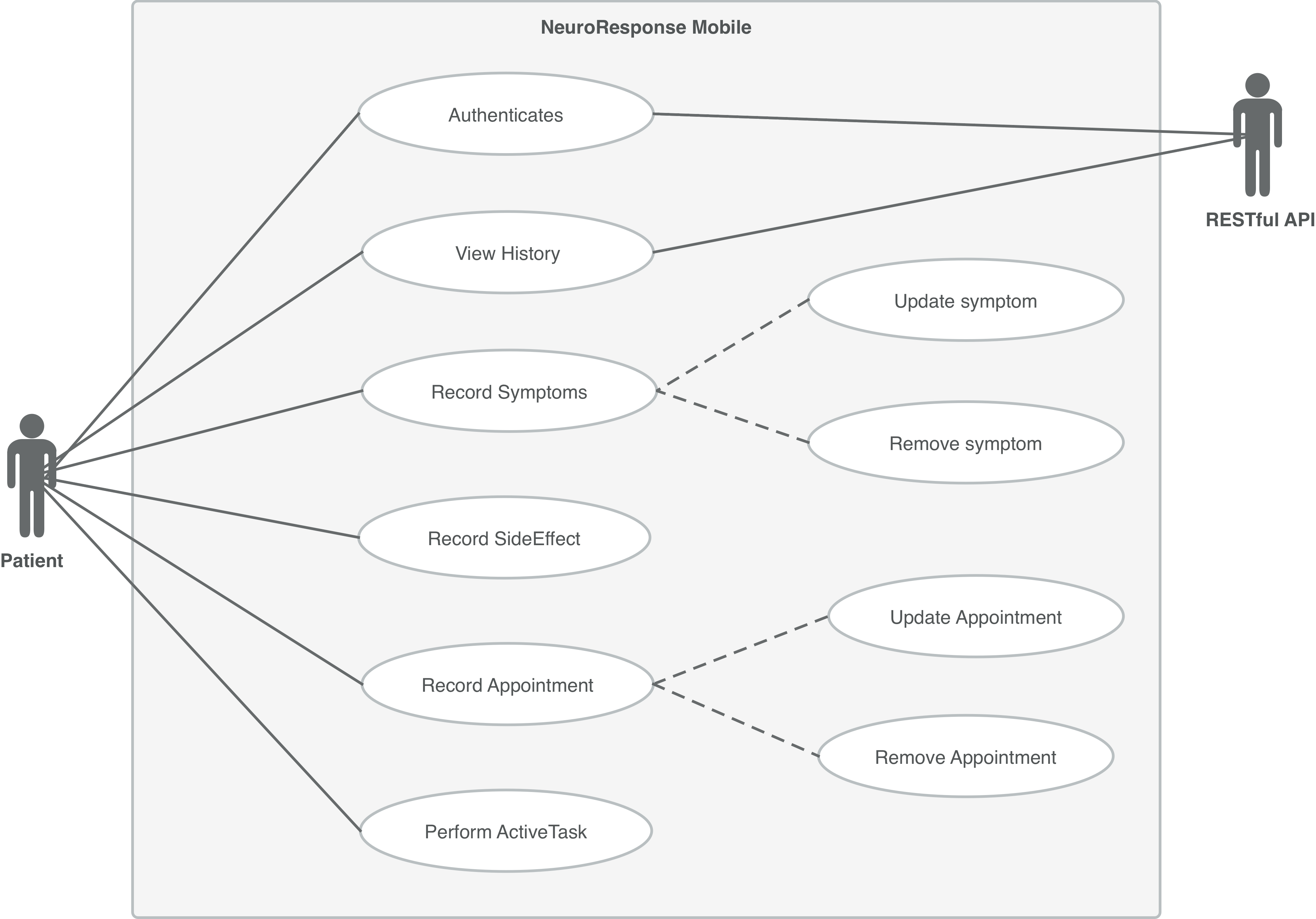
A use case diagram has to show the interaction between the system (application) and the external users (actors). We believe that this aim has to be achieved in a simple and visual way. From the previous we have extracted the must haves requirements and generated their corresponding use cases, as shown in the following figure.
List
| ID | Use case name |
|---|---|
| U_1 | PatientAuthenticates |
| U_2 | PatientRecordsSymtpom |
| U_3 | PatientRecordsSideEffect |
| U_4 | PatientSetsAppointment |
| U_5 | PatientModifiesAppointment |
| U_6 | PatientViewsSymptomHistory |
| U_7 | PatientViewsSideEffectHistory |
| U_8 | PatientPerformsActiveTask (only on iOS) |
Detailed use cases
PatientAuthenticates
- ID: U_1
- Brief description : Patient authenticates.
- Primary Actor(s) : Patient
- Secondary Actors(s) : RESTful API
- Main flow :
- Patient types in the NHS number and a code given by the clinician.
- Patient taps the authenticate button.
- The system displays a new view, the tracking view.
- The system displays the tracking view.
- Extensions
- System displays error message because on local input:
- Incorrect credentials.
- Server-side error. Patient couldn’t be retrieved.
PatientRecordsSymtpom
- ID: U_2
- Brief description : Patient records a set of symptoms.
- Primary Actor(s) : Patient
- Precondition : U_1
- Main flow :
- Patient taps the tracking view tab.
- Patient taps the symptoms button.
- The system displays a table view will all the general symptoms.
- Patient taps on a general symptom.
- The system displays a table view will all the specific symptoms
- Patient taps on a specific symptom.
- The system displays a pop-over to set a scale.
- Patient slides the slider to set up the scale.
- Patient taps set button.
- Patient taps on the back button.
- Patient taps save button.
- The system displays the track
- Extensions
- Patient taps on a symptom that is already set:
- Patient slides the slider to set a new scale.
- Patient taps on the remove button to unset the symptom.
- Patient discards the symptom. Patient taps on cancel button.
- a) Patient wants to record more symptoms. Repeat from action 5.
- b) Patient discards all the saves symptoms. Patient taps on cancel button.
PatientRecordsSideEffect
- ID: U_3
- Brief description : Patient records a side effect check.
- Primary Actor(s) : Patient
- Precondition : U_1
- Main flow :
- Patient taps the tracking view tab.
- Patient taps the side effect button.
- The system displays a questionnaire view 4. according to the drug the patient is on.
- Patient taps on an answer for the given question.
- Patient taps on next button.
- The system displays the next question.
- Repeat actions 4,5,6 until there are no more questions.
- The system displays the final screen of the questionnaire.
- Patient taps on save button.
- The system displays the tracking view.
- Extensions
- Patient wants to discard the questionnaire. Patient taps on cancel button.
PatientSetsAppointment
- ID: U_4
- Brief description : Patient sets an appointment.
- Primary Actor(s) : Patient
- Precondition : U_1
- Main flow :
- Patient taps on the appointments view tab.
- The system displays a table with all the appointments.
- Patient taps on the add appointment button.
- The system displays a pop up with title and date options.
- Patient sets a title.
- Patient sets a date.
- Patient taps on the save button.
- The system displays the history view.
PatientModifiesAppointment
- ID: U_5
- Brief description : Patient modifies an appointment.
- Primary Actor(s) : Patient
- Precondition : U_1, U_4
- Main flow :
- Patient taps on the appointments view tab.
- The system displays a table with all the appointments.
- Patient taps on an existing appointment.
- The system displays a pop up with the title and the date from the chosen appointments.
- Patient edits the details.
- Edits title.
- Edits date.
- Patient taps on the save button.
- The system displays the history view.
PatientViewsSymptomHistory
- ID: U_6
- Brief description : Patient visualises the symptoms history.
- Primary Actor(s) : Patient
- Secondary Actors(s) : RESTful API
- Precondition : U_1
- Main flow :
- Patient taps the tracking view tab.
- Patient taps the history view all button.
- The system displays a table with all the previous symptoms recorded.
PatientViewsSideEffectHistory
- ID: U_7
- Brief description : Patient visualises the side effects questionnaires history.
- Primary Actor(s) : Patient
- Secondary Actors(s) : RESTful API
- Precondition : U_1
- Main flow :
- Patient taps the tracking view tab.
- Patient taps the history view all button.
- Patient taps on the side effects tab.
- The system displays a table with all the previous side effects questionnaires recorded.
PatientPerformsActiveTask (only on iOS)
- ID: U_8
- Brief description : Patient performs an ActiveTask.
- Primary Actor(s) : Patient
- Precondition : U_1, iOS device
- Main flow :
- Patient taps the ActiveTask view tab.
- The system displays a table with all the available ActiveTasks to perform.
- Patient taps on a specific ActiveTask.
- The system displays the ActiveTask view.
- The patient follows the set of instructions unit the ActiveTask is finished.
- Extensions
- Patient wants to stop the active task. Patient taps on cancel button.
References
[1] Public Health England. (2016) “Life expectancy at older ages is the highest it’s ever been". [Online] Avaiable at: https://www.gov.uk/government/news/life-expectancy-at-older-ages-is-the-highest-its-ever-been
[2] The King’s Fund. (2018) "Technology in the NHS". [Online] Avaiable at: https://www.kingsfund.org.uk/projects/technology-nhs
[3] Amid Ayobi et al.. (2017) [Online] "Quantifying the Body and Caring for the Mind: Self-Tracking in Multiple Sclerosis". [online] Avaiable at: https://uclic.ucl.ac.uk/content/6-news-events-seminars/20170502-ucl-will-have-a-great-presence-at-chi-2017/ayobi.paper.pdf