Testing
Testing is a crucial part of any project and NeuroResponse was no different. Our general approach is to test key functionalities as we develop them following a TDD approach. Therefore, as we come closer the end of the project, we will have most of the features tested.
Unit testing
In order to follow a TDD approach unit testing is essential. With unit testing means we are testing the individual units of behavior of our project. An individual unit of behavior is the smallest possible unit of behavior that can be individually tested in isolation [50]. With TDD, first we write the tests and then the program logic to pass them.
However, for the mobile clients it resulted really difficult to follow the TDD approach when designing the UI workflow since if we want to test just a single component we had to mock all the other components. As a consequence, we ended up testing the essential logic of our mobile clients, the connections with the RESTful API. Most of these units test, are essentially integration tests because most of the logic of the mobile clients relies on posting and retrieving data from the server.
For iOS we have used XCTest framework [51] to write unit tests for the Xcode projects. This framework it is integrated seamlessly with Xcode's testing workflow. With this testing framework we have tested the main endpoints of the RESTful API that the mobile app can deal with such as posting symptoms and side effects as well as retrieving them. There are also tests for user authentication such as if the user is properly authenticated to present the new screen, to store the token...
For Android the system related components are created using Context class that cannot be used in Unit tests. Hence, we are using Mockito library to mock Context class and all objects constructed using context. All unit tests are performed using Junit library. We also recorded data input into devices shared preferences, which can be accessed through Android studio to recreate user data. Following is an example of a test to retrieve user setting from Shared Preferences:
  private Context context;
  private SharedPreferences sharedPrefs;

  @Before
  public void before() throws Exception {
      this.sharedPrefs = Mockito.mock(SharedPreferences.class);
      this.context = Mockito.mock(Context.class);
      when(context.getSharedPreferences(anyString(), anyInt())).thenReturn(sharedPrefs);
  }

  @Test
  public void testNotificationSettings() {
      when(sharedPrefs.getInt("notifications_color_indicator", Color.BLUE)).thenReturn(Color.GREEN);
      when(sharedPrefs.getBoolean("notifications_new_message_vibrate", true)).thenReturn(false);
      assertThat(SettingsValues.getNotificationColor(context), is(Color.GREEN));
      assertFalse(SettingsValues.isVibrationOn(context));
  }
For the server we have used django.test.TestCase, which is a subclass of unittest.TestCase, unittest is the Python standard library module. One of the great things about built-in Django's testing framework is that tests that require a database will not use the (production) database. Separate, blank databases are created for the tests. Then, regardless of whether the tests pass or fail, the test databases are destroyed. Folowing this approach, we have tested the different endpoints of the API, data validation and user authentication.
API testing (integration tests)
Integration tests determine if independently developed units of software work correctly when they are connected to each other [52]. We have proceeded with this testing strategy after all the unit tests have been passed. We are following a bottom-up approach, first testing the small isolated components and then linking them together to test the behavior as a whole.
As we have mentioned before, most of the unit tests we have for the mobile clients replicate integrations test, since most of the business logic requires to connect to the RESTfulAPI. Therefore, we are already testing the two components together in the case of the mobile clients.
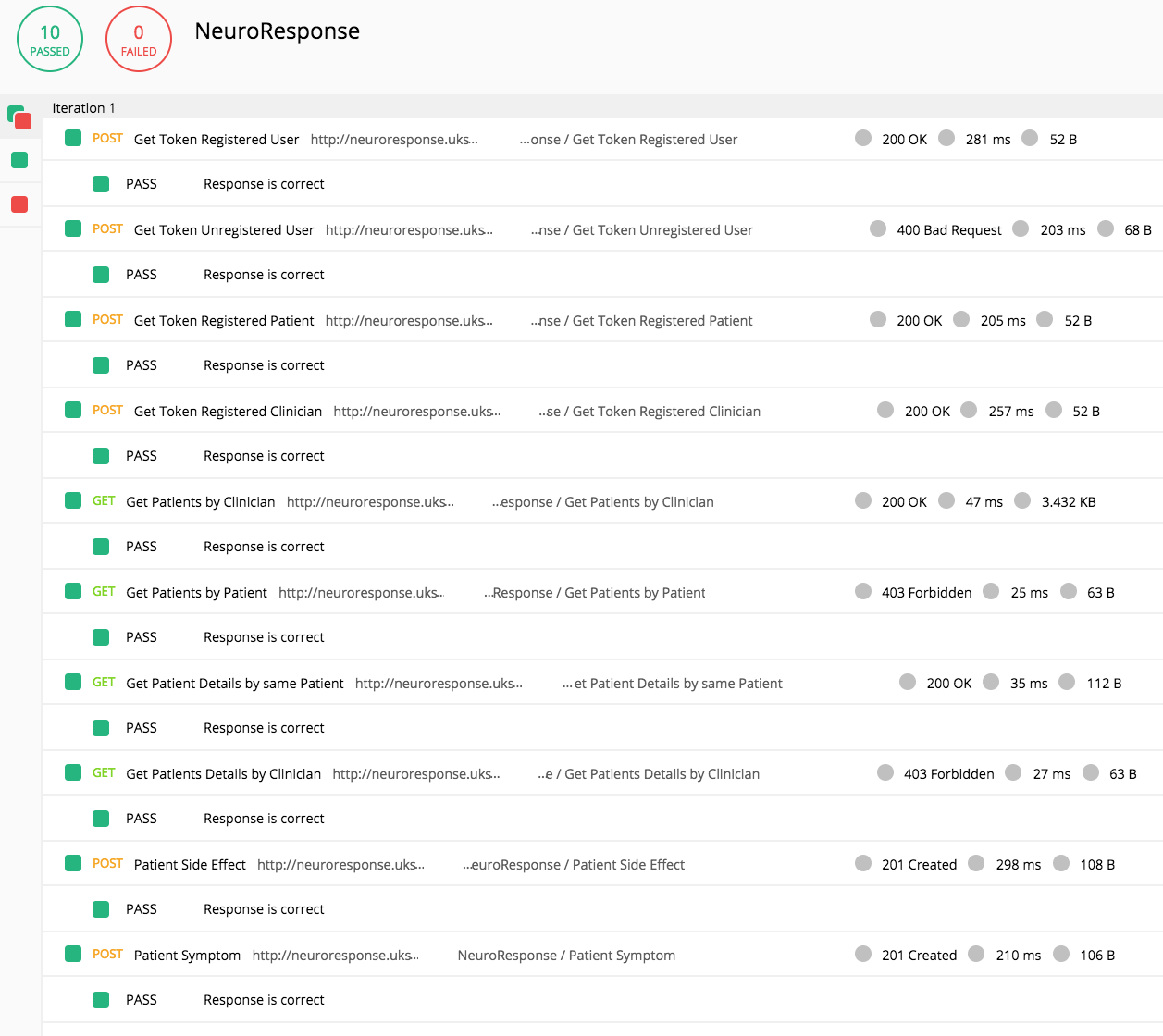
Another way we have used to test the API is through Postman [53]. It is really good to test the API’s behavior, consistency, or backward compatibility with just using JavaScript syntax. We have tested all of the endpoints of our API, testing things like HTTP status codes, response times and headers. Another feature of Postman is that we can collect the the tests into a single automated test sequence and run it automatically with the Postman Collection Runner.
We are considering this, integration testing, because these tests replicate the requests from the mobile clients, that would call the RESTFul API trying to retrieve or post data. We are using a testing pre-populated database that we have set up. By doing so we are testing all the components together.
Load testing
Load testing generally refers to the practice ofmodellingmodeling the expected usage of a software program by simulating multiple users accessing the program concurrently [54].
With load testing Load testing is testing that checks how systems function under a heavy number of concurrent virtual users performing transactions over a certain period of time.
To load test our server we have used Locust.io [55]. It is an easy to use framework for load testing where we define our user behaviour with Python code and then swarm our system with hundreds of simultaneous users. As you can see in the graph below the final iteration of the server outperforms the initial one.
Initial server: RESTful API (Django server) with SQLite3 database (for testing) on a virtual machine (Ubuntu 16.04) on Azure. Using nginx for reverse proxying.
Final server: dockerized version of the RESTful API with two containers, one for the Django sever and the other for a PostgreSQL database, both of them connected through a virtual network.
Compatibility testing
Compatibility testing is a type of software testing used to ensure compatibility of the application built with various other objects such as other web browsers, hardware platforms, operating systems versions, etc... [56]
As we mentioned earlier, in the research section, our mobile app is just compatible for Android and iOS. Knowing this, we also need to ensure that our app is compatible with the most possible number of OS versions for both platforms, but at the same time we need to implement the features that the app requires.
For iOS: it has been built using Swift 4 and it offers compatibility from iOS 10. Looking at the graph below (measured by the App Store on January 18, 2018), 93% of devices are using either iOS 10 or iOS 11.
For Android: it has been built using SDK level 21, offering compatibility for Android 5.0 onwards. It is compatible with 71% of all devices.
For both platforms we have run the app on all the versions mentioned earlier through simulator and the latest ones via a real device and in none of them the app has crashed. In addition, all the functionalities were working and without any major bugs.
UI testing
UI testing gives you the ability to find and interact with the UI of your app in order to validate the properties and state of the UI elements [57].
For iOS: we tried using XCTest the same framework we used for the unit tests. Creating UI tests in source code is similar to creating unit tests.
For Android: we tried using Espresso [58] test, included in the Android Studio tools, to record UI tests. Espresso accesses UI widgets and their properties, records interactions with UI elements and their subsequent changes.
However, both XCTest and Espresso test proved to be unreliable in terms of the time required to record and execute tests on a real device or simulator. In addition, XCTest documentation for UI Testing was outdated.
Thus, we decided to perform all the UI related tests on a real device by logging interactions and changes in data objects, by monitoring CPU performance, memory and network usage in Android Profiler tool and Xcode Instruments.
User acceptance testing
We carried out a session of user testing with a set of different users that had never used the app. We asked them to read the manual and start interacting with the app in order to verify if they would pass the test cases. For example we asked them the following tasks:
- Set a blood test reminder.
- Record a blurred vision symptom.
- Check the symptom history.
- Check the side effect history.
- Perform a Fitness Check Active Task.
Note: we gave the test users an NHS Number and a password in order to authenticate themselves.
Use cases
After asking them the questions, we went through the following list and verified if all the test cases were passed. The application, as shown in the table below, passed all the possible test cases.
| ID | Test case name | Use Case ID | Result |
|---|---|---|---|
| T_1 | PatientAuthenticates | U_1 | Passed |
| T_2 | PatientRecordsSymtpom | U_2 | Passed |
| T_3 | PatientRecordsSideEffect | U_3 | Passed |
| T_4 | PatientSetsAppointment | U_4 | Passed |
| T_5 | PatientModifiesAppointment | U_5 | Passed |
| T_6 | PatientViewSymptomHistory | U_6 | Passed |
| T_7 | PatientViewsSideEffectHistory | U_7 | Passed |
| T_8 | PatientPerformsActiveTask (only on iOS) | U_8 | Passed |
PatientAuthenticates
- ID: T_1 (U_1)
- Valid outcome :
- The patient enters the correct credentials and she is logged in (the new view is presented).
- The patient enters the incorrect credentials and she is not logged in (the view is not presented).
- Invalid outcome :
- The patient enters the incorrect credentials and she is logged in (the new view is presented).
- The patient enters the correct credentials and she is not logged in (the view is not presented).
- Status: passed
PatientRecordsSymtpom
- ID: T_2 (U_2)
- Valid outcome :
- The patient records a set of symptoms, saves them and they are available in the history view.
- The patient cancels the recorded symptoms, they should not appear in the history view.
- Invalid outcome :
- The patient records a set of symptoms, saves them and they do not appear in the history view.
- The patient cancels the recorded symptoms, they appear in the history view.
- Status: passed
PatientRecordsSideEffect
- ID: T_3 (U_3)
- Valid outcome :
- The patient records a side effect, saves it and it is available in the history view.
- The patient cancels the recorded side effect, it should not appear in the history view.
- Invalid outcome :
- The patient records a side effect, saves it and it is not available in the history view.
- The patient cancels the recorded side effect, it appears in the history view.
- Status: passed
PatientSetsAppointment
- ID: T_4 (U_4)
- Valid outcome :
- The patient sets an appointment, it should appear in the local calendar.
- Invalid outcome :
- The patient sets an appointment, it does not appear in the local calendar.
- Status: passed
PatientModifiesAppointment
- ID: T_5 (U_5)
- Valid outcome :
- The patient selects an appointment and modifies it. The updated appointment should appear in the local calendar.
- Invalid outcome :
- The patient selects an appointment and modifies it. The updated appointment does not appear in the local calendar, or it is remains the same as before.
- Status: passed
PatientViewSymptomHistory
- ID: T_6 (U_6)
- Valid outcome :
- The view displays an empty table if symptoms have not been record.
- The view displays a populated table with the correct recorded symptoms.
- Invalid outcome :
- The view displays an empty table even though symptoms have been record.
- The view displays a populated table, but recorded symptoms are missing.
- Status: passed
PatientViewsSideEffectHistory
- ID: T_7 (U_7)
- Valid outcome :
- The view displays an empty table if side effects questionnaires have not been record.
- The view displays a populated table with the correct side effects questionnaires.
- Invalid outcome :
- The view displays an empty table even though side effects questionnaires have been record.
- The view displays a populated table, but recorded side effects questionnaires are missing.
- Status: passed
PatientPerformsActiveTask
- ID: T_8 (U_8)
- Valid outcome :
- The Active Task asks for permissions, if they are denied, the active task should be canceled automatically.
- The Active Task does not ask for permissions, the Active Task is performed.
- Invalid outcome :
- The Active Task should ask for permissions and it does not. The active task continues.
- Status: passed
Feedback
Feedback from users
As mentioned before, we tested our app with 10 users. However this set of users were friends from the Computer Science Department and there were not patients with multiple sclerosis. Therefore, we are still missing a testing phase with real users (with the implications that involves).
On the other hand, all the team member, our client and in addition the 10 test users have been testing our app recoding data constantly and even though we have not tested it with the real type of user, we have been able to see how the system responds under different circumstances such as:
- Different types of devices.
- OS versions.
- Screen sizes.
Most of the users did not experience any trouble with the app, however, there was one suggestion from an iOS tester referring to add offline compatibility for the iOS app.
Feedback from client
We have been sendind our client the different iterations of our product. He has been approving the updates and suggesting possible modifications to make the product better:
- Integrate it with Apple Research Kit.
- Simplify the UI.
- Record user interaction.
- Make the authentication system easier.
In the end, we sent our client the finished product and he replied with the following comments:
Positive aspects:
- The app is clean, with an intuitive design and easy to use.
- Data visualisation is really useful.
- Key functionalities in place.
- Really impressed with Active Tasks on iOS.
Negative aspects:
- None.
References
[50] Fowler, Martin. (2014) "Unit Test". [Online] Avaiable at: https://martinfowler.com/bliki/UnitTest.html
[51] Apple. (2018) "Apple Documentation: XCTest". [Online] Avaiable at: https://developer.apple.com/documentation/*xctest*
[52] Fowler, Martin. (2018) "Integration Test". [Online] Avaiable at: https://martinfowler.com/bliki/IntegrationTest.html
[53] Messinger, James. (2013) "API testing tips from a Postman professional". [Online] Avaiable at: https://www.amazon.com/Every-Computer-Performance-Book-Computers/dp/1482657759/
[54] Wescott, Bob. (2013) "The Every Computer Performance Book, Chapter 6: Load Testing". [Online] Avaiable at: https://www.amazon.com/Every-Computer-Performance-Book-Computers/dp/1482657759/
[55] Locust.io. (2018) "Locust.io". [Online] Avaiable at: https://locust.io
[56] ISTQBExamCertification. (2017) "What is Compatibility testing in software testing?". [Online] Avaiable at: http://istqbexamcertification.com/what-is-compatibility-testing-in-software/
[57] Apple. (2018) "Apple Documentation: Unit Testing". [Online] Avaiable at: https://developer.apple.com/library/content/documentation/DeveloperTools/Conceptual/testing_with_xcode/chapters/09-ui_testing.html
[58] Android. (2018) "Testing UI for a Single App". [Online] Avaiable at: https://developer.android.com/training/testing/ui-testing/espresso-testing.html