Research
To ensure that we were approaching the project correctly, we decided to research about multiple sclerosis as a disease, but also the specific programming languages and frameworks that would best aid us in the development process.
We also tried to identify any open-source projects that would give us an advantage in building this project. Whilst our client from the NHS provided assistance with this, we still felt the need to take the opportunity to fully research our options and decide upon the right technologies and take inspiration from suitable, related projects.
Infrastructure
To implement NeuroResponse Mobile we would consider three main components in our system and an optional one. The three main would be:


The optional component is the complementary clinician portal, which is not an initial requirement but it could be useful for future stages of the deployment process. The main use of this portal would be for clinicians to register new patients into the system.
Mobile apps (iOS and Android)
The first component of the system is a mobile app. According to the market share held by mobile operating systems in the UK by March 2018 [4] is:
- iOS 53%
- Android 43%.
- Rest 4%.
If we want to rich the highest market share of patients/users we will have to clearly develop an app for the two main platform which holds a 96% of the marketshare, Android and iOS.
We have two main choices to develop a cross platform app, one way is using cross-platform frameworks and the other one is using native apps.
Native app: a native mobile app is an application which meets the requirements of a particular operating system by using its SDK (as well as hardware memory, gear and other applications installed on a device) [5].
Cross-platform app: is a mobile app which is compatible with multiple operating systems and can therefore run on any smartphone or tablet [6]. We have multiple options:
- Web apps: make use standard of standard web technologies. It would simply by an application delivered through a web page. It has some vital limitations such as session management, offline storage, and access to native features.
- Hybrid apps: it embeds HTML5 apps inside a thin native container, combining both elements of native and HTML5 apps.
- Native cross-platform apps: each operating system has its SDK and major tech stack (Java for Android and Objective-C/Swift for iOS app development). They run on top of SDK and use the same codebase for both Android ad iOS apps. Native cross-platform applications are primarily built with Xamarin, React-Native…
For our project, we will have to use local storage (to store the patient records) and session management (keep patient logged in), therefore we discard the web app option.
One of the requirements for our project is to record the interaction between the patients and their phones, therefore we will require access to the sensors of the phone. For this reason, we can also discard hybrid apps because of restrictions to access the sensors, and also performance issues and compatibility issues with native frameworks such as Apple ResearchKit (also required by our client).
Therefore, we are left with the native apps. In this field, we have two choices: develop independently each mobile app using Java for Android and Swift for iOS or use the popular framework React Native.
React-Native is a cross-platform mobile framework that lets you build mobile apps using only JavaScript and then it is compiled to native code, Swift for iOS and Java for Android [7]. This means that React-Native provides the benefits from both Native and Hybrid Mobile Apps. Using React-Native we would be able to access sensors and native frameworks such as Apple Research Kit.
However, the main inconvenient with React-Native is that we do not know it, and in our case, one team member already knows Java for Android development and the other Swift for iOS. Therefore, since we have the option to start development from the very first moment, we have chosen to develop independently the iOS and Android apps with their respective native languages (Swift and Java) and avoid having to learn a new language.
Android
- We are going to use Google Places API to identify precise data of the location user is currently doing his Symptom Check test.
- With Google Places API, we are not just going to raw data from GPS or Network provider, but also applies longitude and latitude to obtain a list of the locations registered for these coordinates with the exact address.
- Users and clinicians would be able to track where the test was held.
iOS
Instead of building everything from scratch, we can use Apple ResearchKit [8]:
A software framework for apps that let medical researchers gather robust and meaningful data. An open source framework for building apps, ResearchKit makes it easier to enrol participants and conduct studies. Since its introduction, the amount of data collected — and the insight gained — has been groundbreaking.
- We can use Apple Research Kit, as it has ready-made various activity testing tests called Active Tasks.
- Active tasks invite users to perform activities under partially controlled conditions while iPhone sensors are used to collect data. For example, an active task for analysing gait and balance might ask the user to walk a short distance, while collecting accelerometer data on the device.
- The results of the Active Tasks can be applied for monitoring patients wellbeing and identifying some symptoms, for example tremors can be diagnosed by a simple screen touching activity.
- With ResearchKit we also have Surveys which are a sequence of questions. We are are going to using them to implement the questionnaires.
- ResearchKit also offers Consent Document Model making it easy to display consent documents and to obtain a participant’s signature.
Server
Now that we have sorted out the front-end of our, system the mobile apps, we need to consider where all the data is going to be stored. For this reason we will need a server.
When it came to choosing a framework to use for the server, we have several options.
Ruby on rails [9] is very popular model-view controller web framework. We took it into consideration simply because it is a well-known framework with a large community around it. We had heard that this framework was extremely powerful and did most of the back-end stuff for you. However, we were looking for a framework that worked with a language that we were familiar with and since none of us had any experience with Ruby this particular framework seemed unlikely.
Another alternative is Node.js [10], which is framework served as a runtime environment on JavaScript that allows developers to run JS on the server side, although we had no prior experience with it, it is easy to learn, it would give us a lot of freedom, we would have lot of flexibility to structure the server and it has an active community. Another great thing about Node.js support for package management using the npm tool that comes by default with every Node.js installation. There are tons of really useful packages out there which would help us to make a modular server from scratch fulfilling our specific needs.
Finally, Python, a language all three of us knew to some extent, has two main web development frameworks: Django [11] and Flask [12]. We looked at both when deciding. Flask is a micro framework, meaning it is very much up to the developer to create everything, which is great if you want full control over everything. However, we realised that the scope of this project meant that we did not require such precise control. Therefore, we are going to choose Django mainly because we have experience with Python but also for the following features:
Django compared to Node.js gives people more directions to work with from scratch. Django has been designed in a way to help the developers make an application as fast as possible. From idea, production to release, Django helps in making it both cost effective and efficient. This is because it already comes shipped with a lot of features such as user authentication, site maps, content administration…
Django is also secure: it ensures that developers don’t commit any mistakes related to security. Some of the common mistakes include SQL injection, cross-site request forgery, clickjacking and cross-site scripting. To manage effectively usernames and passwords, the user authentication system is the key.
Also, the community surrounding Django is huge and we recognised that this would be very beneficial when it came to building the project because, if we got stuck, it would be easy to do a quick Google search and find useful advice and solutions. Also, we had experience with Python, so the learning curve would not be as as steep meaning we could begin implementing features rather quickly.
Finally, Django is versatile thanks to its built-in ORM which offers great utility to abstract access to databases. Django offers a lot of support for SQL database, therefore it results really easy to change from one SQL engine to another.
It is worth mentioning that all these nice features imply a few caveats. Django is too monolithic, everything is based on it ORM and it is not easy to modularise every component, since they get deployed together and a knowledge of full system is required to work [13].
RESTful API
We decided to use Django for the server, but then how are we going to serve the content to the mobile clients. The clear choice is through a RESTful API.
RESTful services and the Web provide a framework and structure for content delivery that is scalable, in size and in use cases [14]. Through them we can to expose parts of your application to third-parties simply making available the information you store in databases using a standardised format, such as JSON. Thanks to this, any external application can interact with our application and our data, without having to connect directly into your database [15].
Other benefits from a RESTful architecture:
- Our system components will remain properly decoupled and can be evolved more easily in the future than if you had tied directly the mobile apps with the database.
- It will not matter if our database is MySQL or MongoDB, or if your application was written in Java or Python. This will give us a lot of flexibility to integrate it with our mobile clients.
- It will also help if we want to be able to update the server regularly without needing to update the client software

Now, if we want to provide a RESTful API through Django, there are two main frameworks to create customisable abstractions for REST interfaces. One is Django TastyPie [16] and the other Django REST Framework (DRF) [17]. DRF is the most popular one and seems the best option, since its better documented, more modular and pluggable and it also supports a browsable API (really useful for the early stages of development). TastyPie on the other hand is older an although it can do almost anything, is less Django-style. Therefore, we are going to choose DRF. In addition DRF also has:
- The Web browsable API is has huge usability.
- Authentication policies including packages for OAuth1a and OAuth2.
- Serialization that supports both ORM and non-ORM data sources.
- Customizable all the way down.
- Extensive documentation, and great community support.
- Used and trusted by recognised companies such as Mozilla, Red Hat, Heroku, and Eventbrite.
Database
We are going to use a Relational Database Management System (RDBMS) since Django is designed essentially to be used with relational databases thanks to it model system [18]. Apart from this fact, since out data is going to be structured and unchanging then, there is no reason to use a system designed to support a variety of data types and changing data such as non-relational databases.
The other reason to use relational over non-relational is that it is the standardised protocol over the NHS and widely-used. This can be essential if in the future we have to integrate our system with an already existing patient record system [19].
A comparison of the most popular relational databases [20]:


- SQLite: very powerful, embedded relational database management system.
- Advantages:
- It gets embedded inside the application that makes use of.
- Built-in (default) with Django.
- Integration works with functional and direct calls made to a file holding the data.
- Fast and efficient.
- Disadvantages:
- No user management
- Lack of possibility to tinker with for additional performance
- Conclusion: it can be useful for testing.
- Advantages:
- MySQL: The most popular and commonly used RDBMS.
- Advantages:
- Easy to integrate with Django.
- Easy to work with.
- Scalable and powerful.
- Secure.
- Speedy.
- Disadvantages:
- Known limitations.
- Reliability issues.
- Stagnated development.
- Conclusion: can be a viable option for our server.
- Advantages:
- PostgreSQL: The most advanced, SQL-compliant and open-source objective-RDBMS.
- Advantages:
- An open-source SQL standard compliant RDBMS.
- Strong community.
- Strong third-party support
- Extensible
- Disadvantages:
- Performance: for simple read-heavy operations, PostgreSQL is less efficient than MySQL.
- Less popular.
- Hosting is harder due to its popularity.
- Conclusion: can also be a viable open-source option for our server.
- Advantages:
Our choice lies between MySQL or PostgreSQL. Thanks to Django ORM tools, it results really easy to change from one database engine to the other. In terms of security both choices offer the same features, so we are going to try using PostgreSQL since it is the open source option. If we any problems with it, changing to MySQL will not result a problem.
Competing solutions
In terms of finding projects that are related to ours, there are quite a few already endorsed by the NHS. Our client identified two in particular that we may find useful: Patients Know Best and Symtrac MS.
We had some minor issues when it came to exploring the related projects because they are all paid-for services or for strict use by the NHS, in which we would have to be a professional clinician in order to access. This held us back a bit, however the respective websites of each service gave us a fairly good overview and provided screenshots of the apps.
Patient Knows Best
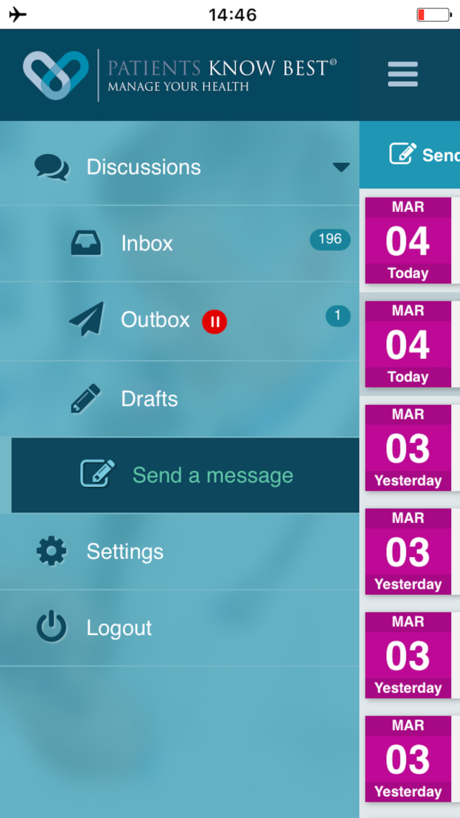
Web application and mobile application used by the NHS with multiple features [21]. These include:
- Ability to integrate with pre-existing medical records, lab systems and case management systems, they can show immediate or delayed lab results, copies of the users’ case notes, appointment letters, discharge letters, reports and a whole host of the patient’s data.
- Offers online message and video conferencing, personalised care plans and they integrate with tele-care apps for home monitoring.
- Ability for patient to monitor and track symptoms and alerts for clinicians for patient symptom tracking.
One of the limitations of such an application is that it has such a large variety of features, from the viewpoint of a non-technical user, that may seem overwhelming. Also, our client explained that their concern about this application is that the clinician cannot limit the data the patient can view.
Evaluating the application in terms of our client’s requirements:
- It is not at all tailored towards people suffering MS.
- Lacks simplicity.
- Too many condensed features, can seem overwhelming.
Symtrac MS
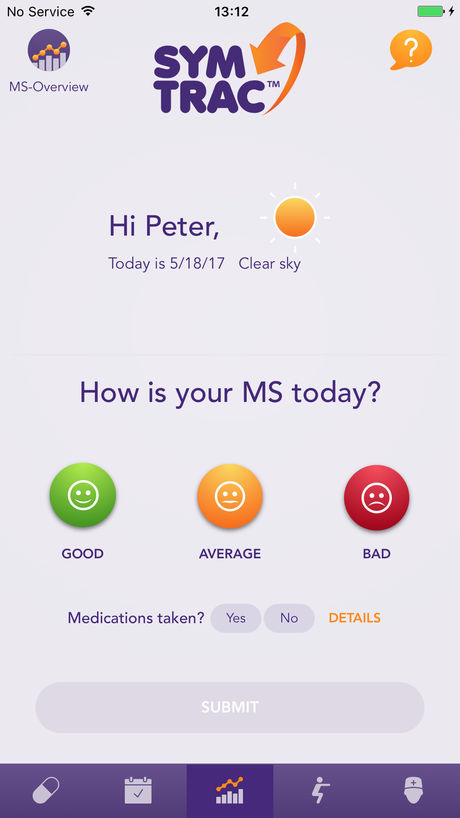
This is a mobile application that is a more similar to our application [22]. It is tailored to patients with multiple sclerosis. The features of this application include: symptom tracker, wellbeing diary, a record of your doctors and nurses contact details, an appointment centre and a medication tracker.
The main advantages of this application is that it is tailored towards people with MS, it has a good way of monitoring the symptoms and has a good way or organising the patient’s data.
The limitations of this application is that everything has to be imputed by the user, which means medical data could be inputted incorrectly which could affect the treatment.
- Evaluating this in terms of our client requirements:
- It is fitted better than any other application that we found.
- It is designed in a way that it is easy for people with motor and visual disabilities, which can happen with the progression of MS.
Comparison
| Name | Platform | Pros | Cons |
|---|---|---|---|
| Patient Knows Best | Web/Mobile |
|
|
| Symtrac MS | Mobile |
|
|
Summary
For the mobile app we are using fully native choices, which are Java for Android and Swift for iOS. In this way we can maximise performance, make use of all possible sensors and use native frameworks such as Research Kit. Apart from being a symptom tracker, our app will also collect data from various sensors for the research purposes. The app will record patient's interactions by tracking the position of the screen touch and obtain data from the accelerometer sensors.
For our server we are using Django in conjunction with Django Rest Framework and a relational database (PostgreSQL). Using these tools, we will be able to provide a RESTful API that will be used from the mobile clients. At the same time, this will also be extensible platform for the future, for example to provide an API for the clinicians apps.
References
[4] Statista. (2018) Market share held by mobile operating systems in the United Kingdom (UK) from December 2011 to March 2018". [Online] Avaiable at: https://www.gov.uk/government/news/life-expectancy-at-older-ages-is-the-highest-its-ever-been
[5] Gopala KR. (2018) "10 Week Course - Mobile Dev". [Online] Avaiable at: https://github.com/gopala-kr/10-weeks/tree/master/Projects-Blogs/04-mobile-dev
[6] Salesforce. (2018) "Native, HTML5, or Hybrid: Understanding Your Mobile Application Development Options". [Online] Avaiable at: https://developer.salesforce.com/page/Native,_HTML5,_or_Hybrid:_Understanding_Your_Mobile_Application_Development_Options
[7] Facebook. (2018) "React Native". [Online] Avaiable at: https://facebook.github.io/react-native/
[8] Apple. (2018) "Research Kit". [Online] Avaiable at: http://researchkit.org
[9] Ruby on Rails. (2018) " Ruby on Rails". [Online] Avaiable at: http://rubyonrails.org/
[10] Tomislav Capan, Node.js Foundation. (2017) "Why the Hell Would You Use Node.js". [Online] Avaiable at: https://medium.com/the-node-js-collection/why-the-hell-would-you-use-node-js-4b053b94ab8e
[11] Django Project. (2018) "Django". [Online] Avaiable at: www.djangoproject.com
[12] Flask. (2018) "Flask". [Online] Avaiable at: http://flask.pocoo.org
[13] Steven Hansen. (2017) "Advantages and Disadvantages of Django". [Online] Avaiable at: https://hackernoon.com/advantages-and-disadvantages-of-django-499b1e20a2c5
[14] MIT Media Lab. (2018) "Chain API". [Online] Avaiable at: https://www.media.mit.edu/projects/chain-api/overview/
[15] Microsoft Azure. (2018) "API design". [Online] Avaiable at: https://docs.microsoft.com/en-us/azure/architecture/best-practices/api-design
[16] Daniel Lindsley. (2017) "Tastypie". [Online] Avaiable at: https://django-tastypie.readthedocs.io/en/latest/
[17] Tom Christie. (2017) "Django REST framework". [Online] Avaiable at: http://www.django-rest-framework.org
[18] Django Project. (2018) "Documentation - Models". [Online] Avaiable at: https://docs.djangoproject.com/en/2.0/topics/db/models/
[19] Health and Care Information Centre. (2015) "England’s Health Service adopted Azure to cut costs—and then found the real benefits". [Online] Avaiable at: https://customers.microsoft.com/doclink/englands-health-service-adopted-azure-to-cut-costs-an1
[20] O.S. Tezer. (2014) "SQLite vs MySQL vs PostgreSQL: A Comparison Of Relational Database Management Systems". [Online] Avaiable at: https://www.digitalocean.com/community/tutorials/sqlite-vs-mysql-vs-postgresql-a-comparison-of-relational-database-management-systems
[21] Patients Know Best. (2017) "Patients Know Best". [Online] Avaiable at: https://www.patientsknowbest.com
[22] Novartis UK. (2015) "Symtrac MS". [Online] Avaiable at: http://www.symtrac.com/ms/