Requirements
1. Project Background and Partner Introduction
Many factors, such as climate change, post-pandemic complications, and civil conflicts are driving a rise in hazard events around the world - many more people are affected each year. As thus, the importance of reporting on such hazard events and classifying them properly becomes increasingly evident: the more they are accurately scrutinised, the more they can be used as aggregate data to prevent casualties or property damage. However, different organisations report and classify hazards differently, making collaboration difficult and the collection of big data next to impossible.
To mitigate this rift, a 2018 collaboration between the United Nations Disaster Risk Reduction (UNDRR) and the International Science Council sought to unionise the hazard classification process. They proposed a detailed hazard taxonomy scheme with over 300 different hazard types. Unfortunately, almost no organisations have adopted the taxonomy scheme today despite rigorous planning and efforts. This is due to its complexity: even an expert on natural hazards would find it difficult to accurately classify every event report scenario. Reading through the 100+ pages of definitions is also a chore; a faster and easier way to classify hazards is necessary for the widespread adoption of this taxonomy scheme.
The project partner for this project was Hamish Patten, a data analyst working for the International Federation of Red Cross and Red Crescent Societies (IFRC). As an expert on data analysis, he specifically understood the importance of uniformity when aggregating data. But when LLMs such as ChatGPT became commercially available, he recognised that such technology could facilitate the classification of hazards in a previously unseen manner.
2. Project Goals
This project aims to build a lightweight tool that will guide users to quickly and accurately classify a hazard event report with respect to the full ISC-UNDRR taxonomy scheme. The tool will employ the use of a Large Language Model (LLM) to scan through the text and determine possible hazards that are present according to the report. The tool will then make sure that these events actually happened by surfacing clarification questions, so that the user can confirm that the hazard actually took place. In this way, the tool guides the user towards an accurate classification of the hazards involved in any event report. The tool also aims to cut down the time required to tag an event report by up to 90%. Through streamlining a rather tedious process, the project members hope that the tool incentivises the widespread adoption of the ISC-UNDRR taxonomy scheme.
3. Gathering Requirements
To find out the exact scope of the project, the project members created an online survey that was sent to members of the three main target groups of the tool (Field Workers, Data Analysts, Disaster Risk Experts). These key target groups were established by a discussion featuring a hazard classification manager from the IFRC, Hamish Patten, and the project group members, wherein they discussed critically who would be tagging the majority of reports and thus would require access to this tool the most. The survey aimed to rank the potential features and design choices by necessity and eventually establish a MoSCoW requirements list.
The questions in the survey broadly reflected specific requirement categories, since the group members aimed to deduce the diverse needs of the target groups. The result of the survey are detailed as follows:
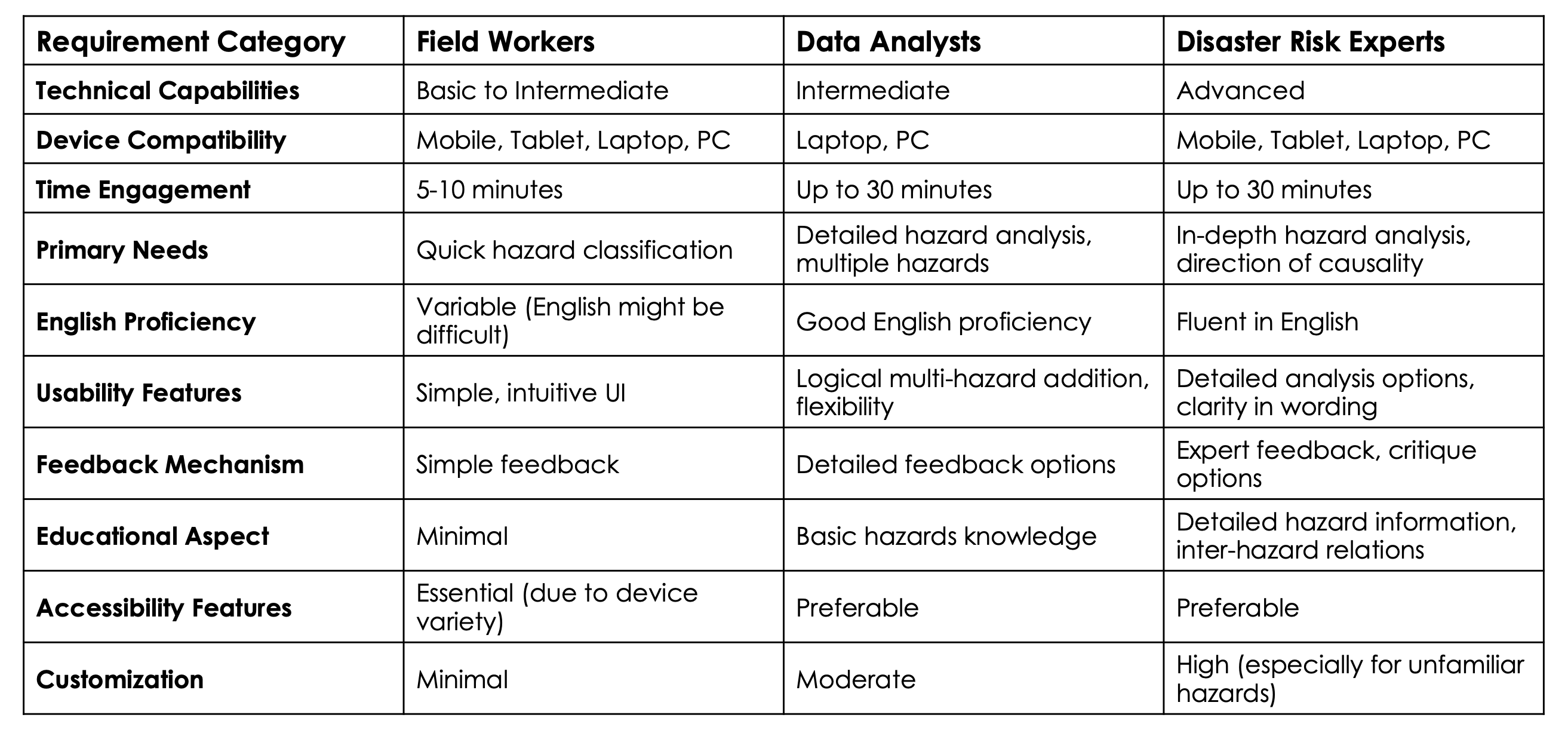
Figure 1: A table of requirements for each category derived from a survey sent to major target groups.
To ensure that the needs of all target groups was met as closely as possible, the minimum requirement in each requirement category was set to the lowest bar. For example, since field workers may have basic technical capabilities as opposed to the more experienced data analysts and disaster risk experts, the tool must be designed to be as user-friendly and guiding as possible. Similarly, the most important usability features were also equally considered and were specifically designated as top priorities.
The team members also requested further technical information (below) from their IFRC mentor, Hamish Patten. Through his expertise, the technical requirements of the tool were decided as well.
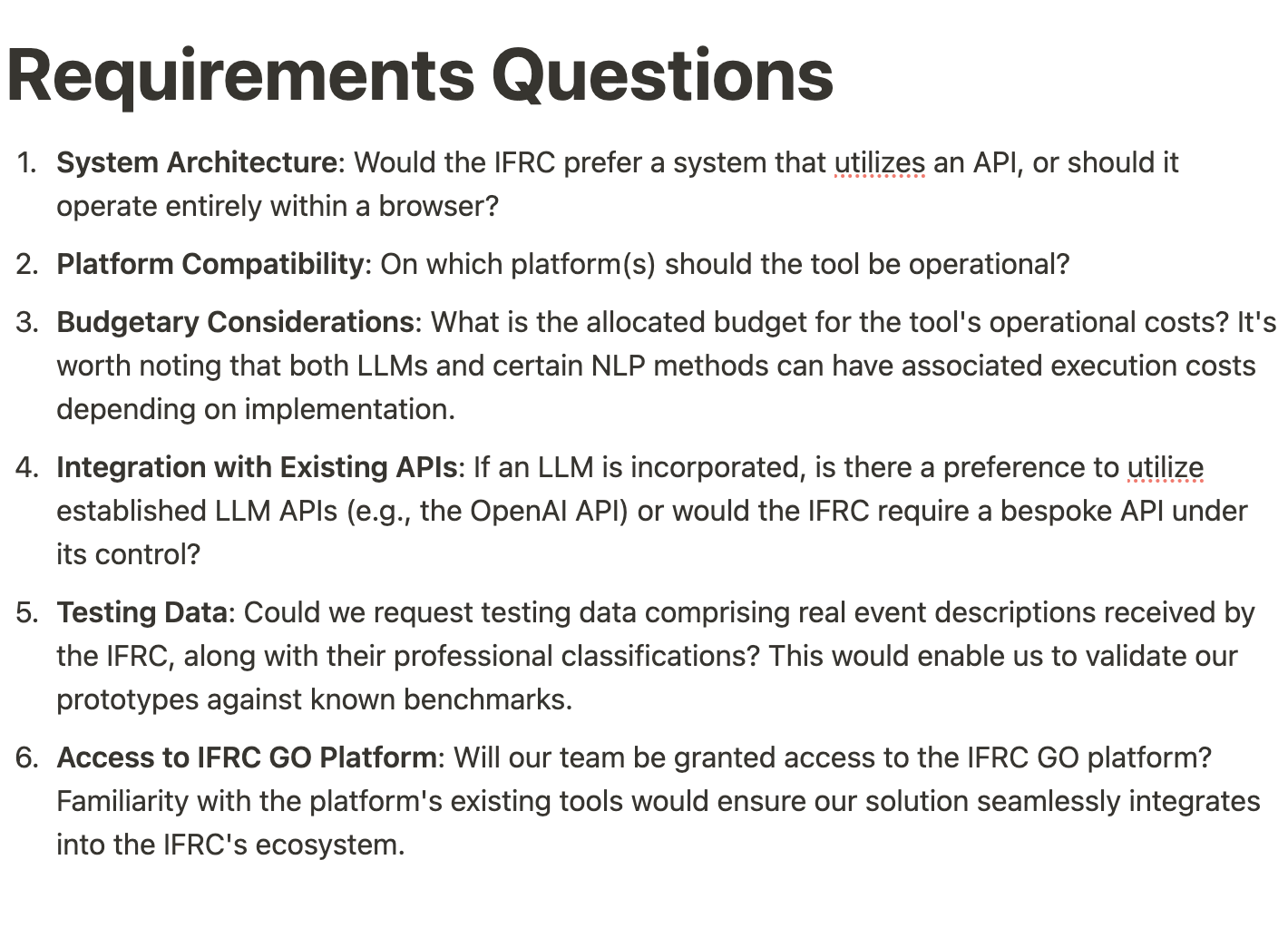
Figure 2: A set of technical questions that were sent to the IFRC mentor to gain his clarifications on.
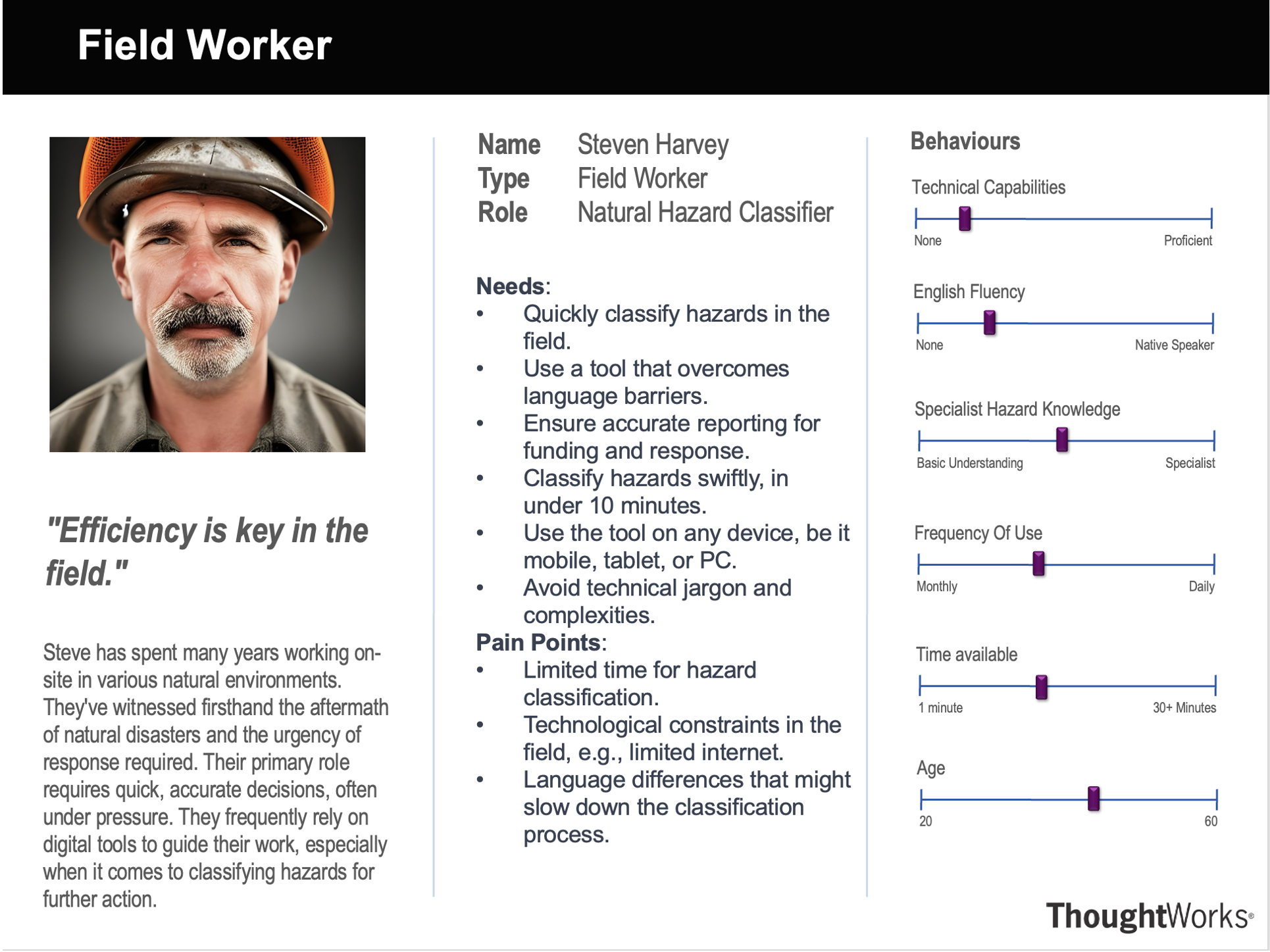
4. Personas
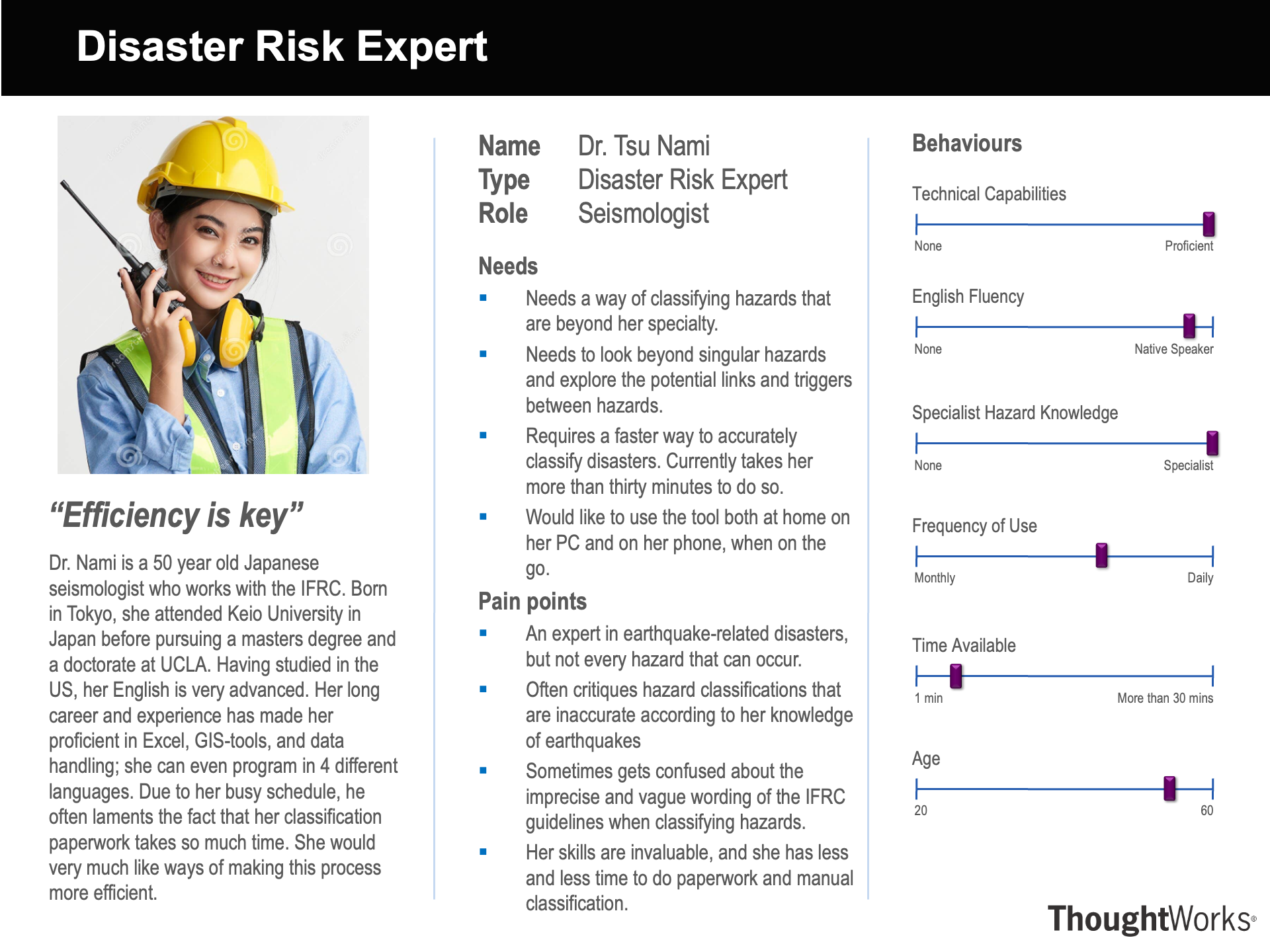
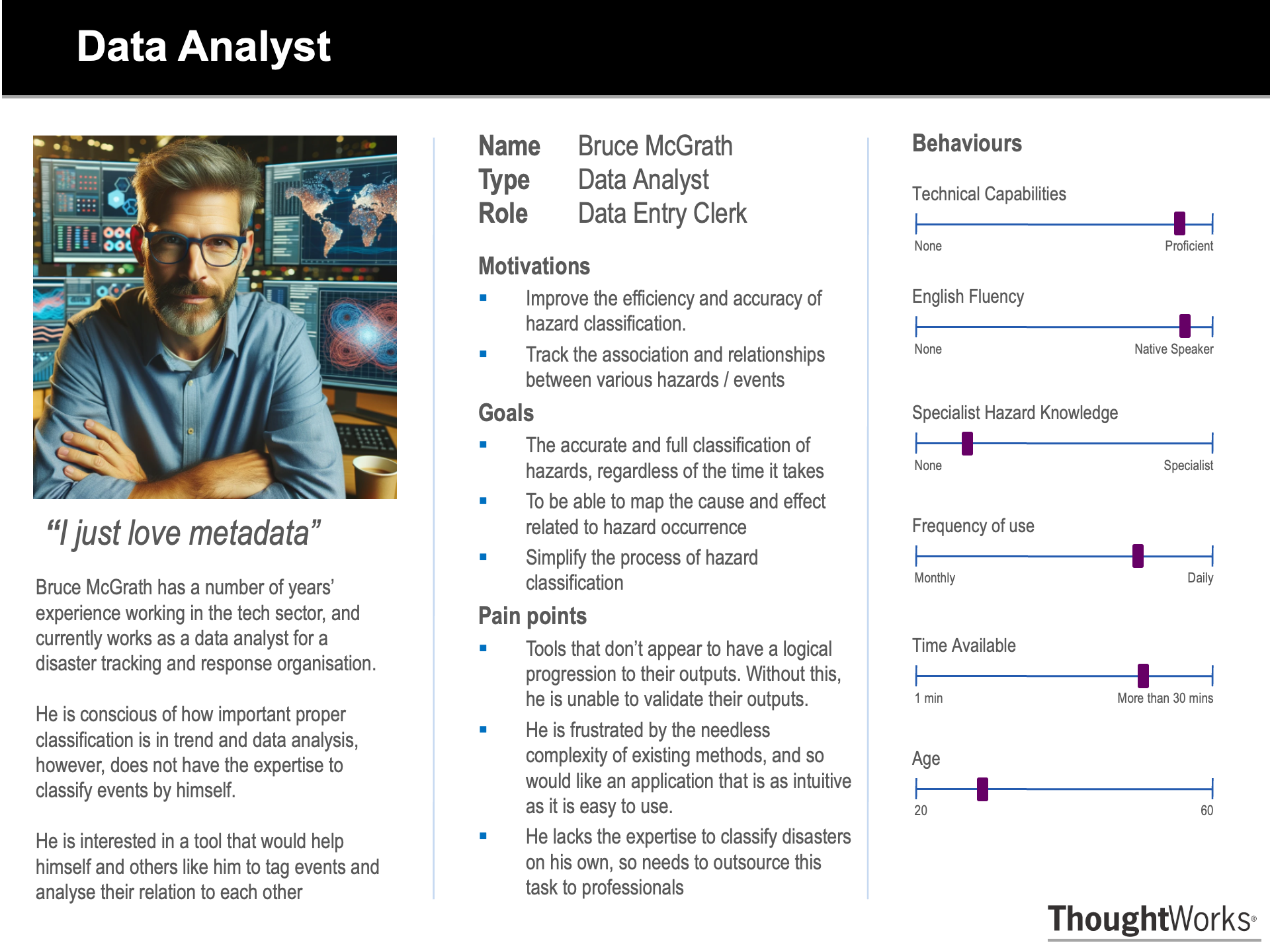
Through probing deeper into the specific nuances of the target groups, the group determined some pseudo-personas based on real members in the target groups. These eventually aided in deciding the final set of requirements.
5. Use Cases
The hazard taxonomisation tool has many uses aside from its main intended purpose. Its primary job is to simplify hazard classification by abstracting expert-specific knowledge and reducing the time needed for this process. A use case diagram and use case list were created to illustrate the tool in action.
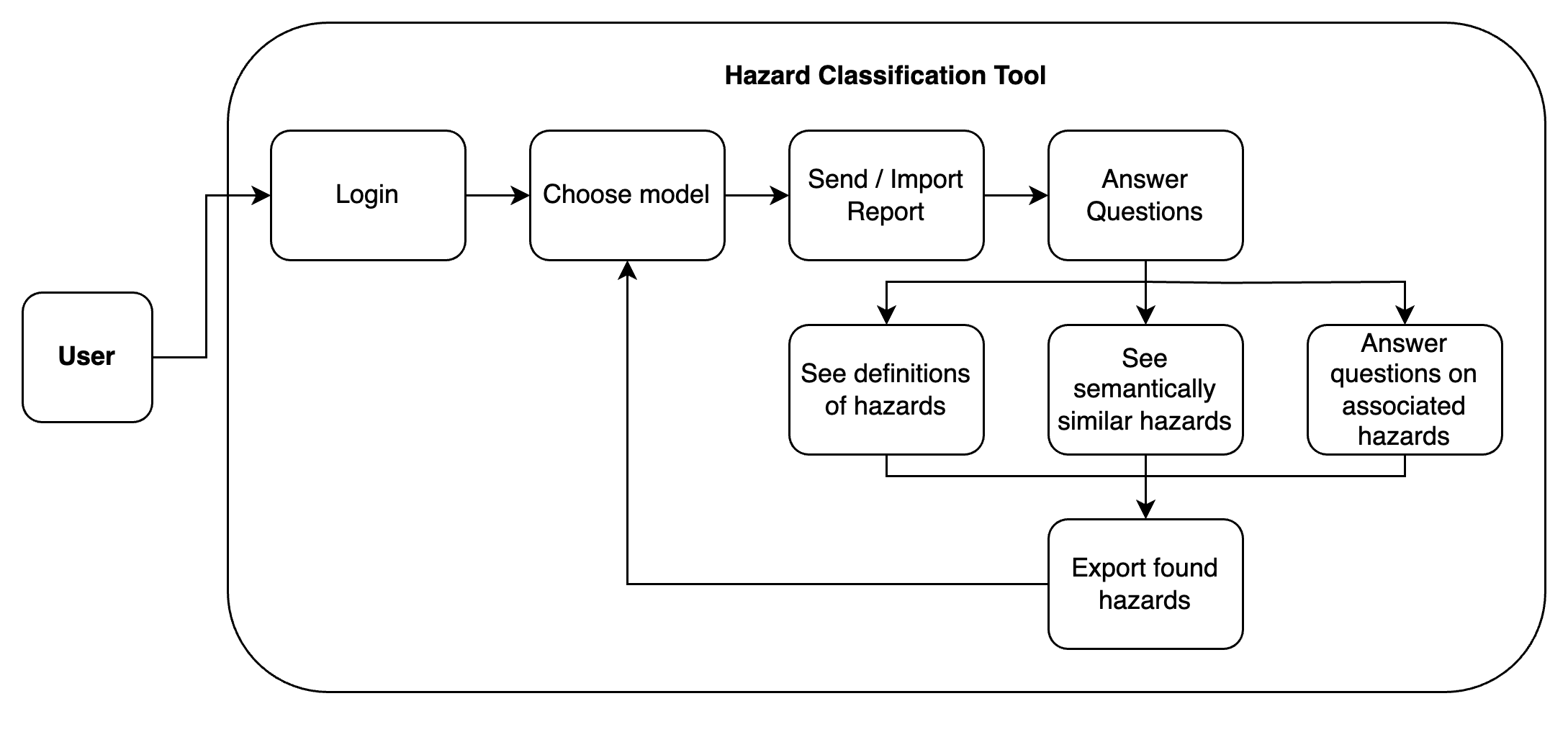
Figure 3: A simple program flow diagram of the tool.
| ID | Use Case for User |
|---|---|
| HID1 | Choose Model |
| HID2 | Send / Import Report |
| HID3 | Answer Questions, See definitions of hazard, Answer questions on associated hazards |
| HID4 | See semantically similar hazards |
| HID5 | Export found hazards |
| HID6 | Re-running classification process |
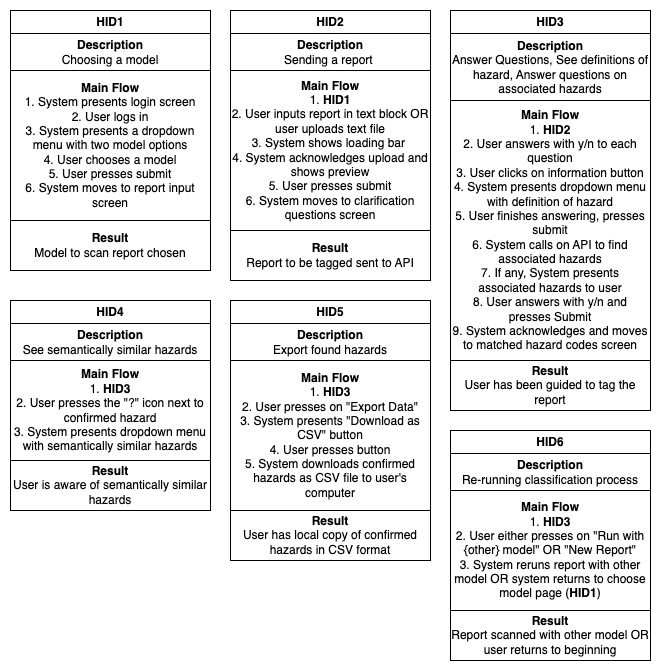
Figure 4: Descriptions of each use case.
N.B. the admin side of the hazard classification tool was not included in the diagram and use case list, as it was redundant and not the focus of the project.
Another main role of the tool is as a proof of concept. This tool serves as a reminder that with proper resources and investment, a further refined classification tool is not in the realm of fantasy. The tool served, and eventually evolved into, a compelling pitch to IFRC internal managers, advocating for dedicated research efforts aimed at streamlining classification mechanisms.
Furthermore, the tool can also be used for several other purposes. For example, it can be used as an educational resource to teach users about various hazard types and intra-hazard associations. Due to its modular and scalable nature, it can also be used later as part of a bigger, more advanced system. In particular, the tool can easily be expanded to collect aggregate data. Similarly, many of the individual modules can be easily swapped out and replaced as more functionality is implemented.
6. MoSCoW Requirements List
6.1 Functional Requirements
The functional requirements were defined from all the research into the target groups that the project members performed, as well as their Mentor’s specific technical guidance.
6.1.1 Must Haves
| ID | Requirement | Description | Priority | Completed? |
|---|---|---|---|---|
| R1 | Identification of all hazards in a report according to the UNDRR-ISC Hazard Information Profiles (HIPs) | The tool must take a report as input, and then through some method produce a list of hazard codes (from the HIPs) that are present at the event the report is describing | 1 | Yes |
| R2 | Intra-Hazard linkage classification, clustering of hazards | We have to, through some method, identify the causal links between different hazards. This can be clustering or one hazard triggering another. | 1 | Yes |
| R3 | Semantical Similarities Warning System | Since many hazards differ through slight nuances, the tool must have a feature that warns users of similar hazards. | 1 | Yes |
| R4 | Individual Components Testing | All core classification tools must be comprehensively tested. Any ancillary features (front-end) need only acceptance testing as they will be replaced by the client. | 2 | Yes |
6.1.2 Should Haves
| ID | Requirement | Description | Priority | Completed? |
|---|---|---|---|---|
| R5 | Ranking hazards by order of occurrence and impact | To support future data analysis, we collect the order in which the hazards occurred, and how destructive they were in comparison with each other. | 3 | Yes |
6.1.3 Could Haves
| ID | Requirement | Description | Priority | Completed? |
|---|---|---|---|---|
| R6 | Easily view hazard definitions | Remove the need to have to search the HIP document manually by providing the hazard definition of a hazard on demand | 4 | Yes |
| R7 | Export hazard data in standard formats | Ability to download or export the data automatically in CSV or JSON format | 4 | Yes |
| R8 | Upload text files | Instead of only having a text input field, have the ability to upload text files directly | 5 | Yes |
| R9 | Accessibility features | Implementing accessibility features such as high contrast text, font size adjustment, etc | 5 | Yes |
6.1.4 Won’t Haves
| Requirement | Reason for Exclusion |
|---|---|
| Formal database structure for holding data, such as SQL | Beyond the scope of the project, as it (wrongly) assumes critical resources such as servers to exist within client’s organisation. In addition, database holding data not big or complex enough to warrant a separate database structure. |
| Chat-like interface | Less intuitive than a simple questionnaire based approach. This was deduced from extensive UI testing and target group feedback. |
| Translation into different languages | Too difficult to translate the hazards_definitions spreadsheet to be localised into a different language. However, the tool was kept modular for future extensions to the tool’s language locale. |
6.2 Non-Functional Requirements
The non-functional requirements were mostly defined from the survey that was sent to the target groups, as well as what the group members inferred from the project background and problem.
6.2.1 Must Haves
| Requirement | Description | Priority | Completed? |
|---|---|---|---|
| Streamlined UI | The UI must be intuitive and quick to use. A user must not feel bottlenecked by the UI. | 1 | Yes |
| Fast Learning Curve | The tool must require very little auxiliary instructions to get working. A user must naturally be able to grasp how the tool works | 1 | Yes |
| Extensibility | The tool must be coded and structured in a way that new features and modules could easily be added. | 1 | Yes |
| Performance | The tool must perform at a reasonable speed such that a user is not bottlenecked by the tool’s speed. | 1 | Yes |
| Maintainability | The tool must be coded and structured in a way that it is easy to maintain and debug. | 2 | Yes |
| Scalability | The tool must be coded and structured in a way that it is easy to scale up according to demands. | 2 | Yes |
6.2.2 Should Haves
| Requirement | Description | Priority | Completed? |
|---|---|---|---|
| Login page / Authentication | The tool should have a user authentication mechanism that protects the API endpoint from malicious users. | 3 | Yes |
| Device compatibility | The tool should be compatible with devices of any kind, i.e. PC, smartphones, tablets, etc. | 3 | Yes |
| 24/7 Availability | The tool should be always available, even if third party APIs go down. | 4 | Yes |