Testing
The group members ensured that the project deliverable underwent rigorous testing across various suites to guarantee its reliability, functional correctness, and performance.
1. Backend Testing
HazardID’s backend functionality contains the core logic and processing of the classification tool, and as such we must ensure that its operation is both sound and complete. To validate this, we implemented a comprehensive and diverse testing strategy to ensure maximum coverage of the tool’s operation. This allowed us to catch several issues early and prevent many silent errors from creeping in. We further implemented CI through GitHub Actions to make this type of testing fully automated, providing a readout for every update by the team.
1.1 Unit Testing
The first round of tests implemented were unit tests. These tests make up the bulk of our testing strategy, as they provide a very granular readout on the exact points of failure for our application.
1.1.1 API Unit Testing
Our API tests are written using the Jest framework, as it not only provides mocking and coverage testing but also gives rich and easily understandable exception context.
Mocking allows for isolating components and dependencies, ensuring that tests focus on specific units of functionality without relying on external factors. Coverage testing helps in identifying areas of code that are not adequately covered by tests, enabling developers to fill in the gaps and improve overall code quality.
Tests are sorted by class and then by method. Each method has several tests written for it to provide 100% branch coverage and account for both successful runs and errors.
describe('ClassificationService', () => {
  beforeEach(() => {
    jest.resetAllMocks();
  });
  afterEach(() => {
    jest.restoreAllMocks();
  });

  describe('startClassification', () => {
    test('should classify a report successfully', async () => {
      const report = "Sample report containing hazard";
      const mockHazardDefinitions = [
        { Hazard_Code: "001", Description: "Sample hazard", Keywords: "hazard, keywords", Questions: "Is there a hazard?"},
        { Hazard_Code: "002", Description: "Another hazard", Keywords: "", Questions: "Is there another hazard?"}
      ];
      hazardDefinitionService.getHazardDefinitions.mockResolvedValue(mockHazardDefinitions);

      const expectedResponse = [{hazardCode: "001", question: "Is there a hazard?"}];
      const questions = await ClassificationService.startClassification(report);

      expect(questions).toEqual(expectedResponse);
      expect(hazardDefinitionService.getHazardDefinitions).toHaveBeenCalled();
    });

    test('should throw an error if report is not provided', async () => {
      await expect(ClassificationService.startClassification(null))
        .rejects
        .toThrow("Report is required");
    });
  });
  ...
  ...
});
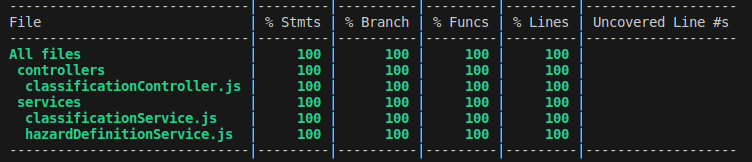
Figure 1.1.1a: Code coverage of the unit tests for the API.
This testing strategy extends to the whole API, ensuring that every endpoint and functionality is thoroughly tested for both expected behaviour and error handling. By organising tests by class and method, it becomes easier to maintain and extend the test suite should the API evolve over time.
Jest framework's features such as mocking, coverage testing, and rich exception context greatly contribute to the effectiveness of the testing process. Additionally, the rich exception context provided by Jest facilitates quick diagnosis and resolution of issues when tests fail, leading to faster development cycles and more reliable code.
Overall, this comprehensive testing approach using Jest ensures that the API is robust, reliable, and capable of meeting the requirements of its users, while also allowing for future enhancements and modifications with confidence.
1.1.2 Command Line Rules-Based Model Testing
The command-line version of the rules-based model was also extensively tested using the unittests module in Python. This ensures that the command-line interface functions correctly and produces the expected output based on different inputs and scenarios. Each aspect of the command-line interface, such as loading data, processing input, displaying results, and handling user interactions, was thoroughly tested to verify its functionality and robustness.
Additionally, edge cases and error conditions were considered to ensure that the command-line interface gracefully handles unexpected situations and provides appropriate feedback to the user. Through comprehensive testing, the command-line version of the rules-based model was validated to be reliable and capable of effectively identifying hazards as well as providing relevant information to the user.
Since this version was directly ported to be part of the API, it was extremely crucial that this initial implementation had few bugs and worked as intended.
1.2 Integration testing
Our integration tests used a combination of the Jest framework and the Supertest module. Using Supertest let us simulate API calls, enabling the testing of the full flow. For each test, the only modules mocked were the hazardDefinitionService (as it requires access to the Google Cloud Storage API) and Axios.
describe('startGPTClassification', () => {
    test('Integration test startGPTClassification', async () => {
        const mockHazardDefinitions = [
            { Hazard_Code: "001", Category: "01", Hazard_Description: "Sample hazard", Keywords: "hazard, keywords", Questions: "Is there a hazard?"},
            { Hazard_Code: "002", Category: "01", Hazard_Description: "Another hazard", Keywords: "", Questions: "Is there another hazard?"},
            { Hazard_Code: "001", Category: "02", Hazard_Description: "Sample hazard", Keywords: "hazard, keywords", Questions: "Is there a hazard?"},
            { Hazard_Code: "002", Category: "02", Hazard_Description: "Another hazard", Keywords: "", Questions: "Is there another hazard?"}
        ];
        hazardDefinitionService.getHazardDefinitions.mockResolvedValue(mockHazardDefinitions);

        const mockGPTResponse = {
            choices: [
            {
                message: {
                    function_call: {
                        arguments:
                            '{"possible_hazards": [{"hazard_code": "001"}]}'
                        }
                    }
            }
        ]};
        const mockAxios = jest.spyOn(axios, 'post').mockResolvedValue({data: mockGPTResponse});

        const response = await request(app.classify).post('/classify/startGPTClassification').send({report: 'Example report content containing a hazard'}) // Use the server instance to make the request

        expect(response.statusCode).toBe(200);
        expect(response.body).toStrictEqual([{hazardCode: "001", question: "Is there a hazard?"}])
    });
});
As you can see, we make a Supertest mock post request to our API. We only mock the hazardDefinitionService and Axios, having it call any other internal functions it needs to. While the unit tests have verified that each component functions on its own, this approach ensures that all components will work in conjunction with one another.
The contents of our API's response.statusCode and response.body can then be checked against our ground truth values to verify API functionality.
1.3 Compatibility Testing
As the core API is based on REST principles, any device with an internet connection would theoretically be able to make use of it. To be completely sure of this, we set a testing environment that creates dockerised instances of a multitude of operating systems. Each docker instance will install Postman (or Pocket Postman for mobile operating systems), and attempt to make a post request to our getHazardsByCode endpoint. This endpoint was chosen as it returns the same output for a given hazardCode, and therefore an output to test against. By supplying a list of operating systems, this workflow quickly and easily provides a compatibility test for our API.
As a result, we verified that our API can be called from any Windows / Windows Server instance, all of the major Linux flavours, any version of Android, and the available Mac OS images. To verify the remaining Mac and IOS operating systems, we manually installed Httper (a postman-like application) on live hardware and made calls to the same endpoint). With these calls successful, we could rest assured that we would not encounter compatibility issues in our API.
1.4 Performance Testing
We tested the performance of the API under stress by simulating a large simultaneous load. This was done using Python and its requests / concurrency libraries, allowing us to send 1000 concurrent requests to the API.
import requests
import concurrent.futures

# This is a stress test for the API. It sends 1000 requests to the API concurrently and checks if the response is 200.

def test_api_stress():
    url = "https://europe-west2-hazardid.cloudfunctions.net/hazard-id/classify/startClassification"
    headers = {
        'Content-Type': 'application/json'
    }
    data = {
        "report": "In April 2023, Eleven types of hazard incidents occurred across Bangladesh, including, Boat Capsized, Bridge Collapse, Covid-19, Dengue, Fire, Heat Wave, Lightening, Nor‘wester, Riverbank Erosion, Wall Collapse, and Wild Animal Attacks. According to the daily newspaper, 18 Lightning events occurred in sixteen districts which caused 26 people to die from different age and gender groups. Three incidents of Boat Capsized occurred in 3 districts including Lalmonirhat, Narayanganj, and Patuakhali districts. Due to these incidents, six people died and one person was missing in the districts. With reference to the daily hazard situation report of MoDMR and DDM, a total of 970 Fire incidents took place in 17 districts, resulting in five death, sixty-two injured, and 9,095 shops, one warehouse, and 63 houses were burnt. etc. due to Fire incidences in April 2023. The estimated losses were 1,004 crores 20 lakh and 50 thousand takas. Based on the DGHS daily situation report, Dengue was slightly more severe in April 2023 with compare to March 2023. It caused the death of five people, and 143 confirmed cases were identified throughout 11 districts this month. Three events of the Wild Elephant Attacks happened in Mymensingh and Sherpur districts respectively on the 14th, 22nd, and 28th of April 2023. two people were killed by a Wild Elephant Attack in the mentioned districts. On the other hand, a wall collapse incident occurred in Madaripur district. During this incident, one child died and four were injured. A Bridge collapsed in Mymensingh which caused a car damaged and three people injured. In the district of Shariatpur, one incident of Riverbank Erosion occurred which resulted in of 100-meter embankment collapse due to erosion. In this month, seven nor ‘wester incidents hit Patuakhali, Bagerhat, Cox's Bazar, Dhaka, Satkhira, Mymensingh, and Gazipur districts which caused damage to 1050 houses, 100 shops, 1,000 tin-roofed structures, 200 hectares of land at the affected areas. Covid-19 affected a total number of 204 people in 7 districts in April 2023. According to the national report published by DGHS in April 2023, due to Covid-19, no death is reported and 108 recovered. The devastating activity of Covid-19 decreased compared to March 2023, but the infected rate slightly increased in April compared to March 2023. Besides, the country has experienced a total of 29 different levels of heat wave in 64 four districts where Mild, mild to moderate, and extreme heat wave was 3, 2, and 1 respectively. The maximum temperature was recorded at 43 degrees Celsius at Ishdardi (Pabna) during heat wave situations on 18 April 2023. No casualties were recorded due to the heat wave."
    }
    with concurrent.futures.ProcessPoolExecutor() as executor:
        results = [executor.submit(requests.post, url, json=data, headers=headers) for _ in range(1000)]
        for f in concurrent.futures.as_completed(results):
            assert f.result().status_code == 200
            print(f.result().status_code)

test_api_stress()
Google Cloud Functions (the platform we chose to host the API) will automatically scale the number of instances based on current demand. Through our testing, we found the API perfectly capable of keeping up with even the above’s 1000 requests.
2. Frontend Testing
The frontend of our web application, developed using Streamlit, serves as the interactive interface for users to interact with our classification tool. This section of the report details the systematic approach undertaken to ensure the frontend's functionality, responsiveness, and user acceptance were rigorously tested and optimised across various platforms and devices.
Due to the dynamic nature of the project and the emphasis on a concept that remains fluid to adapt to user needs and feedback, we opted not to conduct traditional unit testing. Instead, we engaged in constant manual testing facilitated by the client and a group of disaster field experts representing our target user base. This approach allowed us to prioritise user acceptance testing and responsive design aspects of the development, ensuring the application evolved in direct response to practical, real-world usage and feedback.
We manually tested the system internally to ensure its functionality performed as intended. This involved verifying that buttons executed the expected actions, inputs produced the correct outputs, and API calls in Google Cloud Functions displayed the correct data, thereby ensuring a highly responsive and user-centric design.
2.1 Responsive Design Testing
To guarantee a seamless user experience, the application underwent extensive responsive design testing across multiple devices and operating systems. The testing methodologies and outcomes are summarised below:
2.1.1 Desktop The application was tested on various browsers including Chrome, Firefox, and Safari across Linux, Windows, and macOS operating systems. Efforts were made to ensure that the layout, interactive elements, and overall performance were optimised for desktop users. Adjustments were made to accommodate different screen sizes and resolutions, ensuring a consistent and user-friendly interface across all desktop platforms.
2.1.2 Mobile Recognising the growing reliance on mobile devices for accessing web applications, special attention was paid to mobile responsiveness. The application was designed with a mobile-first approach, emphasising the use of toggles and buttons to minimise the need for typing, thereby enhancing usability on touchscreens. Tests on tablets and smartphones confirmed the application's functionality and accessibility, ensuring users could efficiently navigate and interact with the tool regardless of the device used.
2.1.3 Low Performance Device Given the cloud-based nature of the application, it was imperative to ensure that users with low-performance devices could also access and use the tool without hindrance. Testing confirmed that the application's processing demands were minimal on the client side, allowing for smooth operation even on devices with limited computing capabilities.
3. User Acceptance Testing
User acceptance testing (UAT) was a critical phase in the development process, involving direct feedback from the client and the target user group. This phase ensured that the application not only met technical requirements but also fulfilled the needs and expectations of its intended users.
3.1 Client
Throughout the development process, bi-weekly meetings were held with the client to demonstrate the application's progress and functionality. These sessions allowed the client to interact with the tool, providing invaluable feedback which was instrumental in refining the user interface and functionality. Adjustments were made to streamline navigation, enhance user interaction, and ensure the tool's output met the client's specifications.
3.2 Target Group
The application was also presented to a select group of field experts, who represented the target user demographic. This group conducted thorough testing, simulating real-world usage scenarios to evaluate the tool's effectiveness, usability, and accuracy. Feedback from these sessions highlighted the tool's intuitive design, with particular praise for the seamless integration of complex functionalities such as model selection, report classification, and hazard identification. Suggestions for improvements included enhancing the definitions feature for hazards and optimising the question-generation algorithm for better user engagement. These insights were critical in fine-tuning the application to better serve the needs of its users.
In conclusion, the frontend testing phase was pivotal in ensuring the application's readiness for deployment. Through rigorous testing and iterative feedback, the application was optimised to provide a robust, user-friendly interface that effectively meets the needs of its users, facilitating accurate classification and analysis of reports with minimal effort.
3.3 Target Group Feedback
One user from each target group was selected to test out the tool.
- Sasha, 56, Natural Hazard Classification Expert
- Sol, 27, Data Analyst
- Esther, 30, Field Worker
3.3.1 Natural Hazard Classification Expert Feedback
Sasha, an expert on natural hazard classification, was particularly pleased about how fast one could complete a report classification without compromising on accuracy. He reported that the tool was capable of tagging nearly all hazards present within it in just 20% of the time compared to manual tagging.
3.3.2 Data Analyst Feedback
Sol, a data analyst working for the IFRC, was especially happy about not needing to research the hazards that she was not sure of. She was able to save time on tagging reports by not having to look through the HIP document every time she was not sure of a hazard definition.
3.3.3 Field Worker Feedback
Esther, a field worker, was mostly happy about the low device specification requirements - out in the field, she often had very limited bandwidth and low-performance devices. She was also happy about the fact that she could access the tool on her laptop, phone, tablet, or desktop. Esther also appreciated that the tool was easy to pick up and did not require much time for her to get used to it.
3.3.4 Feedback Table and Summarisation
The below table was created to showcase aggregate user feedback from the target groups.
| Acceptance Requirement | Strongly Disagree | Disagree | Agree | Strongly Agree | Comments |
|---|---|---|---|---|---|
| Accurate Hazard Classification | X | Hazards matched by the tool included most of the hazards that an expert would have tagged manually. | |||
| Quick to Use | X | Tool was fast to use, and report tagging time decreased by a significant margin. | |||
| No Hazard expertise required | X | Able to tag reports despite not knowing the difference between many of the similar hazards. | |||
| Fast Learning Curve | X | Easy to pick up, did not require any research to figure out how to use. | |||
| Reasonable Performance | X | Tool performance did not bottleneck the tagging process at all. | |||
| Device Compatibility | X | All modern devices conceivable were able to run the tool. | |||
| Abstraction of Complex Features | X | Even non-technical experts fully understood how to use the tool. | |||
| Accessibility Features | X | Dark Mode and the large text was useful, but not many other accessibility features. |