Welcome to the Traffic Light System
Traffic Light System is an intelligent, dependable, and versatile all-in-one solution for project-based classes. It is developed at UCL as part of the Industrial Exchange Projects program that aims to streamline the process for lecturers and TAs to manage and assess students' performance in project-based classes.
Core Features
- Separate Portals: The system has three portals: lecturers, TAs, and admins, each with its own set of features and functionalities. Lecturers can view the performance of each student and each group for all the modules they teach. TAs can create weekly feedback for each student and group. Admins manage the entire system and add lecturers to the system.
- Hassle-free Login: The system uses UCL Single Sign-On to authenticate users, ensuring that users can conveniently and securely access the system. Email/password login is also available, and it is also possible to integrate other SSO providers into the system.
- Insightful Graphics: The system provides insightful graphs to help lecturers and TAs understand the performance of each student and each group. There are bar charts that show the performance of each student and group for each module, along with line graphs tracking students’ performance over the course.
- Personalized Dashboard: Users can quickly pin teams they are interested in to the left menu bar so that they access them wherever they are. This customization saves users a tremendous amount of time and prioritizes tasks efficiently.
- Modern UI: The system features a modern and intuitive UI, designed to be user-friendly and professional-looking. We take advantage of MUI, a state-of-the-art React UI framework, to make the UI polished and consistent.
- Exceptional Performance: We use cutting-edge technologies to ensure fast and responsive performance even under challenging circumstances. We leveraged Next.js, a versatile and high-performance framework built upon React, to achieve server-side rendering, speeding up site response.
- Mobile Support: We have taken great care to ensure that users from mobile devices can have excellent user experiences. Mobile sites include all the features that are available to desktop users. Users can conveniently access the system on the go.
- Rich Features: The system includes abundant features stemming from user interviews and countless iterations of discussions. We have consulted with our client, who is very experienced in module delivery and user experience, throughout the development process. We are confident our product will address actual users’ pain points.
- Comprehensive Archive: At the end of each year, the system automatically generates a complete archive of the entire site. Users can easily access the archived site dating back to five years ago. This feature is possible because we implemented smart annual backup to automatically keep a secure copy of that year’s data.
Gantt Chart
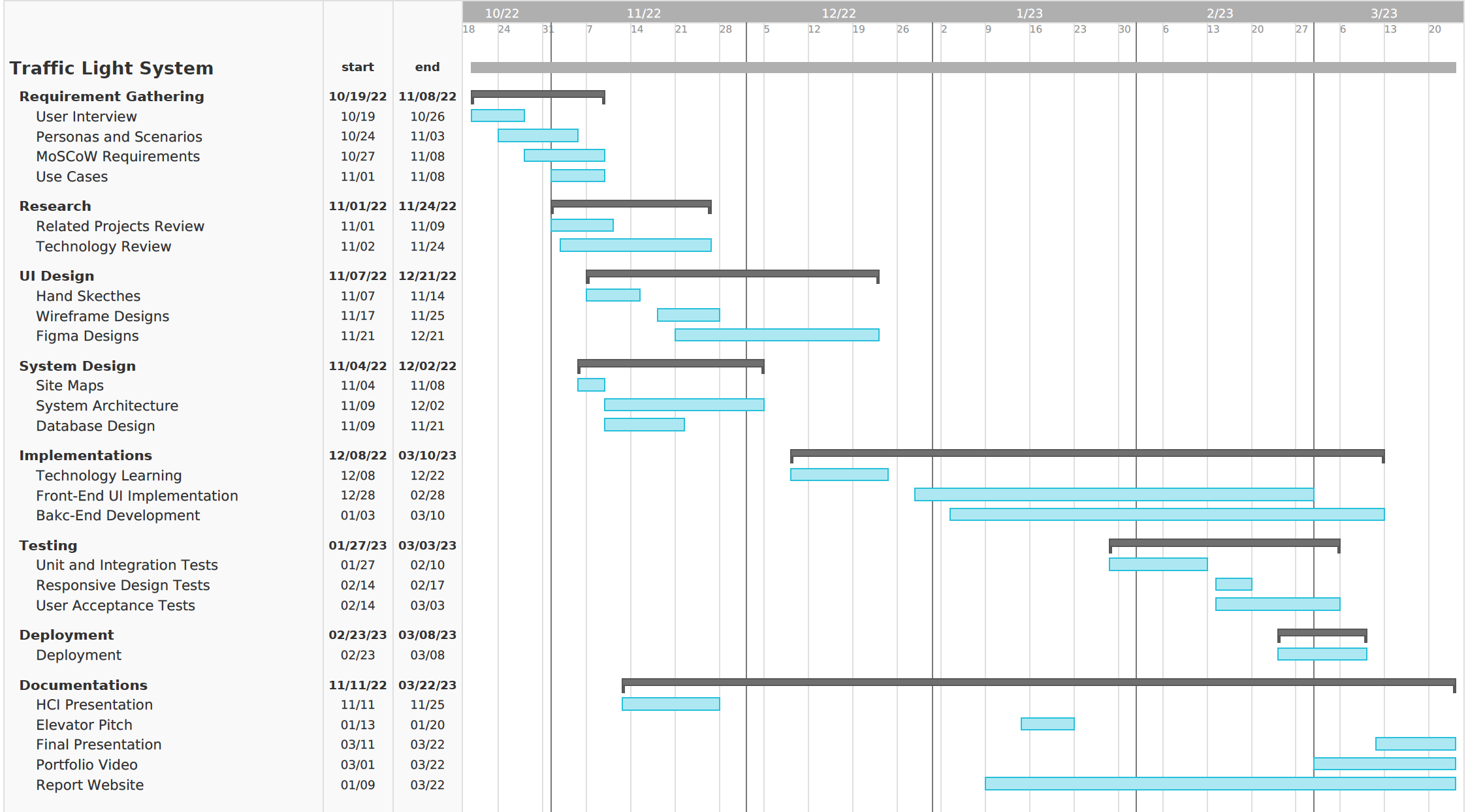
A Gantt chart is a project management tool used to visualize and track the progress of tasks over time. It displays a timeline of the project, with each task represented as a horizontal bar that spans the duration of the task. Web application projects like ours is a complex process that involves many different tasks, such as designing the user interface, developing the back-end functionality, and testing and debugging the application. By using a Gantt chart, we can easily see what tasks are being worked on, who is responsible for each task, and when each task is due. So we can allocate our time and resources more efficiently to deliver a high-quality final product.
How to use this documentation
This documentation not only provides a guide for users to use the system, but also provides a detailed record of the development process.
The Backgrounds and Requirements section provides a introduction of the project background and a detailed account of our requirememt gathering process.
The Research section provides a detailed review of related projects and relevant technologies and how we finalized our technical decisions.
The UI Design section showcases the design iterations of our UI to meet the requirements and user needs.
The System Design section provides a detailed account of our system design process, including system architecture, site map, and database design.
The Implementations section review key technical implementations in detail with some helpful code snippets.
The Testing section provides a detailed account of our testing process, including unit testing, integration testing, and user acceptance testing.
The Evaluation section includes our critical evaluation of the system and the development process and future work.
The Deployment Guide is a good reference for developers who wish to adopt and deploy our system.
The User Guide provides practical instructions for users to use the system.
The Legal Guide section contains pertinent legal information about the system.