Authentication
In our system, we support two types of user authentication flows: either through traditional email-password login or UCL single sign-on (SSO). Additionally, due to the nature of the system, there are three user types with distinct requirements. Therefore, we need to implement a robust authorization mechanism that ensures certain pages are only accessed by users with certain roles. We will provide a brief overview of the overall process, then discuss the integration of UCL SSO into our system.
Email and Password Login
In our authentication system, we have implemented a traditional email and password login process using the CredentialsProvider library. This process involves the following steps:
- The user provides their email and password on the frontend login page.
- The user's email and password are sent to the server's login endpoint via the CredentialsProvider.
- On the server, we use Prisma ORM to check if the database has the user's record according to the email provided. If the database has the record, we compare the provided password with the one stored in the database.
- If the user is verified, we perform authorization by checking the "role" field in the user's table, as defined in our database schema.
- After authorization, we sign a custom JSON Web Token (JWT) containing the user ID and user role using the
jsonwebtokenlibrary. - We return the JWT token back to the frontend, where it is stored in the client side for future authentication requests.
The following code snippet shows our implementation of the CredentialsProvider's authorization method:
async authorize(credentials): Promise<UserAuthPayload | null> {
  if (!credentials) return null;

  // Find user by email in Prisma ORM
  const user = await prisma.user.findUnique({
    where: { email: credentials.email },
    select: {
      id: true,
      email: true,
      firstName: true,
      lastName: true,
      role: true,
      lecturerRegistrationVerified: true,
      lecturerRegistrationId: true,
      password: true
    }
  });

  // If user not found or password is not set, return null
  if (!user || !user.password) return null;

  // Compare provided password with the stored password using bcrypt
  const verified = await compare(credentials.password, user.password);
  if (!verified) return null;

  // Remove password from user payload
  const { password, ...payload } = user;

  // Return user payload
  return payload;
}
In this code snippet, we first check whether the provided credentials are null or not. Then, we use Prisma ORM to find the user by their email address and select only the necessary fields from the user's table. If the user is not found or the password is not set, we return null to indicate that the login attempt failed.
If the user is found, we use bcrypt to compare the provided password with the one stored in the database. If the passwords match, we remove the password field from the user object before returning the user payload. Finally, the user payload is used to sign a JWT token and send it back to the frontend for future authentication requests.
UCL Single Sign-on
The process of logging in through UCL Single Sign-On (SSO) is different from the traditional email and password method, but the end result is the same. Once authenticated and authorized, users can access resources on the website. To implement UCL SSO, the website needs to be registered as an application with the UCL API. This involves providing basic information and obtaining an API key for authentication purposes.
The login process begins with the user clicking the "Login using UCL SSO" button on the login page. The user is then redirected to the UCL API website where they are prompted to enter their UCL email and password and authorize the UCL API to pass their identity information to the website. After the user is authenticated by the UCL API, the UCL API calls a predefined callback link to pass the authorization code back to the website.
To access the user's identity information, the website uses the authorization code to request an access token from the UCL API. The User Identity service returns a JSON object containing the user's information, which is used to check if the user exists in the website's database. The authorization process is then initiated, which involves checking the user's role against the required role to access certain pages.
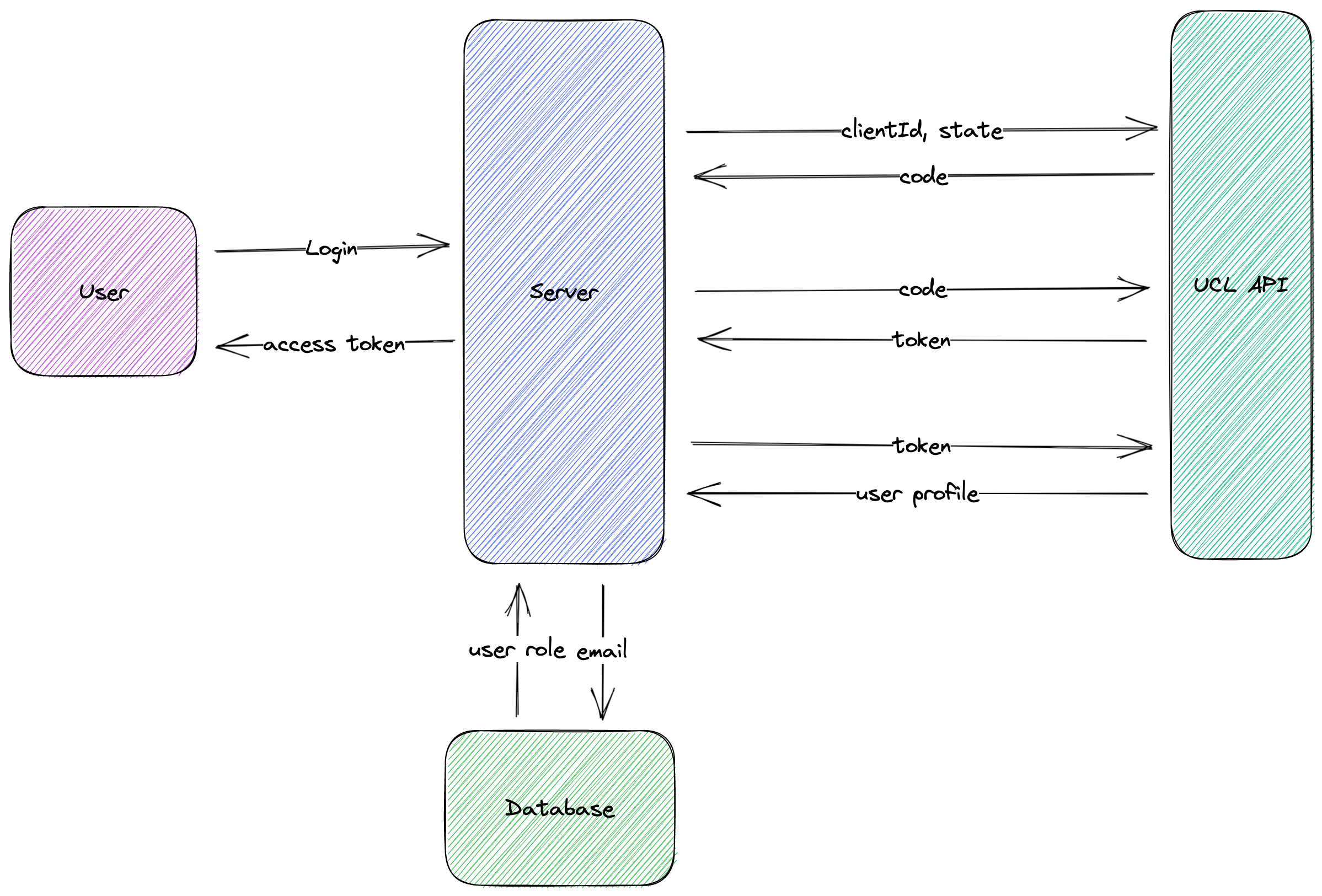
Once authenticated and authorized, a JSON Web Token (JWT) containing the user's ID and role is created and signed using a secret key, which is then returned to the front end. The JWT is included in subsequent requests to the server, allowing for authentication and authorization without storing session information on the server. The JWT contains a header, payload, and signature, which is decoded to verify the user's ID and role against the required role to access the requested resource.
Here is a detailed implementation of our UCL Single Sign-on authentication configuration:
/**
 * UCL Single Sign On
 * Ref: <https://uclapi.com/docs/>
 * Implementation based on: <https://github.com/uclapi/enghub>
 */
{
  id: 'uclapi',
  name: 'UCL API',
  type: 'oauth',
  /**
   * UCL API does verify email address
   * So, we are safe here to say if email is the same, we got verified user
   */
  allowDangerousEmailAccountLinking: true,
  authorization: {
    url: '<https://uclapi.com/oauth/authorise>',
    params: { grant_type: 'authorization_code' }
  },
  token: {
    url: '<https://uclapi.com/oauth/token>',
    async request(context) {
      const tokens = await makeTokenRequest(context);
      return {
        tokens: {
          access_token: tokens.access_token
        }
      };
    }
  },
  userinfo: {
    url: '<https://uclapi.com/oauth/user/data>',
    async request(context) {
      return await makeUserInfoRequest(context);
    }
  },
  clientId: process.env.UCL_API_CLIENT_ID,
  clientSecret: process.env.UCL_API_CLIENT_SECRET,
  /**
   * Used to generate token for user
   * id field in the returned object is required to be unique and consistent
   */
  async profile(profile) {
    /**
     * Case1: User already exists in the database
     * Find that user and return it
     */
    const dbUser = await prisma.user.findUnique({
      where: { email: profile.mail },
      select: {
        id: true,
        firstName: true,
        lastName: true,
        email: true,
        role: true,
        lecturerRegistrationVerified: true,
        lecturerRegistrationId: true
      }
    });
    if (dbUser) return dbUser;

    /**
     * Case2: User does not exist in the database
     * Create a new user and return it (SSO registration)
     * Caveat: if id is not customized it will lead to different providers of students' accounts - ACCOUNT_NOT_LINKED case
     */
    const newUserNames = (profile.full_name as string).split(' ');
    const new_user: UserAuthPayload = {
      id: uuidv4(),
      firstName: newUserNames[0],
      lastName: newUserNames.slice(1).join(' '),
      email: profile.mail,
      role: profile.is_student ? UserRole.Student : UserRole.Lecturer,
      lecturerRegistrationVerified: null,
      lecturerRegistrationId: null
    };
    return new_user;
  }
}
The code block starts with an object named uclapi that defines the properties and methods required for the UCL SSO login. This object has four main properties:
id: A unique identifier for the authentication provider.name: The name of the authentication provider.type: The type of authentication protocol used, which in this case is OAuth2.0.allowDangerousEmailAccountLinking: A boolean value that indicates whether email address verification is required for a user to be considered a verified user.
The authorization property is an object that defines the URL and parameters required to request an authorization code from UCL API. The url property specifies the URL to which the authorization request is sent, and the params property specifies the grant type for the authorization request.
The token property is an object that defines the URL and request method required to exchange the authorization code for an access token. In this case, the request method is used to make a request to the makeTokenRequest function, which is not shown in the provided code snippet. This function is responsible for making the HTTP request to UCL API and returning the access token received in the response.
The userinfo property is an object that defines the URL and request method required to fetch the user's profile data after authentication. In this case, the request method is used to make a request to the makeUserInfoRequest function, which is not shown in the provided code snippet. This function is responsible for making the HTTP request to UCL API and returning the user's profile data received in the response.
The clientId and clientSecret properties are the client ID and secret provided by UCL API to authenticate the web application.
The profile property is an asynchronous function that maps the user's profile data received from UCL API to a custom format expected by the web application. This function takes a single argument, profile, which contains the user's profile data. The function checks whether the user already exists in the database by querying the database using the user's email address. If the user exists, the function returns the user object from the database. If the user does not exist, the function creates a new user object with the user's first and last name, email address, role, and lecturer registration verification status. The id field in the user object is set to a unique identifier generated using the uuidv4 function. This unique identifier is required to ensure consistency and avoid conflicts when linking the user's account with other authentication providers.