Personas and User Scenarios
In order to gain a deeper understanding of our users' needs, we conducted a thorough analysis of personas and scenarios. This involved placing ourselves in the shoes of the users and interacting with the system from their perspective.
Personas
A user persona is a fictional representation of the typical user of the system. It is created by gathering information about the target audience, such as demographics, needs, and behaviors. User personas help the project team to empathize with the user's goals and expectations, allowing them to create a system that meets the user's needs.
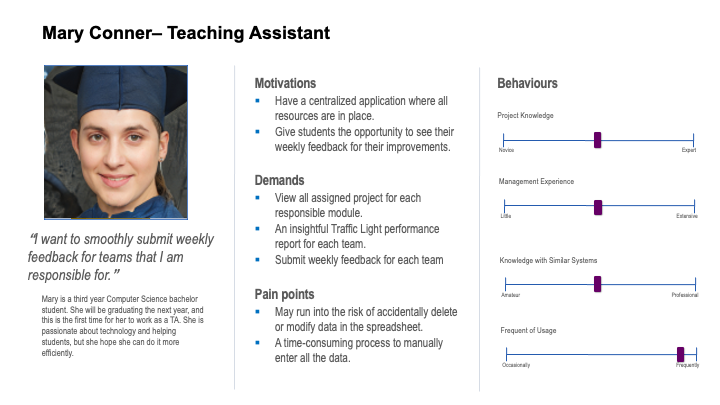
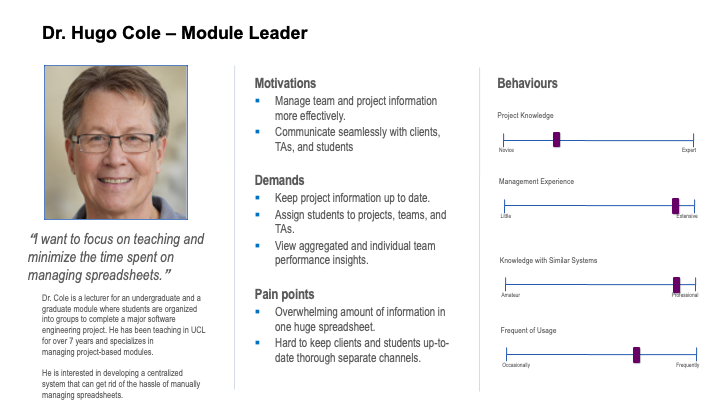
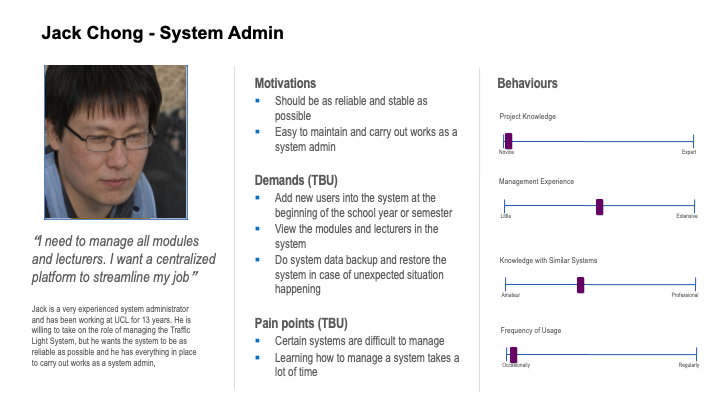
To ensure that we had a comprehensive understanding of our user base, we included four personas in our project. Each persona represents a different type of user, with unique needs and behaviors. The personas we used in our analysis were the following: lecturer, student, teaching assistant, and system administrator.
By taking the time to thoroughly analyze our users' needs, we were able to create a more user-centered system that is tailored to their preferences and behaviors.
Persona for TA
Persona for Lecturer
Persona for System Admin
User Scenarios
A scenario is a narrative that describes a specific situation in which a user might interact with the system. By painting a detailed picture of the user's goals, the steps they take to achieve those goals, and any obstacles or challenges that they may encounter, scenarios allow the project team to understand how users interact with the system and identify potential problems that might arise. We included three scenarios, each catering to one of the three main types of users: lecturer, student, and TA.
Scenario for TA
Gerry is working as a TA and he is a third-year computer science student. It is a busy day for him. He needs to attend three lectures today. At each weekly session, he oversees 10 teams. The job is: first, take attendance for each team; second, have a quick chat with students to understand their progress and challenges; third, give a weekly contribution score based on the information gathered. After checking up with each team, he goes around the room to support each team when needed. When a team has consistently subpar performance or a student is continually absent without valid excuses, he needs to flag it and escalate to the module leader.
He uses a huge spreadsheet shared with the module leader to record each student's performance each week. He enters the score manually into the spreadsheet. He is a bit annoyed with the current approach since he finds the process repetitive and prone to accidental errors. But he enjoys the intuitiveness of a spreadsheet.
Scenario for Lecturer
Dr. Wong is a computer science professor with 20+ years of researching computer algorithms and 5+ years of managing project-based modules. He is now responsible for directing a new project-based module for graduate students interested in gaining some industrial exposure and working on real-life projects. He needs to coordinate with external project sponsors frequently and assign students to projects in accordance with their interests. He also needs to allocate a TA for each project that matches the TA's expertise.
Since he needs to juggle different tasks from supervising his PhD students to doing his research, he can only commit at most 1 hour a day to manage this module. He glances at weekly feedback from TAs and emails underperforming teams to understand their obstacles. He also needs to relay the communication between external clients and students. He communicates with students, clients, and TAs through different channels. And due to the sheer size of information he needs to keep track of, he finds it frustrating sometimes. Sometimes, students receive wrong feedback, or he fails to deliver requested work to clients. Based on his extensive experience, this is the nature of being a module leader. But he believes a centralized platform for module leaders, clients, TAs, and students would help to keep everyone in the loop and communicate with each other seamlessly.
Scenario for Admin
Dr. Katz is the System Admin for the Traffic Light System. He logs into the system to perform his daily tasks. Today, he is tasked with creating a system backup.
He navigates to the Admin Dashboard and clicks on the "Create Backup" button. A pop-up window appears, asking Dr. Katz to confirm the creation of a backup. He clicks "Yes" and waits for the system to finish creating the backup. Once the backup is complete, he downloads the backup file to his computer.
Next, Dr. Katz wants to view all the existing lectures and modules in the system. He navigates to the Lectures and Modules page and sees a list of all the current lectures and modules. He clicks on one of the modules and views the detailed information, including the table of students enrolled and the TAs assigned to the module.
Satisfied with his progress, Dr. Katz logs out of the system, knowing that he has completed his tasks for the day.