Tracking Board
The implementation of the tracking board required a lot of self-defined React components, including cards and text inputs. For specific implementation details, please refer to the source code under src/sections/board. Here is a high-level overview of the component design:
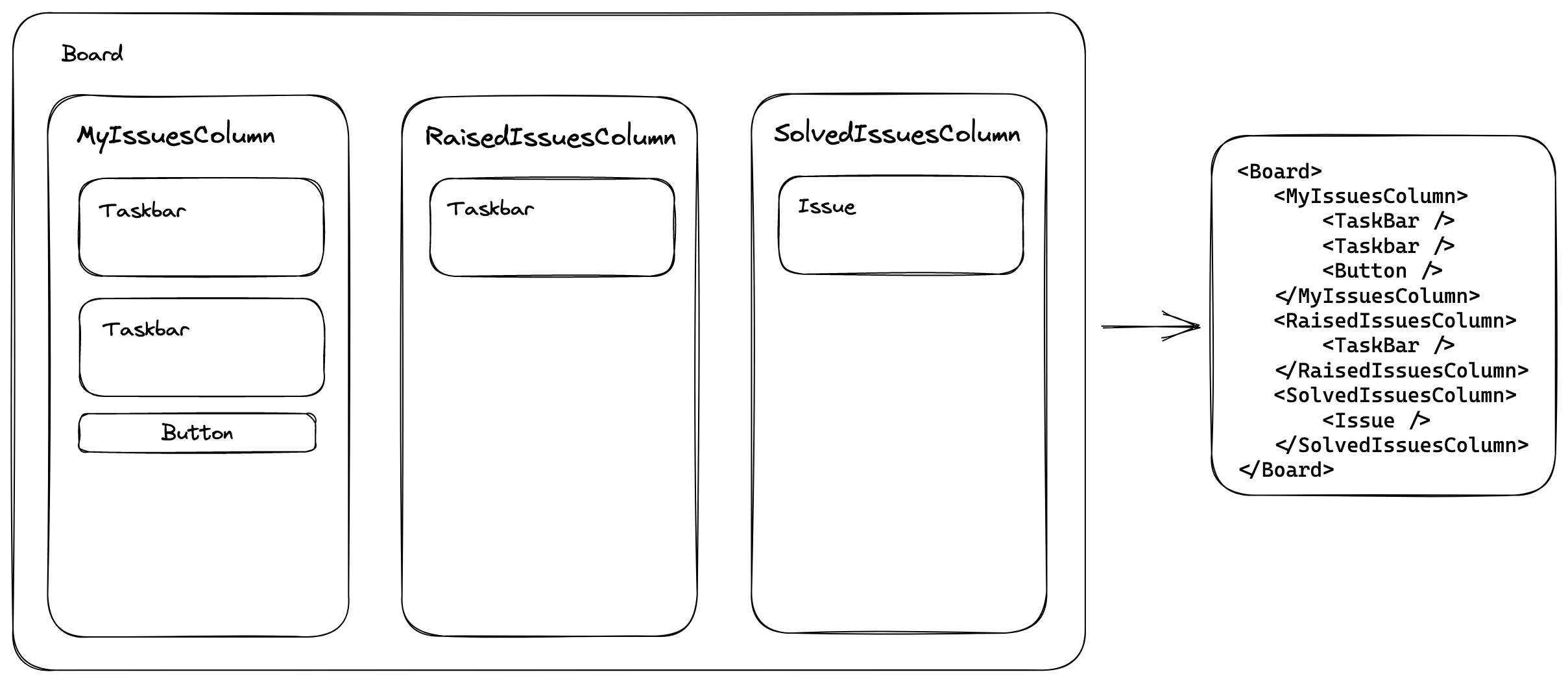
JSX Component
The code imports several components, including icons, styled components, and hooks. The imported icons are used for the menu options. The styled component creates a custom component for the Kanban board column, with a specified background color, padding, and border radius. The hooks are custom functions that allow the code to use GraphQL queries, handle snackbar notifications, and dispatch state updates to the Kanban board.
const useDeleteIssue = () => {
  const [deleteIssue] = useDeleteIssueMutation();
  const openSnackbar = useSnackbar();

  const handleDeleteIssue = async (issueId: string) => {
    try {
      await deleteIssue({
        variables: {
          issueId
        }
      });
      openSnackbar('Issue deleted successfully', 'success');
    } catch (error) {
      openSnackbar('Error deleting issue', 'error');
    }
  };

  return { handleDeleteIssue };
};

interface MenuProps {
  issueId: string;
}
const MyIssuesMenu: React.FC<MenuProps> = ({ issueId }) => {
  ...

  const handleRaiseIssue = async () => {
    try {
      await raiseIssueGraphQL({
        variables: {
          issueId
        }
      });
      dispatch(raiseIssue({ issueId }));
      openSnackbar('Issue raised successfully', 'success');
    } catch (error) {
      openSnackbar('Error raising issue', 'error');
    }
  };

  return (
      <StyledMenu
        ...
      >
        <MenuItem
          ...
        >
          <QuestionCircleTwoTone />
          Raise Issue
        </MenuItem>
        <MenuItem
          ...
        >
          <DeleteOutlined style={...} />
          Delete Issue
        </MenuItem>
      </StyledMenu>
  );
};

const RaisedIssuesMenu: React.FC<MenuProps> = ({ issueId }) => {
  ...

  const handleResolveIssue = async () => {
    try {
      await resolveIssueGraphQL({
        variables: {
          issueId
        }
      });
      dispatch(resolveIssue({ issueId }));
      openSnackbar('Issue resolved successfully', 'success');
    } catch (error) {
      openSnackbar('Error resolving issue', 'error');
    }
  };

  return (
    <>
      <Box sx={{ m: 1, position: 'relative' }}>
        <IconButton
          ...
        >
          <MoreOutlined />
        </IconButton>
      </Box>

      <StyledMenu
        ...
      >
        <MenuItem
          ...
        >
          <CheckCircleTwoTone />
          Mark as Solved
        </MenuItem>
        <MenuItem
          ...
        >
          <DeleteOutlined style={{ color: theme.palette.error.main }} />
          Delete Issue
        </MenuItem>
      </StyledMenu>
    </>
  );
};

export interface BoardProps {
  courseId: string;
  relatedTeams: {
    id: string;
    teamNumber: number;
  }[];
}
export default function Board({ courseId, relatedTeams }: BoardProps) {
  const { myIssues, raisedIssues, solvedIssues } = useSelector((state) => state.kanban);

  return (
    <Grid container spacing={2}>
      <Grid xs={12} md={4} item key={myIssues.id}>
        <StyledColumn>
          <Typography>
            My Issues
          </Typography>
          {myIssues.items.map((item, i) => (
            <Items ... menu={<MyIssuesMenu ... />} />
          ))}
          <AddItem courseId={courseId} relatedTeams={relatedTeams} />
        </StyledColumn>
      </Grid>
      <Grid xs={12} md={4} item key={raisedIssues.id}>
        <StyledColumn>
          <Typography ...>
            Raised Issues
          </Typography>
          {raisedIssues.items.map((item, i) => (
            <Items ... menu={<RaisedIssuesMenu issueId={item.id} />} />
          ))}
        </StyledColumn>
      </Grid>
      <Grid xs={12} md={4} item key={solvedIssues.id}>
        <StyledColumn>
          <Typography ...>
            Solved Issues
          </Typography>
          {solvedIssues.items.map((item, i) => (
            <Items key={item.id} item={item} />
          ))}
        </StyledColumn>
      </Grid>
    </Grid>
  );
The code may seem daunting to understand. This code defines a React component called Board that renders a Kanban board with three columns: "My Issues", "Raised Issues", and "Solved Issues". Each column contains a list of Items that can be clicked to reveal a menu of options for the item, such as "Raise Issue" or "Mark as Solved".
The code also defines two additional components, MyIssuesMenu and RaisedIssuesMenu, which are used to render the menus for the corresponding items.
The useDeleteIssue hook is used to delete an issue, and the useSnackbar hook is used to display a notification when an issue is deleted, raised, or resolved.
The Board component receives two props, courseId and relatedTeams, which are used to add new items to the "My Issues" column. The Board component also uses Redux to manage state, specifically the kanban slice of the Redux store. The myIssues, raisedIssues, and solvedIssues arrays are obtained from the store using the useSelector hook.