Table Rendering
There are three technical difficulties in terms of table rendering:
- How to represent the table data in a logical and structural manner and request it from the backend service.
- Rendering structured table UI.
- Working with pagination for hundreds of rows of data.
In order to resolve these issues, we introduce GraphQL, which is a query language for APIs that provides a more efficient, powerful, and flexible alternative to REST. It allows frontend developers to specify the exact data they need from the server in a single request, making it easier to develop and maintain web applications.
GraphQL uses a domain-specific schema definition for data that is available for query. A domain-specific schema is a definition of the data that is available for query. It defines the types of data that can be queried, as well as the relationships between them. There are several advantages of using a domain-specific schema for GraphQL. One advantage of defining a domain-specific schema is that it makes it easier for front-end developers to understand the structure of the data and to write queries that retrieve exactly the data they need. Additionally, because the schema is defined on the server side, it can help to enforce data validation and ensure that the queries are well-formed and efficient. Finally, because GraphQL is strongly typed, the schema can be used to generate documentation and to provide autocomplete and validation features in development tools.
After the schema is defined, we can write queries using specific syntax defined by GraphQL, which is more logical and natural to read when compared to raw SQLs that may need to be presented if we do not use GraphQL. It is more readable than SQL because it is designed to read like natural language. For example, instead of writing a complex SQL query to fetch data from multiple tables, a GraphQL query can be written to retrieve exactly the data needed, with clear and concise syntax. Additionally, GraphQL queries can be nested, allowing for more efficient data retrieval and reducing the need for multiple queries, greatly reducing the development complexity.
Overview: A Simple Table
For the purpose of simplicity and clarity, we take the table for the project table as an example. Note that the following code is simplified for demonstration purposes. Please refer to the Github production code for more information. First of all, we define our GraphQL schema for project tables.
type Project {
  id: ID!
  title: String!
  teamNumber: String!
  ta: TA!
}

type Course {
  id: ID!
  title: String!
  code: String!
  projects: [Project!]!
}

type Query {
  course(code: String!): Course!
}
In the above schema definition, we have a Query type which is used to define all of our GraphQL endpoints that can be accessed by the frontend. The course function takes a mandatory course code parameter as input and returns a non-optional Course object. We then defined a list of projects represented by [Project!]!, which means this list is non-optional and the elements inside the list are non-optional. The benefit of defining such a schema is that we now have a precise and logical view of the shape of data that the server will return, which saves us an enormous amount of time debugging traditional RESTful APIs. Another advantage is that the schema definition itself is an API documentation with precise data types that the backend server will return, so this also saves us countless hours of rewriting ever-changing API documentation and enables us to iterate features faster.
After writing the schema definition, we can now query our service using the following query:
query GetProjectData($courseCode: String!) {
  course(code: $courseCode) {
    projects {
      id
		  title
		  teamNumber
		  ta {
		    firstName
		    lastName
		  }
    } # end projects
  } # end course
}
The above block of GraphQL code defines a query named "GetProjectData" which takes a course code as input. It will return a list of projects, each with an ID, title, team number, and TA. The TA object includes their first and last name. The returned data will be in the shape shown below:
{
	projects: [
		{
			id: "d3fb2dd4-c587-4e83-9edb-58402b9701f6",
			title: "IXN Traffic Light System",
			teamNumber: 17,
			ta: {
				firstName: "Yun",
				lastName: "Fu"
			}
		},
		...
	]
}
The data is clearly structured and can be easily used to render the UI mentioned below.
We can now use the data to render our table using the following composition of MaterialUI React components:
<Table>
	<TableHead>
		<TableRow>
	    <TableCell>Team Number</TableCell>
	    ...
    </TableRow>
  </TableHead>
  <TableBody>
      {course.projects.map((project, idx) => (
        <TableRow key={idx}>
          <TableCell>Team {project.teamNumber}</TableCell>
          ...
        </TableRow>
      ))}
  </TableBody>
</Table>
Pagination
The above solution is fine for a limited amount of data. However, for a table containing thousands of rows, it is inefficient for the backend server to return a long list of records under one response. For a real-life scenario, consider a table of students which might have hundreds of rows. In order to optimize this scenario, we will make use of pagination and the Relay API from GraphQL to implement it. GraphQL Relay is an implementation of the GraphQL specification that provides a set of conventions for building pagination and cursor-based navigation into your GraphQL APIs. The Relay specification defines a set of GraphQL types and mutations for handling pagination, caching, and other common patterns in modern web applications. It provides a standardized way of handling large datasets in a performant and efficient way. It is widely used in production environments and has a large and active community of developers contributing to its development and maintenance. For more information, please refer to https://graphql.org/learn/pagination/ (opens in a new tab).
First of all, we will amend our schema definition to be as follows:
type Project {
  id: ID!
  title: String!
  teamNumber: String!
  ta: TA!
}

type ProjectEdge {
  cursor: Cursor!
  node: Project!
}

type PageInfo {
  hasNextPage: Boolean!
  hasPreviousPage: Boolean!
  startCursor: Cursor
  endCursor: Cursor
}

type ProjectConnection {
  nodes: [Project!]!
  edges: [ProjectEdge!]!
  pageInfo: PageInfo!
  totalCount: Int!
}

type Course {
  id: ID!
  title: String!
  code: String!
  projects: ProjectConnection!
}

type Query {
  course(code: String!): Course!
}
In this schema definition, we have three new schema types: ProjectEdge, PageInfo, and ProjectConnection. The ProjectConnection is a wrapper type for pagination. It contains project edges, which indicate all projects related to a certain course. It also contains a PageInfo, which is used to store essential pagination parameters, such as whether the current pagination has a next page. As its name suggests, the GraphQL API encourages us to rethink pagination as dealing with relations in graphs, as illustrated in the following graph. The benefit of this is that the API can be generalized to represent any form of data, including data from graph-based databases and complex networks. For more information regarding connections, please refer to https://relay.dev/graphql/connections.htm (opens in a new tab).
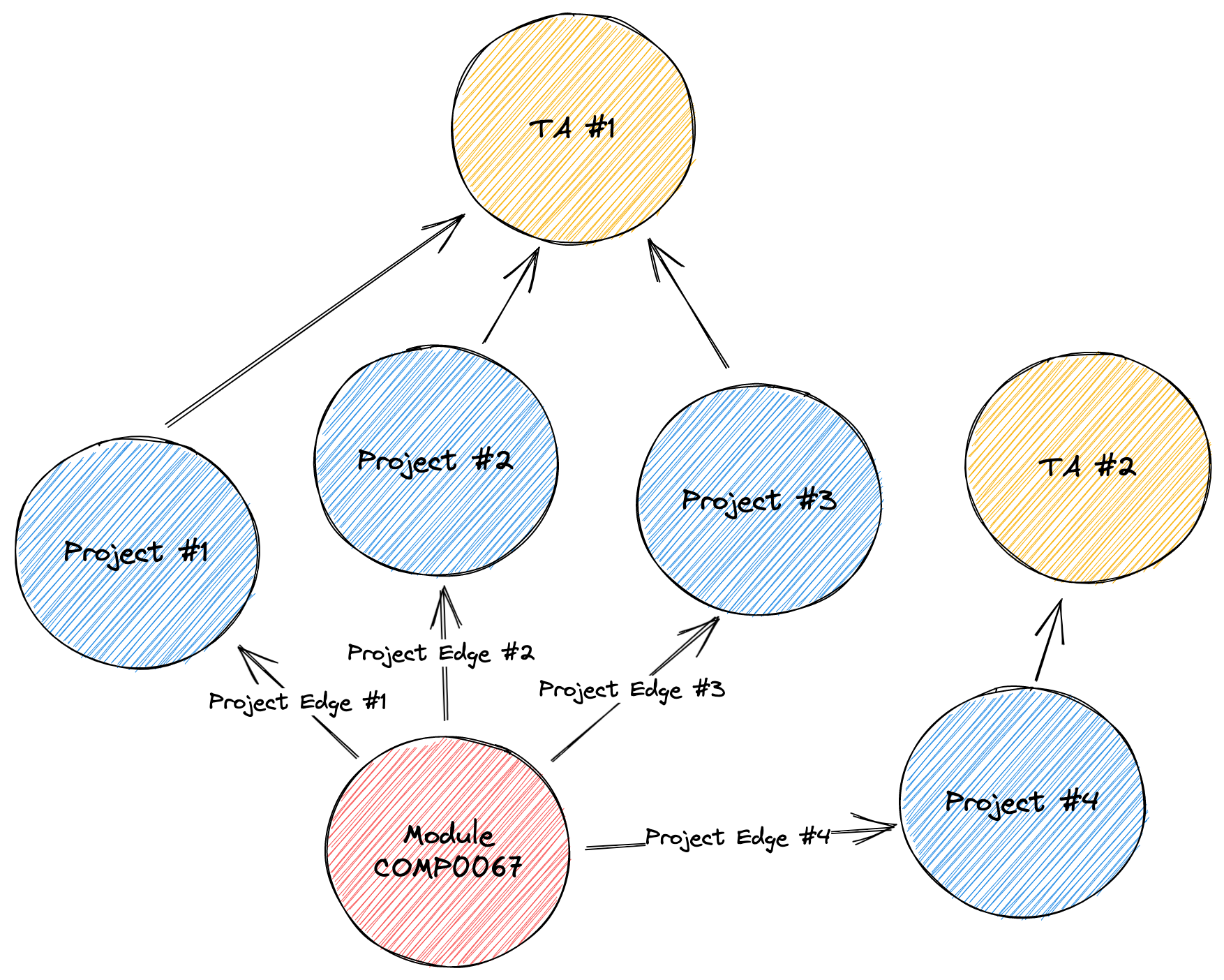
With this revised data model, we can now query our data by rewriting our query as follows:
query GetProjectData($courseCode: String!) {
  course(code: $courseCode) {
    projects {
			edges {
				node {
					id
				  title
				  teamNumber
				  ta {
				    firstName
				    lastName
				  }
				} # end node
			} # end edges
			pageInfo {
        hasNextPage
        hasPreviousPage
        startCursor
        endCursor
      }
    } # end projects
  } # end course
}
Now, we need to implement the backend server for the GraphQL endpoint defined above.
We first define our course query resolver:
export const courseQueries = {
  course: async (parent, args, { user, prisma }, info) => {
    const course = await prisma.course.findUnique({ where: { code: args.code }, select: ... });
    if (!course) {
      throw new GraphQLError(`Course ${args.code} not found`);
    }
    return course;
  }
}
This resolver searches for a specific course record from the database using the course code and returns that entity back to the caller. The prisma variable is provided from the GraphQL context, which is centrally managed by the database connection provider mentioned in the previous chapter.
We now continue to define our projects query resolver:
export const courseResolvers = {
  projects: (parent, args, { user, prisma }) => {
    if (user.role !== UserRole.Admin && user.role !== UserRole.Lecturer) {
      throw new GraphQLError('Permission Denied');
    }

		const counter = () => prisma.project.count({
      where: {
        courseId: parent.id
      }
    });

		const dataProvider = (args) => prisma.course
          .findUnique({ where: { id: parent.id } })
          .projects({
            ...args,
            select: ...,
          })
          .then(...);

    return findManyCursorConnection(dataProvider, counter, args);
  }
}
First, we check whether the user has the required permission to edit the project. We only allow Admin and Lecturer to access this endpoint. Then we define a counter function which is responsible for providing the sum of all records in the database. We also define a dataProvider function which returns a limited amount of rows specified by pagination parameters. We will limit the number of rows to 5 per page by default. Lastly, we are using the library https://github.com/devoxa/prisma-relay-cursor-connection (opens in a new tab) which wraps up all functions declared previously and returns the shape of data in the GraphQL specification.