System Backup
The primary pain point of previous implementations of the system is that they cannot be used over a span of years because it does not archive databases for historical academic year's data. We carefully considered this issue during the research stage and came up with an automatic annual backup feature to resolve this issue. In order to achieve this functionality, 3 essential components are required:
- Migrate the database to a new academic year
- Access the latest academic year's data for normal service
- Access historical academic year's data for archive service
The key services related to these 3 components are live service and archive service. In our implementation, they are 2 separate running processes for 2 corresponding domains:
- live service - trafficlight.cs.ucl.ac.uk
- archive service - archive.trafficlight.cs.ucl.ac.uk
Migrate Database to New Academic Year
The procedures are summarized as follows:
- Create a new database with the name of the current year + 1.
- Copy all user records from the database that the live service is currently using into the new database. This is to ensure that old users can still authenticate into the system.
- Reload the database connection provider to establish new connections to the databases.
- The live service should now use the database containing the latest year's data, and the archive service can accept queries from the previous year's database.
The backend endpoint that realizes this procedure is /api/archive/migrate. Note that this endpoint is designed for the live service. The simplified endpoint implementation is defined as follows:
export default async function handler(req: NextApiRequest, res: NextApiResponse) {
  // check whether the request is from admin
	checkAuth(req);

	// clear logs from /sitedata/logs/access_log.txt
  clearLogs();

	// get previous year
  const oldConfig = getSiteConfig();

	// current year = previous year + 1
  const newTag = getNewTag(oldConfig);

	// create new database
  const client = await prepareNewDatabase(newTag);

	// connect to new database
  await clearDatabasePool();
  global.globalDatabasePool = {
    [newTag]: client
  };

	// copy all user records
  await migrateBackupRecords(oldConfig);

  // let archive service add connection to previous year's database
  await refreshPeerArchiveService()

  res.send({
    success: 'Backup successful',
    logs
  });
}
The corresponding /api/migration/refresh endpoint is running on the archive service, and this endpoint is used to re-connect to the database after a successful migration.
export default async function handler(req: NextApiRequest, res: NextApiResponse) {
  clearLogs();
	// reconnect to all databases of previous academic years
  await reInitializeDatabasePool();

  res.send({
    success: 'Refresh successful',
    logs: getLogs()
  });
}
Access Database for Specific Academic Year
One important component of the archive service is to load data from different academic years, which are stored in different databases named by their academic year. For example, the database with the name 2023 represents the database that stores data for the year 2023.
We also need to differentiate the different year requests from users. This is implemented by adding an additional cookie in the browser called current-year-tag. This cookie stores the academic year that the user wants to access during the current active session. The cookie is created during the login session of the archive system where the user is prompted to select an academic year to view data.
When the browser sends an HTTP request to the backend, the year tag is contained in the HTTP request header, and the backend parses the request header to see which year's data the user is wishing to request. We implement a specific utility function to get a database connection from the request. This function takes a generalized request object and returns a Prisma client for querying databases. Here is a diagram representing the query process:
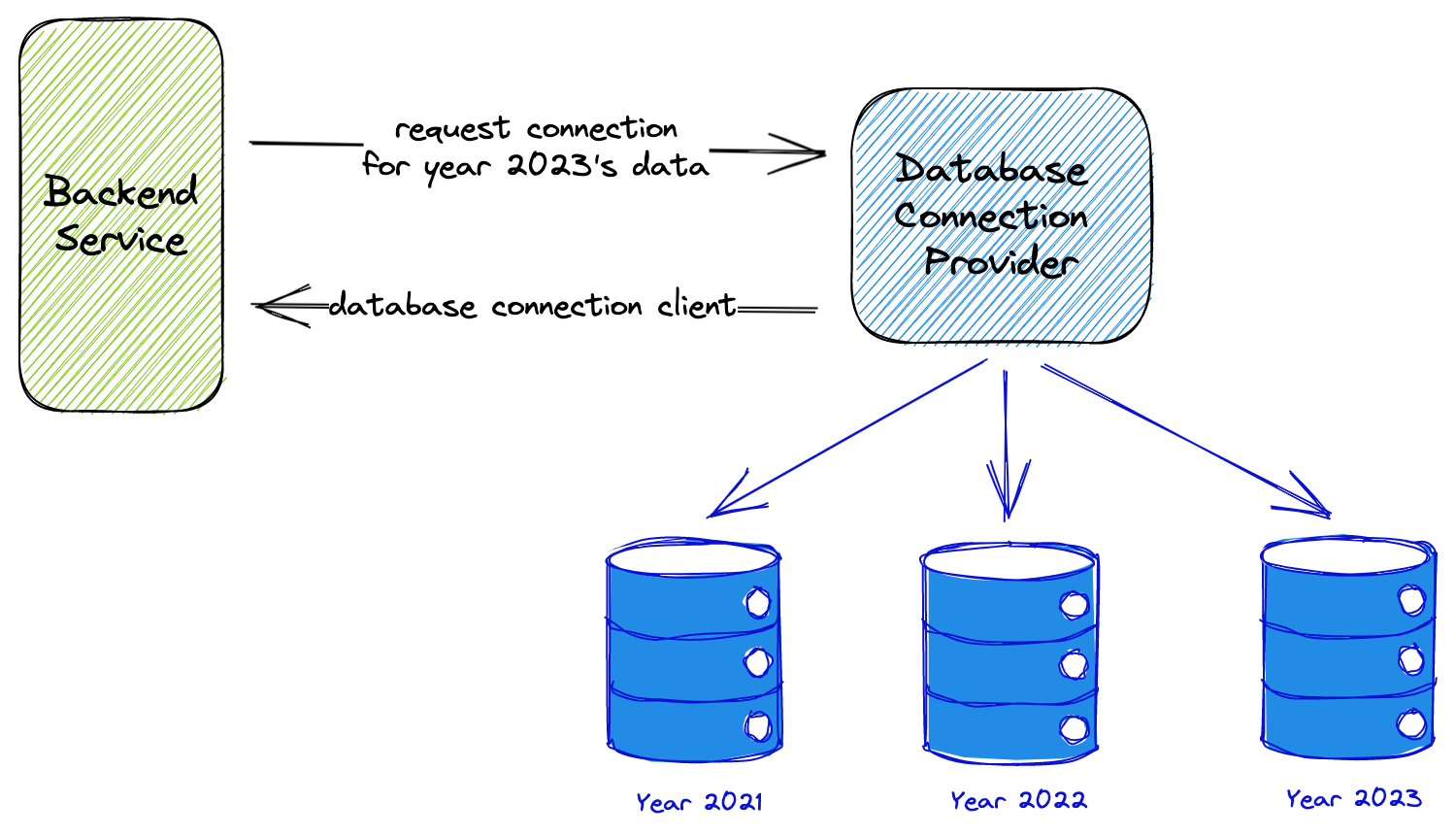
The database connection provider is primarily implemented by the function getDatabaseFromRequest, which is implemented below:
export function getDatabaseFromRequest(req: GetServerSidePropsContext['req'] | NextApiRequest): PrismaClient {
  // Upon successful login, the server will set a cookie with the name 'backup-year-tag'.
  // This cookie is used to determine which year to display in the UI.
  // If the cookie is not set, this means that the client is in live mode, displaying the current year.
  // If the cookie is set, this means that the client is in backup mode, displaying the year specified in the cookie.
  let tagFromCookie = req?.cookies['backup-year-tag'];
  const archiveMode = process.env.ARCHIVE_MODE === 'true';
  const siteConfig = getSiteConfig();
  let tag: string;
  if (!tagFromCookie) {
		// If the cookie is not present in the header.
    if (archiveMode) {
			// If we are in archive mode.
      if (siteConfig.backupRecords.length > 0) {
				// If we have backup records, then take the latest backup data.
        tag = siteConfig.backupRecords[0].yearTag;
      } else {
				// This request is the same as normal year's data.
        tag = siteConfig.currentYearTag;
      }
    } else {
      tag = siteConfig.currentYearTag;
    }
  } else {
    tag = tagFromCookie;
  }
  return getDatabase(tag);
}
The getDatabase function is defined below.
export function getDatabase(tag: string): PrismaClient {
  if (!global.globalDatabasePool) {
    logError('GetDatabase()', 'Database pool is not initialized.');
    throw new Error('Database pool is not initialized.');
  }
  const db = global.globalDatabasePool[tag];
  if (!db) {
    const dbPath = getDbConnectionURL(tag);
    logError('GetDatabase()', `Database for ${dbPath} is not found.`);
    throw new Error(
      `Database for ${dbPath} is not found. This error usually happens when the metadata.json file is corrupted or content in metadata.json file is not consistent with the actual database files under db folder. Please check your configuration. If this error persists, please contact the site administrator.`
    );
  }
  return db;
}
Note that the service will raise an error if there isn't a database for a specific year tag. And the error regarding the initialization process will be explained in the following live service section.
Live Service
The live service uses the latest year's database by default. This is achieved by calling the getDatabaseFromRequest function with req as an argument, which searches for the cookie current-year-tag in the request and finds the corresponding database connection for the year tag. Here is an example of usage:
export const getServerSideProps: GetServerSideProps = async (context) => {
  const db = getDatabaseFromRequest(context.req);
  // ...
  return {
    props: {
      // ...
    }
  };
};
In this example, getServerSideProps is a function that executes on the server side when the page is requested. It calls getDatabaseFromRequest to obtain the database for the current year and then performs some data fetching or processing using that database.
If the ARCHIVE_MODE environment variable is set to true, the live service checks if any backup records are available in the site configuration. If there are, it uses the latest backup record instead of the current year's database. This behavior is controlled by the logic in the getDatabaseFromRequest function that we discussed earlier.